Introduction
This manual provides essential information for the safe and effective use of your Canon PowerShot S230 Digital ELPH Camera. Please read it thoroughly before operating the camera and keep it for future reference. The Canon PowerShot S230 is a compact 3.2-megapixel digital camera featuring a 2x optical zoom, designed for capturing high-quality still images and video clips.
1. Getting Started
1.1 Package Contents
Verify that all the following items are included in your camera package:
- Canon PowerShot S230 Digital Camera
- 16 MB CompactFlash Card
- Lithium-ion Battery (Model NB-1LH)
- Battery Charger (Model CB-2LS)
- USB Cable
- A/V Cables
- Wrist Strap
- CD-ROM with Imaging Software and USB Drivers
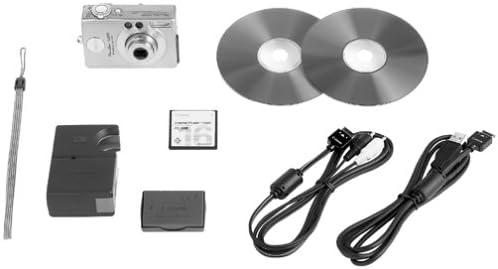
Image: Contents of the Canon PowerShot S230 package, including the camera, cables, battery, charger, memory card, and wrist strap.
1.2 Battery Installation and Charging
- Open the battery compartment cover on the camera.
- Insert the NB-1LH lithium-ion battery, ensuring correct orientation.
- Close the battery compartment cover securely.
- Connect the battery charger (CB-2LS) to a power outlet and insert the battery into the charger. The charging indicator will show the charging status.
- Once charging is complete, remove the battery from the charger.
1.3 Memory Card Installation
- Locate the CompactFlash card slot on the camera.
- Insert the 16 MB CompactFlash card into the slot with the correct orientation until it clicks into place.
- Close the card slot cover.
2. Basic Operation
2.1 Camera Overview
Familiarize yourself with the camera's controls and features.

Image: Front view of the Canon PowerShot S230, showing the lens, flash, and viewfinder.

Image: Rear view of the Canon PowerShot S230, displaying the LCD screen, control buttons, and zoom lever.
2.2 Powering On/Off
Press the power button to turn the camera on or off. The lens will extend when powered on.
2.3 Taking Still Photos
- Turn on the camera.
- Select a shooting mode (e.g., Automatic, Portrait, Landscape, Sports) using the mode dial or menu.
- Frame your shot using the LCD screen or optical viewfinder.
- Use the zoom lever to adjust the 2x optical zoom or 3.2x digital zoom.
- Press the shutter button halfway to focus. The camera features a nine-point autofocus system.
- Press the shutter button fully to capture the image.
2.4 Movie Mode
The PowerShot S230 can record video clips with sound.
- Switch to Movie Mode.
- Press the shutter button to start and stop recording.
- Video clips can be up to 3 minutes long.
- Available resolutions include 160 x 120, 320 x 240, and 640 x 480 pixels.
- An editing feature allows for trimming unwanted scenes during playback.
2.5 Image Playback and Deletion
- Press the Playback button to view captured images and videos on the 1.5-inch LCD screen.
- Use the directional buttons to navigate through your media.
- To delete an image or video, select it and press the Delete button, then confirm.
2.6 Connecting to a Computer
Transfer images and videos to your computer using the supplied USB cable.
- Ensure the camera is off.
- Connect one end of the USB cable to the camera's USB port and the other end to your computer.
- Turn on the camera. Your computer should recognize the camera as a removable storage device.
- Copy files from the camera's memory card to your computer.
- The camera is compatible with Windows Me/2000/XP and Mac OS 8.6 or later without additional driver installation.
3. Maintenance
3.1 Cleaning the Camera
- Use a soft, dry cloth to clean the camera body.
- For the lens, use a lens brush or a soft, lint-free cloth specifically designed for camera lenses. Avoid touching the lens surface with your fingers.
- Clean the LCD screen gently with a soft, dry cloth.
3.2 Battery Care
- Always use the specified Canon battery and charger.
- Store the battery in a cool, dry place when not in use.
- Avoid exposing the battery to extreme temperatures.
3.3 Storage
When storing the camera for extended periods, remove the battery and memory card. Store the camera in a dry, dust-free environment, preferably in a camera bag.
4. Troubleshooting
If you encounter issues with your camera, refer to the following common solutions:
- Camera does not power on: Ensure the battery is fully charged and correctly inserted.
- Images are blurry: Check that the lens is clean. Ensure the camera has focused correctly before taking the shot. Use adequate lighting.
- Memory card error: Reinsert the memory card. If the error persists, try a different compatible CompactFlash card.
- Flash not firing: Check flash settings to ensure it is set to 'Auto' or 'On'.
- Computer does not recognize camera: Ensure the USB cable is securely connected and the camera is powered on. Try a different USB port on your computer.
5. Specifications
| Model Name | Canon PowerShot S230 |
| Photo Sensor Resolution | 3.2 Megapixels |
| Optical Zoom | 2x |
| Digital Zoom | 3.2x |
| Display Type | LCD |
| Screen Size | 1.5 Inches |
| Memory Card Type | CompactFlash (Type I) |
| Supported File Formats | JPEG, RAW |
| Video Resolution | Up to 640x480 (Movie Mode) |
| Connectivity | USB |
| Power Source | Proprietary Lithium-ion Battery (NB-1LH) |
| Dimensions (approx.) | 3.4 x 2.2 x 1.1 inches |
| Weight (approx.) | 6.4 ounces (0.55 Pounds) |
6. Warranty and Support
6.1 Warranty Information
The Canon PowerShot S230 Digital ELPH Camera comes with a 1 Year Limited Warranty from the manufacturer. Please retain your proof of purchase for warranty claims.
6.2 Customer Support
For technical assistance, frequently asked questions, or to download the latest software and drivers, please visit the official Canon website. You may also find support resources and contact information there.


