
Introduction
Thank you for purchasing the Sanyo EM-Z2000S .9-Cubic-Foot Microwave. This manual provides essential information for the safe and efficient operation, maintenance, and troubleshooting of your new appliance. Please read these instructions thoroughly before use and retain them for future reference.
Important Safety Instructions
WARNING: To reduce the risk of fire, electric shock, injury to persons, or exposure to excessive microwave energy, observe the following basic precautions:
- Read all instructions before using the appliance.
- Read and follow the specific "PRECAUTIONS TO AVOID POSSIBLE EXPOSURE TO EXCESSIVE MICROWAVE ENERGY" found on page 1 of this manual (referring to a hypothetical full manual).
- This appliance must be grounded. Connect only to properly grounded outlets. See "GROUNDING INSTRUCTIONS" in a full manual.
- Install or locate this appliance only in accordance with the provided installation instructions.
- Do not heat whole eggs or sealed containers, as they may explode.
- Do not operate this appliance if it has a damaged cord or plug, if it is not working properly, or if it has been damaged or dropped.
- Do not cover or block any openings on the appliance.
- Do not store this appliance outdoors. Do not use this product near water.
- Keep the inside of the oven clean. Food particles or spilled liquids can cause the microwave to overheat.
Product Overview
The Sanyo EM-Z2000S is a .9-cubic-foot countertop microwave oven designed for efficient and convenient food preparation. It features a stainless steel exterior and a user-friendly control panel.
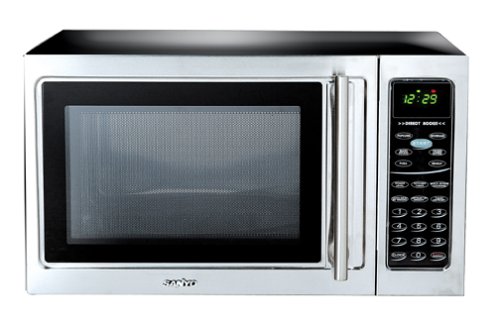
Figure 1: Front view of the Sanyo EM-Z2000S microwave, showcasing its stainless steel finish, door handle, and digital control panel on the right.
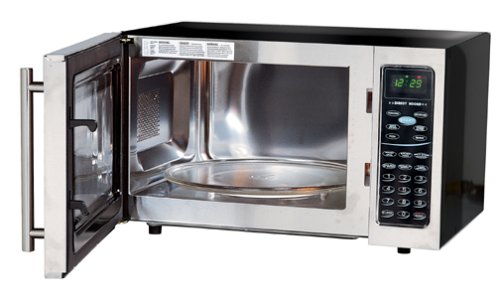
Figure 2: Interior view of the Sanyo EM-Z2000S microwave with the door open, revealing the cooking cavity and the removable glass turntable.
Control Panel Features
The control panel includes a 2-color digital display and various buttons for setting cooking time, power levels, and special functions. It features 6 direct access keys for quick programming of popular food items.
- Digital Display: Shows time of day, cooking time, and various indicators.
- Power Level Button: Adjusts microwave power output.
- Time Cook Button: Sets manual cooking time.
- Defrost Buttons: Options for defrosting by weight or time.
- Direct Access Keys: Six dedicated buttons for common food items (e.g., Popcorn, Potato, Pizza).
- Start/Pause Button: Initiates or temporarily stops cooking.
- Stop/Clear Button: Cancels cooking or clears settings.
Setup and Installation
Unpacking
- Remove all packaging materials from inside and outside the microwave oven.
- Inspect the oven for any damage, such as dents or a misaligned door. Do not operate if damaged.
- Ensure all accessories, including the glass turntable and turntable support, are present.
Placement
- Place the microwave on a flat, stable surface strong enough to support its weight.
- Ensure adequate ventilation. Leave at least 4 inches (10 cm) of space around the sides, back, and top of the oven for proper airflow.
- Keep the microwave away from heat sources, steam, or splashing liquids.
- Do not place the microwave near a radio or TV, as it may cause interference.
Electrical Connection
Plug the microwave into a dedicated, properly grounded 3-prong electrical outlet. Ensure the voltage and frequency match the specifications listed on the appliance's rating label. Do not use extension cords or adapter plugs.
Operating Instructions
Basic Microwave Cooking
- Place food in a microwave-safe container on the glass turntable.
- Close the oven door securely.
- Press the "Time Cook" button.
- Use the number pad to enter the desired cooking time.
- Press the "Power Level" button repeatedly to select the desired power level (default is 100%).
- Press the "Start" button to begin cooking.
Setting Power Levels
The microwave offers various power levels to suit different cooking needs. Press the "Power Level" button and then use the number pad to select a power level from 1 (lowest) to 10 (highest). For example, press "Power Level" then "5" for 50% power.
Defrosting
The Sanyo EM-Z2000S offers two defrosting methods:
- Defrost by Weight: Enter the weight of the food, and the oven automatically calculates the defrosting time.
- Defrost by Time: Manually set the desired defrosting time.
Refer to the full manual for specific instructions on using these defrost functions for various food types.
Using Direct Access Keys
The 6 direct access keys allow for quick cooking of popular items. Simply press the desired key (e.g., "Popcorn") and the microwave will automatically set the appropriate cooking time and power level. Some keys may require you to select a quantity (e.g., 1.75 oz bag of popcorn).
Turntable Operation
The 12-3/8-inch glass turntable rotates during operation to ensure even heating of food. Always ensure the turntable and its support ring are correctly positioned before operating the microwave. The turntable is removable for cleaning.
Maintenance and Cleaning
Regular cleaning and proper maintenance will ensure the longevity and efficient operation of your microwave oven.
Exterior Cleaning
Wipe the exterior surfaces, including the stainless steel finish, with a soft, damp cloth. For stubborn stains, use a mild detergent. Avoid abrasive cleaners or scouring pads, which can scratch the surface. Promptly wipe away fingerprints to maintain the finish.
Interior Cleaning
Clean the interior cavity regularly with a soft cloth and mild soap or a microwave-safe cleaner. For dried-on food spills, place a bowl of water with a few lemon slices inside and microwave for 2-3 minutes to create steam, which will loosen the residue. Then wipe clean.
Turntable Care
The glass turntable and its support ring can be removed for cleaning. Wash them in warm, soapy water or in the dishwasher. Ensure they are completely dry before placing them back in the oven.
Troubleshooting
If you encounter issues with your microwave, consult the following table for common problems and solutions.
| Problem | Possible Solution |
|---|---|
| Microwave does not start | Ensure the door is securely closed. Check if the power cord is properly plugged into a grounded outlet. Check your household fuse or circuit breaker. |
| Food is not heating evenly | Ensure the turntable is rotating freely. Stir or rearrange food halfway through cooking. Use microwave-safe dishes that allow even heat distribution. |
| Excessive noise during operation | Verify the turntable and its support ring are correctly seated. Ensure the microwave is on a flat, stable surface. Some operational noise is normal. |
| Steam accumulating inside the oven door/cavity | This is normal, especially when cooking foods with high moisture content. Wipe the interior dry after use. Ensure adequate ventilation around the appliance. |
| Digital display is blank | Check power connection. If power was interrupted, you may need to reset the clock. |
Specifications
The following are key specifications for the Sanyo EM-Z2000S Microwave:
| Feature | Specification |
|---|---|
| Model Number | EM-Z2000S |
| Brand | Sanyo |
| Capacity | 0.9 Cubic Feet |
| Power Output | 1,000 Watts |
| Turntable Size | 12-3/8 inches (Glass) |
| Installation Type | Countertop |
| Color | Stainless Steel |
| Item Dimensions (LxWxH) | 55.9 x 43.7 x 36.3 Centimeters (20 x 16-11/16 x 12 inches) |
| Item Weight | 16 kg 800 g (Approximately 37 lbs) |
| Included Components | Turntable |
Warranty and Support
Warranty Information
This Sanyo EM-Z2000S Microwave typically comes with a 1-Year Warranty from the date of purchase. Please retain your proof of purchase for warranty claims. The warranty covers manufacturing defects under normal household use. For specific terms and conditions, refer to the warranty card included with your product or contact Sanyo customer service.
Customer Support
For technical assistance, service, or to inquire about replacement parts, please contact Sanyo customer support. Contact information can usually be found on the Sanyo official website or on the product's packaging.