
Sony WMEX190
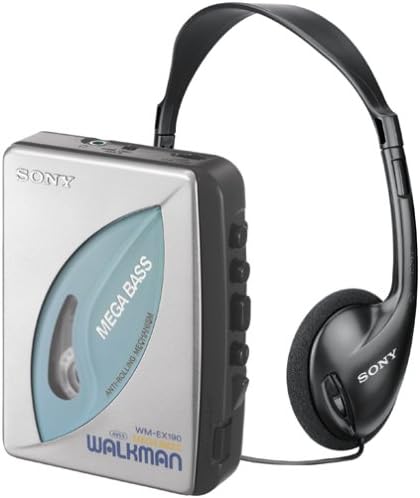
Sony WM-EX190 Walkman Stereo Cassette Player User Manual
Model: WM-EX190
Introduction
This manual provides essential information for the proper use and maintenance of your Sony WM-EX190 Walkman Stereo Cassette Player. Please read it thoroughly before operating the device.
The Sony WM-EX190 is a portable stereo cassette player designed for on-the-go audio enjoyment. It features Sony's Mega Bass Sound System for enhanced low-frequency audio and an anti-rolling mechanism to maintain stable tape speed during movement. The Automatic Volume Limiter System (AVLS) helps manage audio output levels, and an automatic shut-off function conserves battery life and protects your tapes.
Package Contents
Upon unboxing, verify that all components are present:
- Sony WM-EX190 Cassette Walkman Unit
- MDR (Micro Dynamic Receiver)-type Over-Ear Headphones
- Belt Clip
- User's Manual (this document)
- Warranty Information
Setup
1. Installing Batteries
The WM-EX190 requires two (2) AA batteries for operation. For optimal performance and extended playback time, use Sony Alkaline batteries. The unit provides up to 24 hours of continuous tape playback with fresh alkaline batteries.
- Locate the battery compartment on the back of the Walkman unit.
- Open the battery compartment cover.
- Insert two AA batteries, ensuring correct polarity (+/-) as indicated inside the compartment.
- Close the battery compartment cover securely.
2. Connecting Headphones
Connect the supplied MDR-type over-ear headphones to the headphone jack located on the side of the Walkman unit. Ensure the plug is fully inserted for proper stereo sound.
3. Attaching the Belt Clip
The included belt clip can be attached to the back of the unit for convenient portability. Align the clip with the designated slot and slide it into place until it clicks securely.
Operating Instructions
1. Loading a Cassette Tape
- Press the OPEN button to open the cassette compartment door.
- Insert a cassette tape with the desired side facing outwards and the open edge towards the playback head.
- Gently close the cassette compartment door until it latches.
2. Playback
Press the PLAY button to begin tape playback. The anti-rolling mechanism helps maintain stable tape speed even when the player is in motion.
3. Adjusting Volume
Use the VOLUME dial to adjust the listening level. The Automatic Volume Limiter System (AVLS) helps prevent sudden, loud volume increases and maintains a consistent output level.
4. Mega Bass Enhancement
Activate the MEGA BASS switch to enhance low-frequency sounds, providing a deeper and richer bass response for your music.
5. Stopping Playback and Auto Shut-off
Press the STOP button to halt playback. The unit features an automatic shut-off function that will turn off the player at the end of each tape side. This feature conserves battery life and reduces wear on both the mechanical components and the tape itself.
6. Fast Forward and Rewind
Use the FF (Fast Forward) and REW (Rewind) buttons to quickly navigate through the tape.
Maintenance
1. Cleaning the Unit
Wipe the exterior of the Walkman with a soft, dry cloth. Do not use abrasive cleaners or solvents. For the tape head and pinch roller, use a specialized cassette head cleaning kit periodically to ensure optimal sound quality and prevent tape damage.
2. Battery Care
Remove batteries if the unit will not be used for an extended period to prevent leakage and damage.
3. Storage
Store the unit in a cool, dry place away from direct sunlight, extreme temperatures, and high humidity.
Troubleshooting
If you experience issues with your WM-EX190, refer to the following common solutions:
- No Power: Ensure batteries are correctly inserted and are not depleted. Replace with fresh AA batteries if necessary.
- No Sound: Check headphone connection. Ensure volume is turned up. Verify that the tape is properly loaded and the playback head is clean.
- Distorted Sound: Clean the tape head and pinch roller. Try a different cassette tape. Ensure the headphones are fully plugged in.
- Tape Not Playing/Moving: Check if the tape is tangled or damaged. Ensure the cassette compartment door is fully closed.
If problems persist, contact Sony customer support for further assistance.
Specifications
| Feature | Detail |
|---|---|
| Model Number | WM-EX190 |
| Power Source | 2 x AA Batteries |
| Battery Life | Up to 24 hours (using Sony Alkaline batteries) |
| Dimensions (Approx.) | 11 x 7.3 x 3.5 inches (Package Dimensions) |
| Weight (Approx.) | 8.8 ounces (Item Weight) |
| Key Features | Mega Bass, Anti-Rolling Mechanism, Automatic Volume Limiter System (AVLS), Auto Shut-off |
Product Images

Warranty and Support
Your Sony WM-EX190 Walkman comes with a limited warranty. Please refer to the included warranty information document for details regarding coverage, terms, and conditions.
For technical support, service, or additional inquiries, please visit the official Sony support website or contact their customer service line. Keep your purchase receipt and product serial number handy when seeking support.
For more information, you may visit the Sony Store on Amazon.
Ask a question about this manual
Ask about setup, troubleshooting, compatibility, parts, safety, or missing instructions. Manuals+ will review the question and use this page’s manual context to help answer it.