
1. Introduction
This manual provides essential instructions for the safe and effective use of your Konica Minolta Freedom Zoom 160QD 35mm camera. Please read this manual thoroughly before operating the camera and retain it for future reference.
The Freedom Zoom 160QD is a compact automatic 35mm camera featuring a powerful 37-160mm zoom lens and a Quartz Date Back for imprinting dates on your photos.
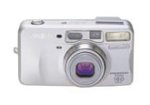
Image 1: Front view of the Konica Minolta Freedom Zoom 160QD camera, showing the lens and body design.
2. Setup
2.1 Battery Installation
- Locate the battery compartment cover on the bottom or side of the camera.
- Slide or lift the cover to open.
- Insert the required batteries (typically CR123A or similar, refer to compartment markings) according to the polarity indicators (+/-).
- Close the battery compartment cover securely until it clicks into place.
2.2 Film Loading
- Open the camera back by sliding the latch on the side of the camera.
- Place a 35mm film cartridge into the film chamber, ensuring the film leader points towards the take-up spool.
- Pull the film leader across to the film take-up indicator.
- Close the camera back firmly. The camera will automatically advance the film to the first frame. The frame counter will display '1'.
3. Operating the Camera
3.1 Power On/Off
To turn the camera on, slide the power switch or press the power button. To turn off, slide the switch back or press the power button again. The lens will extend upon power-on and retract upon power-off.
3.2 Taking a Picture
- Look through the viewfinder and frame your subject.
- Use the zoom buttons (W for wide, T for telephoto) to adjust the focal length (37mm to 160mm).
- Press the shutter button halfway down to activate the autofocus and exposure system. A focus indicator light will confirm focus.
- Press the shutter button fully down to take the picture. The film will automatically advance to the next frame.
3.3 Flash Modes
The camera features various flash modes. Use the flash mode button to cycle through options such as Auto Flash, Fill-in Flash, Flash Off, and Red-eye Reduction. The selected mode will be indicated on the LCD panel.
3.4 Quartz Date Back Function
To set or activate the date imprint function, refer to the small buttons near the date display on the camera back. Use these buttons to set the year, month, day, and time, and to select the desired imprint format (e.g., YYYY MM DD, MM DD YYYY, etc.).
4. Maintenance
4.1 Cleaning the Camera
- Use a soft, lint-free cloth to clean the camera body.
- For the lens, use a lens brush or a blower to remove dust, then gently wipe with a specialized lens cleaning cloth and solution if necessary. Avoid touching the lens surface with your fingers.
- Keep the film chamber and battery contacts clean and free of dust or corrosion.
4.2 Storage
When not in use, store the camera in a cool, dry place away from direct sunlight, extreme temperatures, and high humidity. Remove batteries if the camera will not be used for an extended period to prevent leakage.
5. Troubleshooting
- Camera does not power on: Check battery installation and ensure batteries are fresh.
- Film does not advance: Ensure film is loaded correctly and the camera back is securely closed. Check if the film leader is properly engaged with the take-up spool.
- Flash does not fire: Check flash mode settings. Ensure batteries have sufficient power.
- Pictures are blurry: Ensure the subject is within the camera's focusing range. Hold the camera steady when pressing the shutter button.
- Date imprint not appearing: Verify the Quartz Date Back is set correctly and activated.
6. Specifications
| Feature | Detail |
|---|---|
| Model Name | 160QD |
| Item Model Number | 2472-451 |
| Brand | Konica Minolta |
| Lens | 37mm to 160mm (3.7x) zoom lens |
| Autofocus System | Passive 660-step auto-focus |
| Exposure Modes | Full auto-exposure and programmed exposure modes |
| Film Handling | Easy film load, auto advance, auto rewind |
| Continuous Advance | 5 frames per 6 seconds |
| Film Format Type | 35mm |
| Item Weight | 5 ounces (approx. 0.31 Pounds) |
| Package Dimensions | 6.5 x 3.3 x 2.9 inches |
| Date Feature | Quartz Date Back |
| ASIN | B00006I5I8 |
| UPC | 043325236372 |
7. Warranty and Support
Warranty information for the Konica Minolta Freedom Zoom 160QD camera is typically provided with the original product packaging or can be found on the official Konica Minolta website. Please retain your proof of purchase for warranty claims.
For technical support, service, or inquiries regarding your camera, please refer to the contact information provided in your original purchase documentation or visit the official Konica Minolta support website.
Note: As this model is discontinued, support resources may be limited.


