
Introduction
This manual provides essential instructions for the proper use and care of your Canon EOS 3 35mm SLR camera. Please read this manual thoroughly before operating the camera to ensure optimal performance and longevity.
The Canon EOS 3 is a professional-grade 35mm SLR camera designed for advanced amateurs and professionals. It features a 45-point Area AF system, 21-zone metering, and compatibility with a wide range of Canon EF lenses and accessories.
Camera Components
Familiarize yourself with the main components of your EOS 3 camera.
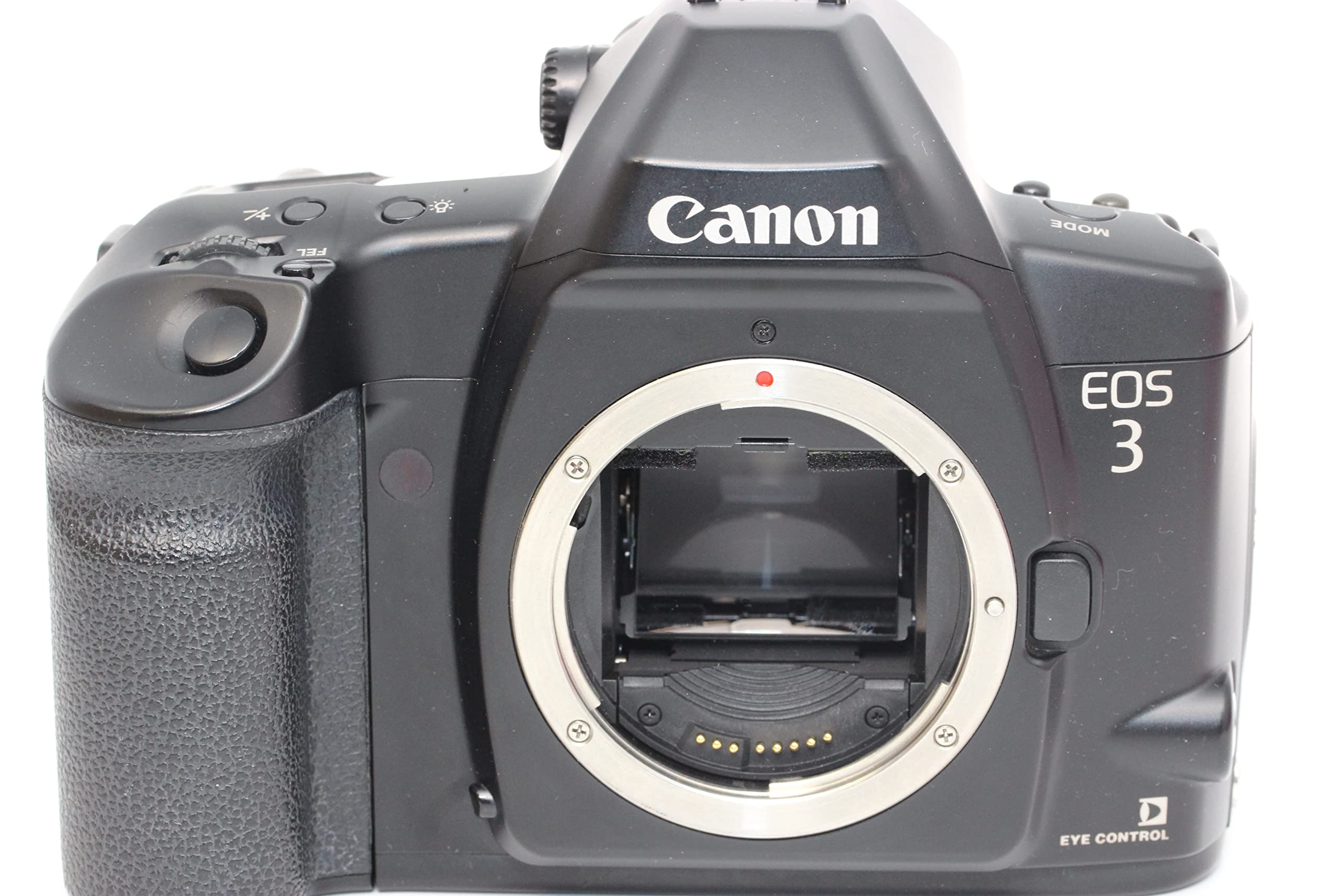
Figure 1: Front view of the Canon EOS 3 camera body. This image shows the lens mount, grip, and various control buttons on the front of the camera.

Figure 2: Top view of the Canon EOS 3 camera. This image highlights the viewfinder, hot shoe, mode dial, and other top-panel controls.

Figure 3: Rear view of the Canon EOS 3 camera with the film compartment door open. This shows the film chamber, pressure plate, and film advance sprocket.

Figure 4: Bottom view of the Canon EOS 3 camera. This image displays the battery compartment cover, tripod socket, and serial number.
Setup
1. Battery Installation
The Canon EOS 3 uses a 2CR5 lithium battery. Ensure the camera is powered off before installing or replacing batteries.
- Locate the battery compartment cover on the bottom of the camera (refer to Figure 4).
- Turn the battery compartment lock counter-clockwise to open the cover.
- Insert the 2CR5 battery with the correct polarity, matching the indicators inside the compartment.
- Close the battery compartment cover and turn the lock clockwise to secure it.
2. Attaching a Lens
The EOS 3 is compatible with Canon EF mount lenses.
- Remove the body cap from the camera and the rear cap from the lens.
- Align the red index mark on the lens with the red index mark on the camera's lens mount.
- Turn the lens clockwise until it clicks into place.
3. Loading Film
The EOS 3 uses 35mm film cartridges.
- Open the camera back by sliding the film door release latch downwards (refer to Figure 3).
- Place a 35mm film cartridge into the film chamber.
- Pull the film leader across to the red index mark on the take-up spool.
- Close the camera back firmly until it latches. The camera will automatically advance the film to the first frame.
Operating the Camera
1. Power On/Off
To power on the camera, rotate the main switch located near the shutter button to the "ON" position. To power off, rotate it to "OFF".
2. Shooting Modes
The EOS 3 offers various shooting modes, including Program AE, Shutter-priority AE, Aperture-priority AE, Manual, and Depth-of-field AE. Select your desired mode using the Mode dial on the top of the camera (refer to Figure 2).
3. Autofocus System
The camera features a 45-point Area AF system with Eye-Controlled Autofocus. To use autofocus:
- Set the lens to AF (Autofocus).
- Look through the viewfinder and half-press the shutter button. The camera will automatically select an AF point or allow you to select one manually.
- For Eye-Controlled AF, calibrate the system first (refer to the full user manual for detailed calibration steps).
4. Metering
The EOS 3 utilizes a 21-zone evaluative metering system, 8.5% center spot metering, and 2.4% spot metering (linkable to the active AF point). Metering modes can be selected via the camera's custom functions or dedicated buttons.
5. Shutter Speed and Aperture
In Manual mode, adjust shutter speed and aperture using the main dial and quick control dial. In Shutter-priority (Tv) or Aperture-priority (Av) modes, the camera automatically sets the corresponding value.
6. Flash Photography
The camera supports external flash units. Connect a compatible Canon Speedlite to the hot shoe (refer to Figure 2). Flash modes (Auto, On, Off) are typically controlled via the flash unit or camera settings.
7. Continuous Shooting
For capturing fast-moving subjects, the EOS 3 offers continuous shooting at up to 4 frames per second (FPS). Select the continuous shooting drive mode using the DRIVE button.
8. Self-Timer
The self-timer function allows for delays of 2, 5, or 10 seconds before the shutter fires. This is useful for self-portraits or to prevent camera shake.
Maintenance
1. Cleaning the Camera
- Use a soft, lint-free cloth to clean the camera body.
- For the lens, use a lens brush to remove dust, followed by a lens cleaning solution and a microfiber cloth.
- Avoid touching the mirror or shutter curtain directly. If cleaning is required in these areas, consult a professional service center.
2. Storage
- When not in use, store the camera in a cool, dry place, away from direct sunlight and high humidity.
- Remove batteries if the camera will not be used for an extended period to prevent leakage.
- Keep the body cap and lens caps on to protect the sensor and lens elements.
Troubleshooting
Common Issues and Solutions
- Camera does not power on:
Check battery installation and ensure batteries are fresh. Verify the main power switch is in the "ON" position.
- "BC" error code:
This error often indicates a battery contact issue or a problem with the camera's internal electronics. Try re-seating the battery or replacing it. If the error persists, professional service may be required.
- Autofocus not working:
Ensure the lens is set to AF mode. Check for sufficient light and contrast in the scene. If using Eye-Controlled AF, ensure it is calibrated correctly. Clean lens contacts if necessary.
- Film not advancing:
Verify that the film is loaded correctly and the leader is properly engaged with the take-up spool. Ensure the camera back is securely closed.
For more complex issues, refer to the full Canon EOS 3 user manual or contact Canon customer support.
Specifications
| Feature | Specification |
|---|---|
| Model Name | Canon EOS 3 |
| Compatible Mountings | Canon EF, Canon RF |
| Photo Sensor Technology | Film |
| Max Shutter Speed | 1/8000 seconds |
| Min Shutter Speed | 0.000125 seconds |
| Autofocus Points | 45 |
| Focus Features | Eye-Controlled Autofocus |
| Metering Description | 21 Zone Evaluative Metering, 8.5% Center Spot, and 2.4% Spot (linkable to active AF Point) |
| Continuous Shooting | 4 FPS |
| Battery Type | 2CR5 battery |
| Item Weight | 2.5 Pounds |
| Manufacturer | Canon Cameras US |
Warranty and Support
For warranty information, service, or additional support, please contact Canon customer service or visit the official Canon website. Keep your purchase receipt as proof of purchase.
You can find more information and support resources at the Canon Store.


