
Introduction
This manual provides essential information for the installation, operation, maintenance, and troubleshooting of your Crucial 128MB PC2100 DDR DIMM RAM module. Please read these instructions carefully before proceeding with installation to ensure proper function and to avoid potential damage to your system or the memory module.
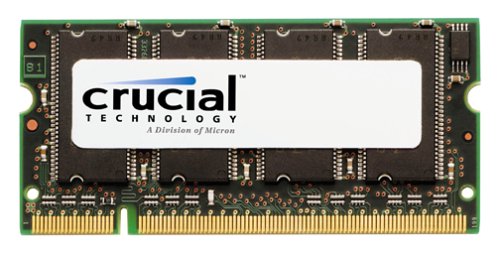
Image: A Crucial 128MB PC2100 DDR DIMM RAM module, typically a green circuit board with black memory chips, designed for desktop computer systems.
Setup and Installation
Installing RAM requires careful handling. Ensure your computer is powered off and unplugged before beginning.
Pre-installation Checklist:
- Compatibility: Verify that your motherboard supports PC2100 DDR (DDR1) memory and 184-pin DIMM modules. Consult your computer or motherboard manual for specific requirements.
- Static Electricity: Ground yourself before handling the memory module to prevent electrostatic discharge (ESD) damage. This can be done by touching a grounded metal object, such as the computer chassis, before touching any internal components.
- Tools: A Phillips head screwdriver may be needed to open the computer case.
Installation Steps:
- Power Down: Shut down your computer completely and unplug the power cord from the wall outlet.
- Open Case: Open your computer's case. Refer to your computer's manual for instructions on how to safely open it.
- Locate DIMM Slots: Identify the DIMM (Dual In-line Memory Module) slots on your motherboard. These are typically long slots with clips on either end.
- Prepare Slot: If installing into an empty slot, push the clips at both ends of the DIMM slot outwards. If replacing an existing module, gently push the clips outwards to release the old module and remove it.
- Insert Module: Hold the new Crucial RAM module by its edges, avoiding touching the gold contacts. Align the notch(es) on the module with the key(s) in the DIMM slot.
- Secure Module: Apply firm, even pressure to both ends of the module until it clicks into place and the clips snap shut. Do not force the module if it does not fit; recheck alignment.
- Close Case & Power On: Once the module is securely seated, close your computer case, plug in the power cord, and power on the computer.
Post-installation:
Upon booting, your system should automatically detect the new memory. You can verify this by checking your computer's BIOS/UEFI settings or the system information within your operating system.
Operating the Memory Module
The Crucial 128MB PC2100 DDR DIMM RAM module operates automatically once installed correctly. It functions as your computer's primary working memory, facilitating the execution of programs and data processing.
- Automatic Operation: No user configuration is typically required after successful installation. The operating system and BIOS manage memory allocation.
- Performance: The module's speed (266MHz) and capacity (128MB) contribute to overall system responsiveness. Ensure your system's front-side bus (FSB) speed is compatible with PC2100 (DDR-266) memory for optimal performance.
Maintenance
Memory modules generally require minimal maintenance. Adhering to these guidelines can help ensure longevity:
- Dust Removal: Periodically clean the interior of your computer case to prevent dust buildup on components, including RAM modules. Use compressed air to gently blow away dust. Ensure the computer is powered off and unplugged before cleaning.
- Environmental Conditions: Operate your computer in a well-ventilated area, away from excessive heat, humidity, and direct sunlight.
- Avoid Physical Contact: Once installed, avoid touching the memory module unless absolutely necessary for troubleshooting or upgrades.
Troubleshooting
If you encounter issues after installing the memory module, consider the following troubleshooting steps:
- System Not Booting / No Display:
- Ensure the module is fully seated in its slot. Re-seat it by pushing down firmly on both ends until the clips engage.
- Verify that the module is compatible with your motherboard.
- If multiple modules are installed, try booting with only the new Crucial module, or try it in a different slot.
- Incorrect RAM Detection:
- Check your system's BIOS/UEFI settings to confirm the detected RAM amount.
- Ensure your operating system is 64-bit if you have more than 4GB of RAM (though this module is 128MB, it's a general consideration for memory detection).
- Update your motherboard's BIOS to the latest version, as this can improve memory compatibility and detection.
- System Instability / Blue Screens:
- Run a memory diagnostic tool (e.g., Windows Memory Diagnostic or MemTest86) to check for errors.
- Ensure the module is not overheating.
Specifications
| Feature | Specification |
|---|---|
| Brand | Crucial |
| Model Number | 102676 |
| Memory Size | 128 MB |
| RAM Memory Technology | DDR (DDR1) |
| Memory Speed | 266 MHz (PC2100) |
| Form Factor | 184-pin DIMM |
| Voltage | 2.5V |
| CAS Latency (CL) | CL2.5 |
| Buffering | Unbuffered |
| UPC | 649528709356 |
Warranty and Support
This Crucial memory module comes with a Limited Lifetime Warranty. This warranty covers defects in materials and workmanship for the life of the product. For specific terms and conditions, please refer to the official Crucial website or the warranty documentation included with your purchase.
For technical support, warranty claims, or further assistance, please visit the official Crucial support website or contact their customer service department. You can often find support resources, FAQs, and contact information on the Crucial Support Page.