Introduction
This manual provides comprehensive instructions for the setup, operation, maintenance, and troubleshooting of your Cambridge SoundWorks Ensemble III Subwoofer/Satellite Speaker System. Please read this manual thoroughly before using the product to ensure proper functionality and longevity.
The Cambridge SoundWorks Ensemble III is a compact yet powerful speaker system designed to deliver natural, balanced, and wide-range sound. It features a two-way satellite speaker design and a dedicated subwoofer for impressive deep bass.
Package Contents
Upon opening the package, please verify that all components are present and undamaged.
- 1 x Ensemble III Subwoofer
- 2 x Ensemble III Satellite Speakers
- Speaker Cables (for connecting satellites to subwoofer)
- Audio Input Cable (for connecting subwoofer to audio source)
- Power Cord
- User Manual (this document)
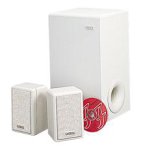
Figure 1: Cambridge SoundWorks Ensemble III Subwoofer/Satellite Speaker System. This image displays the main components: the white subwoofer unit and two compact white satellite speakers.
Setup Instructions
1. Placement
- Subwoofer Placement: The subwoofer can be placed almost anywhere in the room due to its non-directional bass output. For optimal bass response, experiment with placement near a wall or in a corner. Ensure it is on a stable, flat surface.
- Satellite Speaker Placement: Position the two satellite speakers equidistant from your primary listening position. For best stereo imaging, place them at ear level or slightly above, and ensure they are not obstructed.
2. Connections
- Connect Satellite Speakers to Subwoofer: Use the provided speaker cables to connect the satellite speakers to the corresponding outputs on the subwoofer. Ensure correct polarity (positive to positive, negative to negative).
- Connect Audio Source to Subwoofer: Connect your audio source (e.g., TV, receiver, computer) to the audio input jacks on the subwoofer using the appropriate audio cable.
- Connect Power: Plug the power cord into the subwoofer's power input, then plug the other end into a wall outlet.
Important: Ensure all connections are secure before powering on the system.
Operating Instructions
Powering On/Off
Locate the power switch on the subwoofer. Flip the switch to the "ON" position to power on the system. Flip it to "OFF" to power off.
Volume Control
Volume is typically controlled via your connected audio source (e.g., TV remote, receiver volume knob, computer volume control). The Ensemble III system is designed to reproduce the audio signal from your source.
Adjusting Bass Output
The subwoofer may have a dedicated bass level control. Adjust this control to blend the subwoofer's output seamlessly with the satellite speakers, according to your preference and room acoustics.
Maintenance and Care
- Cleaning: Use a soft, dry cloth to clean the surfaces of the speakers and subwoofer. Do not use liquid cleaners or abrasive materials, as they may damage the finish.
- Ventilation: Ensure adequate ventilation around the subwoofer, especially if it has cooling vents. Do not block these vents.
- Environment: Avoid exposing the system to extreme temperatures, high humidity, direct sunlight, or excessive dust.
- Handling: Handle the speakers and subwoofer with care. Avoid dropping or subjecting them to strong impacts.
Troubleshooting
| Problem | Possible Cause | Solution |
|---|---|---|
| No sound from speakers |
|
|
| Distorted sound |
|
|
| No bass output from subwoofer |
|
|
Specifications
| Feature | Detail |
|---|---|
| Model Name | SoundWorks Ensemble III |
| Speaker Type | Subwoofer/Satellite System |
| Subwoofer Dimensions (H x W x D) | 15" x 8" x 8" (38.1 cm x 20.32 cm x 20.32 cm) |
| Satellite Speaker Dimensions (H x W x D) | 4 1/4" x 3 1/8" x 6 5/8" (10.8 cm x 7.94 cm x 16.83 cm) |
| Subwoofer Driver Diameter | 6 1/2 inches (16.51 cm) |
| Surround Sound Channel Configuration | 2.1 |
| Connectivity Technology | Wired |
| Audio Output Mode | Satellite |
| Mounting Type | Tabletop Mount |
| Color | White |
| Item Weight | 10 kg 400 g (22.9 lbs) |
| Manufacturer | Cambridge SoundWorks |
Warranty Information
The Cambridge SoundWorks Ensemble III Subwoofer/Satellite Speaker System comes with a Manufacturer's 10-year parts and labor warranty.
This warranty covers defects in materials and workmanship under normal use. For warranty service, please retain your proof of purchase and contact Cambridge SoundWorks customer support. The warranty does not cover damage caused by misuse, accident, unauthorized modification, or improper installation.
Customer Support
For further assistance, technical support, or warranty inquiries, please visit the official Cambridge SoundWorks website or contact their customer service department.
Online Resources:
- Cambridge SoundWorks Official Website (Please note: This is a placeholder link as the actual website might have changed or be defunct for an older product. Users should search for current support channels.)
When contacting support, please have your product model number (SoundWorks Ensemble III) and purchase information readily available.


