
AcuRite 75322T
AcuRite 75322T Atomic Clock User Manual
Model: 75322T
Introduction
Thank you for purchasing the AcuRite 75322T Atomic Clock. This digital clock provides precise timekeeping, date, day of the week, and indoor temperature readings. Its atomic radio-controlled feature ensures accuracy and automatic adjustments for Daylight Saving Time. Designed for versatility, it can be placed on a tabletop or mounted on a wall, making it suitable for any home, office, or classroom environment.
Safety Information
- Do not expose the unit to excessive force, shock, dust, temperature, or humidity.
- Do not immerse the unit in water.
- Do not remove any screws or attempt to disassemble the unit.
- Do not mix old and new batteries or types of batteries (alkaline/standard).
- Remove exhausted batteries promptly.
- Dispose of old batteries in an environmentally safe manner.
Package Contents
- AcuRite 75322T Atomic Clock
- User Manual (this document)
Note: 2 AA batteries are required and not included.
Setup
1. Battery Installation
- Locate the battery compartment on the back of the unit.
- Remove the battery compartment cover.
- Insert 2 fresh AA alkaline batteries according to the polarity markings (+ and -).
- Replace the battery compartment cover.
Upon battery installation, the clock will power on and begin searching for the atomic time signal.
2. Atomic Clock Synchronization
The AcuRite 75322T is an atomic clock, meaning it automatically synchronizes with the WWVB radio signal broadcast by the National Institute of Standards and Technology (NIST) in Fort Collins, Colorado. This signal ensures the clock maintains split-second accuracy and automatically adjusts for Daylight Saving Time (DST).
- Place the clock in an area with good reception, away from large metal objects, thick walls, or electronic devices that may cause interference.
- The clock will typically acquire the signal within a few minutes to several hours, depending on your location and environmental conditions.
- A signal strength indicator (often a tower icon) on the display will show the reception status.
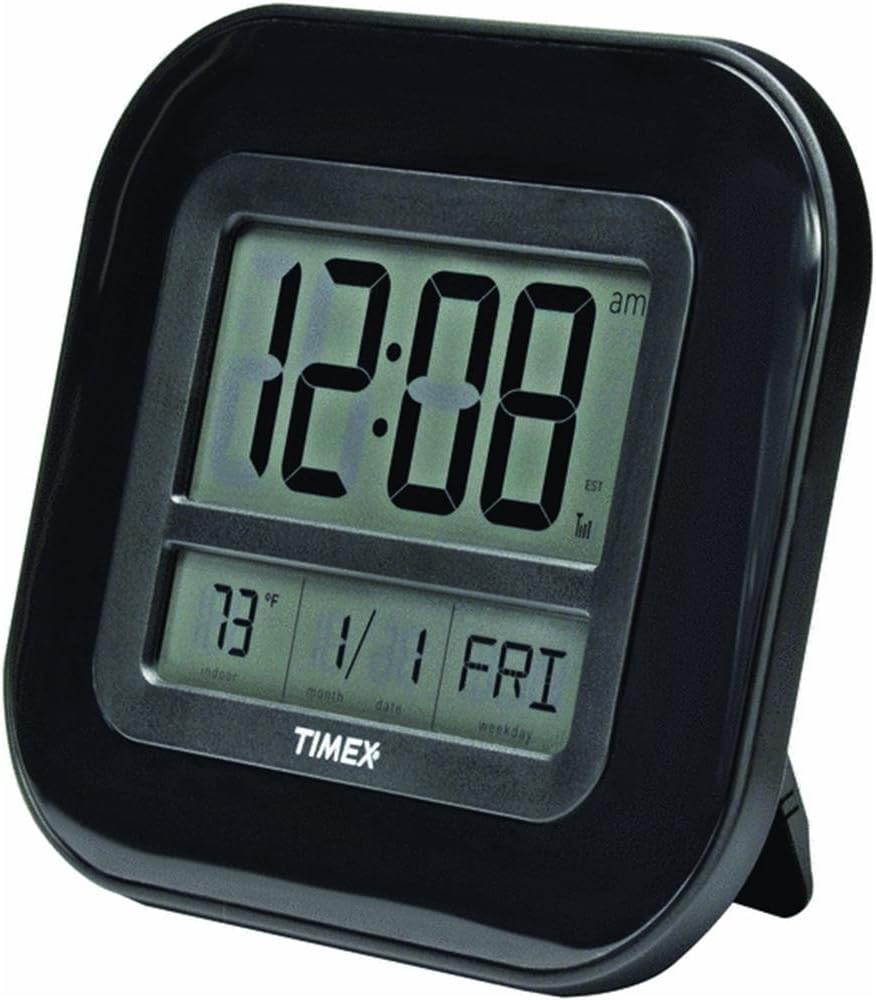
Figure 1: Front view of the AcuRite 75322T Atomic Clock displaying the time, indoor temperature, month, date, and day of the week. The clock has a black frame and a clear digital display.
3. Setting Time Zone and Manual Adjustments
While the atomic clock sets the time automatically, you may need to manually set the time zone. Refer to the buttons on the back of the unit for specific controls. Typically, there will be a "TIME ZONE" button or a combination of buttons to cycle through time zones (PST, MST, CST, EST, etc.).
In rare cases where the atomic signal cannot be received, you can manually set the time and date using the designated buttons (e.g., "SET", "UP", "DOWN"). Consult the markings next to the buttons on your specific unit.
4. Mounting Options
The AcuRite 75322T Atomic Clock offers flexible placement options:
- Tabletop Placement: Utilize the integrated fold-out stand on the back of the clock to place it upright on any flat surface, such as a desk, shelf, or nightstand.
- Wall Mounting: Use the hang-hole located on the back of the clock to securely mount it on a wall. Ensure you use appropriate hardware (screw, nail) for your wall type.

Figure 2: The AcuRite 75322T Atomic Clock displayed wall-mounted in an office setting above a desk, demonstrating its versatility.

Figure 3: Diagram showing the dimensions of the AcuRite 75322T Atomic Clock, measuring approximately 8 inches in height and 9 inches in width.
Operating
Display Information
The large LCD display provides the following information:
- Time: Displays the current time in large, easy-to-read digits.
- Indoor Temperature: Shows the current indoor temperature, which can be displayed in Fahrenheit (°F) or Celsius (°C).
- Date: Displays the current month and day.
- Day of the Week: Indicates the current day of the week.
- Atomic Signal Indicator: A small icon (often a radio tower) on the display indicates the strength of the atomic time signal reception.
Changing Temperature Units
To switch between Fahrenheit (°F) and Celsius (°C) for the indoor temperature display, locate the "°F/°C" button on the back of the unit and press it. The display will toggle between the two units.
Maintenance
Cleaning the Unit
To clean the clock, use a soft, damp cloth. Do not use abrasive cleaners or chemicals that may damage the display or casing.
Battery Replacement
When the display becomes dim or the clock stops functioning, it is time to replace the batteries. Follow the battery installation steps outlined in the "Setup" section. It is recommended to replace both batteries at the same time with fresh AA alkaline batteries.
Troubleshooting
| Problem | Possible Solution |
|---|---|
| Clock not receiving atomic signal. |
|
| Incorrect time displayed. |
|
| Display is dim or blank. |
|
Specifications
- Model: 75322T
- Brand: AcuRite
- Display Type: Digital LCD
- Power Source: 2 x AA Batteries (not included)
- Dimensions: Approximately 9 inches (W) x 8 inches (H) x 1.3 inches (D)
- Indoor Temperature Range: (Specific range not provided in data, general functionality)
- Time Synchronization: WWVB Atomic Radio Signal
- Mounting: Wall Mount or Tabletop
- Material: Plastic
- Color: Black
Warranty and Support
Limited Warranty
The AcuRite 75322T Atomic Clock comes with a one-year limited warranty. This warranty covers defects in materials and workmanship under normal use. For specific warranty details and claims, please refer to the warranty information provided with your purchase or visit the manufacturer's website.
Warranty Type: Limited. Warranty Description: Yes parts and labor www. Atomixtime. Com.
Customer Support
For further assistance, troubleshooting, or to inquire about replacement parts, please contact AcuRite customer support. Contact information can typically be found on the product packaging or the official AcuRite website.
You can also visit the AcuRite Store on Amazon for more information: AcuRite Amazon Store
Related documents75322T

Ask a question about this manual
Ask about setup, troubleshooting, compatibility, parts, safety, or missing instructions. Manuals+ will review the question and use this page’s manual context to help answer it.