
BLACK+DECKER EC85
Black+Decker Spacemaker Under-Counter Can Opener Instruction Manual
Model: EC85
Product Overview
This Black+Decker Spacemaker Can Opener is designed to be mounted under cabinets, optimizing counter space. It features hands-free operation with automatic shutoff, a power-pierce cutting blade for efficient opening, and integrated tools including a knife sharpener and bottle opener. Its compact design accommodates both standard and tall cans.
Setup and Installation
The Spacemaker Can Opener is designed for easy under-cabinet mounting. Ensure you have appropriate screws and a drill for installation. The unit comes with mounting hardware to secure it firmly to the underside of your kitchen cabinet.

Figure 1: Top view of the can opener showing the mounting points and screws.
- Choose Location: Select a suitable location under your kitchen cabinet, ensuring enough clearance for the can opener and any items below it. Consider the proximity to an electrical outlet.
- Mark Mounting Points: Hold the can opener in place and mark the screw locations on the underside of the cabinet. The unit is designed to align with standard cabinet depths.
- Drill Pilot Holes: Drill small pilot holes at the marked locations to prevent wood splitting.
- Secure Unit: Align the can opener with the pilot holes and secure it using the provided mounting screws. Ensure the unit is firmly attached and stable before use.
Operating Instructions
Using the Can Opener
This can opener operates hands-free for convenience.
- Position Can: Lift the can opener lever and position the can so that the rim is securely seated against the cutting blade and the drive wheel.
- Engage Blade: Lower the lever firmly to pierce the can lid. The can opener will automatically start cutting.
- Hands-Free Operation: The can will rotate automatically until the lid is fully cut. The unit will then shut off automatically.
- Remove Can: Once cutting is complete, lift the lever to release the can. The lid may remain attached to the magnet for easy disposal.
Using the Built-in Knife Sharpener
The can opener includes a convenient knife sharpener located on the side of the unit.

Figure 2: Side view highlighting the integrated knife sharpener.
- Locate Sharpener: Identify the sharpening slot on the side of the can opener.
- Insert Knife: Carefully insert the knife blade into the slot, ensuring the blade is centered.
- Sharpen: Pull the knife gently through the sharpener several times, applying light, even pressure. Repeat until desired sharpness is achieved.
Using the Bottle Opener
A bottle opener is also integrated into the design for added utility.
- Locate Bottle Opener: Find the bottle opener hook, typically located near the bottom or side of the unit.
- Open Bottle: Place the bottle cap under the hook and lever the bottle downwards to remove the cap.
Maintenance and Cleaning
Regular cleaning ensures optimal performance and longevity of your can opener.
- Blade Cleaning: The power-pierce cutting blades are designed to release for easy cleaning. Refer to the "Blade Release" switch on the unit. Carefully remove the blade assembly and wash it with warm, soapy water. Rinse thoroughly and dry completely before reattaching.
- Unit Cleaning: Wipe the exterior of the can opener with a damp cloth. Do not immerse the unit in water.
- Knife Sharpener: Periodically clean any metal shavings from the knife sharpener slot using a small brush.
CAUTION: DO NOT IMMERSE IN WATER. HOUSEHOLD USE ONLY.
Troubleshooting
If you encounter issues with your can opener, try the following common solutions:
- Can Not Opening:
- Ensure the can is properly seated and the lever is fully lowered.
- Check if the blade is clean and free of debris.
- Verify the unit is plugged into a working electrical outlet.
- Lid Not Releasing:
- The magnet may be dirty or obstructed. Clean the magnet area.
- Ensure the can is fully cut before attempting to remove it.
- Unusual Noise:
- Check for any foreign objects obstructing the cutting mechanism.
- Ensure the can is properly aligned.
If problems persist, please contact Black+Decker customer support.
Specifications
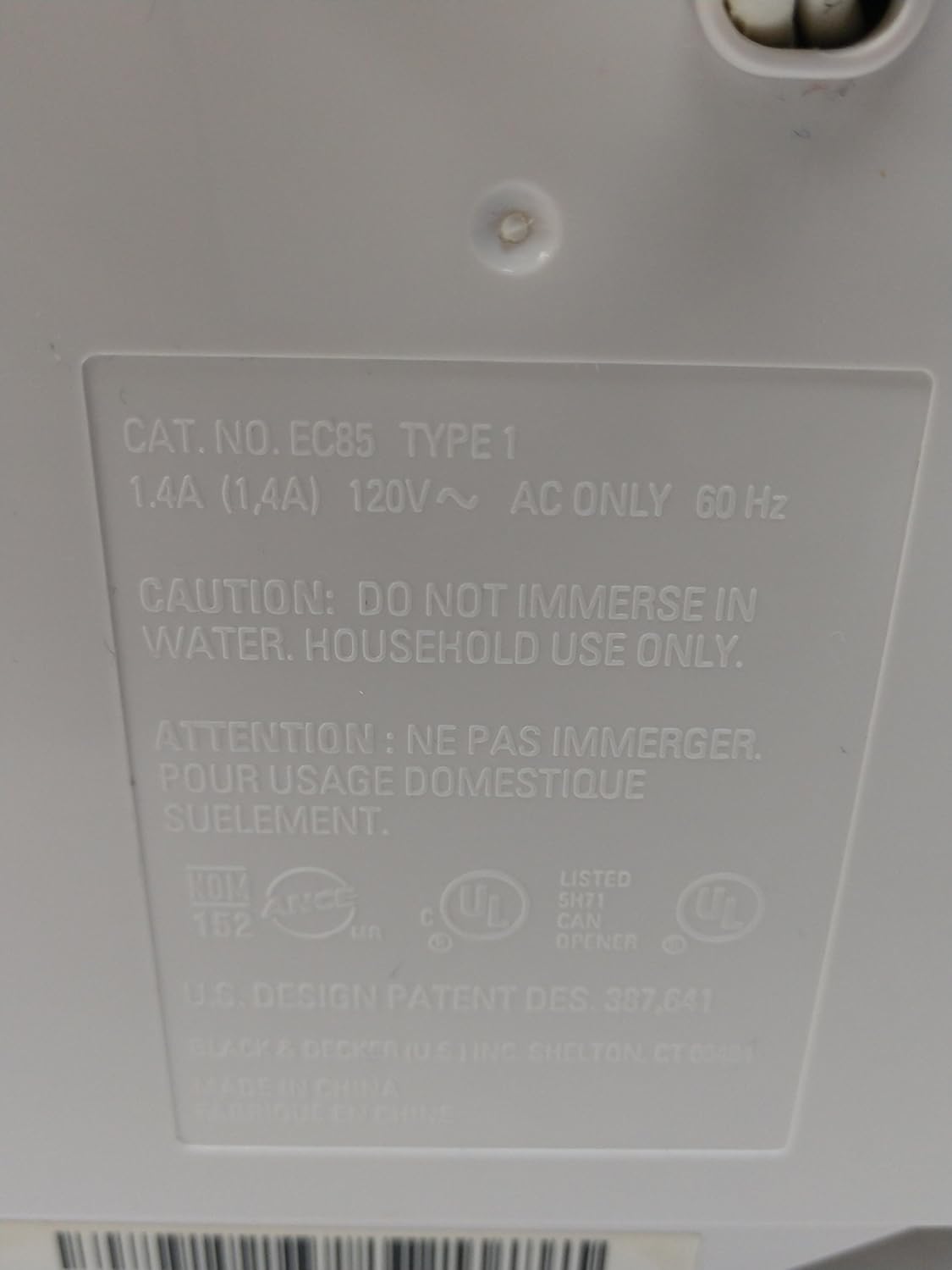
Figure 3: Product label with model and electrical specifications.
| Feature | Detail |
|---|---|
| Model Number | EC85 |
| Brand | BLACK+DECKER |
| Color | Black |
| Product Dimensions | 6.5"W x 10"H (6-1/2 x 10 x 4" overall) |
| Item Weight | 2.2 Pounds |
| Blade Material | Stainless Steel |
| Operation Mode | Automatic, Hands-Free |
| Special Features | Under-cabinet mounting, Power-pierce cutter, Built-in knife sharpener, Built-in bottle opener, Automatic shutoff, Accommodates big and tall cans. |
| Electrical Rating | 1.4A, 120V~ AC ONLY, 60 Hz |
Warranty and Support
For warranty information or technical support, please visit the official BLACK+DECKER website or contact their customer service department. Keep your purchase receipt for any warranty claims.
Online Support: www.blackanddecker.com/support
Related documentsEC85


Ask a question about this manual
Ask about setup, troubleshooting, compatibility, parts, safety, or missing instructions. Manuals+ will review the question and use this page’s manual context to help answer it.