
BRIO 33221
BRIO Remote Control Train User Manual
Model: 33221
Introduction
The BRIO Remote Control Train offers an interactive play experience, allowing users to control the train's movement and features with a wireless remote. This manual provides essential information for setting up, operating, maintaining, and troubleshooting your BRIO Remote Control Train.

This image shows the product in its packaging, highlighting the remote control and the train itself. The packaging indicates it is suitable for ages 3 and up.
Setup
1. Unpacking
- Carefully remove all components from the packaging.
- Verify that all parts are present: one remote control train, one remote control unit.
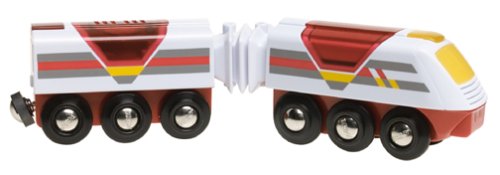
This image displays the two-part BRIO Remote Control Train, ready for track placement. It shows the main engine unit connected to a second car.
2. Battery Installation
The BRIO Remote Control Train and its remote require batteries for operation. Ensure you have the correct type and quantity as specified below.
- For the Train: Requires 4 x AA 1.5V batteries.
- For the Remote Control: Requires 2 x AA 1.5V batteries.
- Locate the battery compartment on the underside of the train and the back of the remote control.
- Using a small screwdriver (not included), open the battery compartment cover.
- Insert the batteries, ensuring correct polarity (+/-) as indicated inside the compartment.
- Replace the battery compartment cover and secure it with the screw.
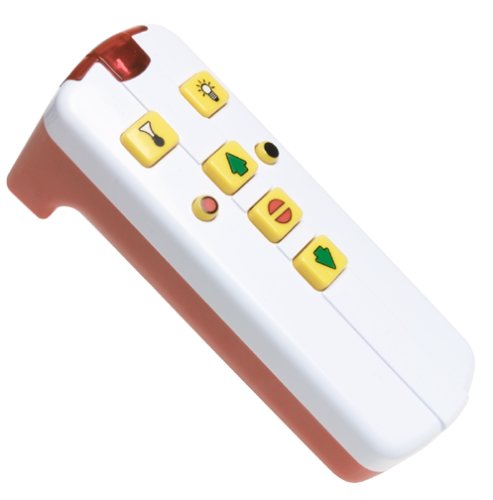
This image shows the handheld remote control with its various buttons for controlling the train's functions.
Operating Instructions
1. Powering On
- Ensure batteries are correctly installed in both the train and the remote.
- Place the train on a compatible BRIO wooden track.
- The train should be ready to receive commands from the remote control.
2. Remote Control Functions
The remote control allows for various actions:
- Forward: Press the designated button to make the train move forward.
- Reverse: Press the designated button to make the train move backward.
- Stop: Press the stop button to halt the train's movement.
- Light: Activate the train's headlight by pressing the light button.
- Horn/Sound: Press the horn button to sound the train's horn.
The train operates using infrared signals from the remote control. Ensure a clear line of sight between the remote and the train for optimal performance.
3. Automatic Shut-off
The train features an automatic shut-off function to conserve battery life. If inactive for approximately 10 minutes, the train will power down automatically.
Maintenance
1. Cleaning
- Wipe the train and remote control with a clean, damp cloth.
- Do not submerge the product in water or use harsh cleaning agents.
- Ensure the product is completely dry before storing or using again.
2. Battery Replacement
When the train or remote control's performance diminishes (e.g., slower movement, weak lights, unresponsive controls), it is time to replace the batteries. Follow the battery installation steps outlined in the "Setup" section.
- Always use new batteries of the specified type.
- Do not mix old and new batteries, or different types of batteries.
- Dispose of used batteries responsibly according to local regulations.
Troubleshooting
| Problem | Possible Cause | Solution |
|---|---|---|
| Train does not move or respond to remote. |
|
|
| Train moves slowly or lights are dim. | Low batteries. | Replace batteries in the train. |
| Remote control buttons are unresponsive. |
|
|
Specifications
- Model Number: 33221
- Product Dimensions: 23 x 5 x 6 cm; 680.39 g
- Material Type(s): Wood
- Batteries Required: Yes
- Batteries Included: Yes (for initial use)
- Train Batteries: 4 x AA 1.5V (included)
- Remote Control Batteries: 2 x AA 1.5V (included)
- Remote Control Included: Yes
- Radio Control Number of Bands: 2
- Manufacturer: Ravensburger
- Recommended Age: 3 years and above
Warranty and Support
For information regarding product warranty, returns, or technical support, please refer to the official BRIO website or contact their customer service directly. Keep your proof of purchase for any warranty claims.
Official BRIO Website: www.brio.net
Related documents33221


Ask a question about this manual
Ask about setup, troubleshooting, compatibility, parts, safety, or missing instructions. Manuals+ will review the question and use this page’s manual context to help answer it.