
SanDisk SDMS-128-822
SanDisk 128 MB Memory Stick Instruction Manual
Model: SDMS-128-822
Introduction
This manual provides essential information for the proper use and care of your SanDisk 128 MB Memory Stick. Designed for high storage capacity and fast data transfer, this non-volatile, solid-state storage solution is ideal for various digital products, including digital cameras, handheld PCs, and audio players. Its robust design ensures data integrity even in challenging environmental conditions.
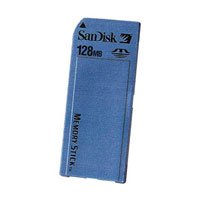
Figure 1: Front view of the SanDisk 128 MB Memory Stick.
Key Features
- 128 MB Capacity: Provides ample storage for photos, music, and documents.
- High Transfer Rate: Enables fast copying and downloading of files.
- Non-Volatile Storage: Data is retained even when power is off, with no moving parts for enhanced durability.
- Environmental Resilience: Designed to withstand extreme heat or cold, ensuring reliable performance.
- Broad Compatibility: Works with digital cameras, handheld PCs, digital audio players, and other devices featuring a Memory Stick slot.
Setup and Installation
The SanDisk 128 MB Memory Stick is designed for easy installation into compatible devices. Follow these general steps:
- Identify the Memory Stick Slot: Locate the Memory Stick slot on your digital camera, handheld PC, or audio player. Refer to your device's manual if you are unsure.
- Orient the Memory Stick: Ensure the metal contacts on the Memory Stick are facing the correct direction as indicated by your device's slot. Do not force the card.
- Insert the Memory Stick: Gently push the Memory Stick into the slot until it clicks into place. Some devices may require you to close a cover or latch.
- Power On Device: Turn on your device. It should automatically detect the Memory Stick. If prompted, format the Memory Stick using your device's menu options. Note: Formatting will erase all data on the card.
Video 1: Demonstration of inserting a Memory Stick into a compatible device. This video shows the physical insertion process for a Memory Stick PRO Duo into a Sony Cyber-shot camera.
Operating Instructions
Once installed, your SanDisk 128 MB Memory Stick functions as an extension of your device's storage. Here are common operations:
- Saving Data: When taking photos, recording audio, or saving files, your device will automatically store them on the Memory Stick if it is set as the primary storage.
- Accessing Data: Use your device's file browser or gallery to view and manage files stored on the Memory Stick.
- Transferring Data to a Computer:
- Remove the Memory Stick from your device.
- Insert the Memory Stick into a compatible Memory Stick card reader connected to your computer.
- Your computer should recognize the Memory Stick as a removable drive. You can then copy files to and from it.
- Formatting: If you wish to erase all data and prepare the Memory Stick for new use, use the formatting option within your device's settings. Always back up important data before formatting.

Figure 2: Various Memory Stick PRO Duo cards, illustrating different capacities.
Video 2: Overview of Memory Stick PRO Duo cards, showcasing different storage capacities.
Care and Maintenance
To ensure the longevity and optimal performance of your SanDisk 128 MB Memory Stick, follow these guidelines:
- Handle with Care: Avoid bending, dropping, or applying excessive force to the Memory Stick.
- Keep Contacts Clean: Do not touch the metal contacts. If necessary, gently wipe them with a clean, dry, lint-free cloth.
- Protect from Elements: While designed to be rugged, avoid prolonged exposure to extreme moisture, dust, or direct sunlight.
- Safe Removal: Always ensure your device is powered off or the Memory Stick is safely ejected through the device's menu before physical removal to prevent data corruption.
- Storage: Store the Memory Stick in its protective case when not in use to prevent damage.
Troubleshooting
If you encounter issues with your SanDisk 128 MB Memory Stick, try the following solutions:
- Memory Stick Not Detected:
- Ensure the Memory Stick is fully and correctly inserted into the device slot.
- Restart your device.
- Try the Memory Stick in another compatible device or card reader to determine if the issue is with the card or the device.
- "Format Error" Message:
- Attempt to format the Memory Stick using your device's internal formatting function.
- If the error persists, try formatting it on a computer using a compatible card reader.
- If formatting fails on multiple devices, the Memory Stick may be damaged.
- Slow Data Transfer:
- Ensure your card reader and USB port (if using a computer) support high-speed data transfer (e.g., USB 2.0 or higher).
- Avoid running multiple demanding applications during data transfer.
- The speed can also depend on the device's internal processing capabilities.
- Data Corruption:
- Always safely eject the Memory Stick from your computer or power off your device before removal.
- Avoid removing the Memory Stick during read/write operations.
Specifications
| Brand | SanDisk |
|---|---|
| Model Name | SDMS-128-822 |
| Memory Storage Capacity | 128 MB |
| Flash Memory Type | Memory Stick |
| Hardware Interface | Memory Stick |
| Compatible Devices | Digital Cameras, Handheld PCs, Digital Audio Players |
| Write Speed | Up to 10 MB/s |
| Special Feature | Water Proof (as per some specifications) |
| Product Dimensions | 3 x 1 x 0.7 inches |
| Item Weight | 0.8 ounces |
| UPC | 619659016531 |
Warranty and Support
Your SanDisk 128 MB Memory Stick comes with an 18-month warranty, providing peace of mind against manufacturing defects. For technical support, troubleshooting assistance, or warranty claims, please visit the official SanDisk support website or contact their customer service. Keep your proof of purchase for warranty validation.
For additional resources and product information, you may visit the SanDisk Store on Amazon.
Related documentsSDMS-128-822


Ask a question about this manual
Ask about setup, troubleshooting, compatibility, parts, safety, or missing instructions. Manuals+ will review the question and use this page’s manual context to help answer it.