
Introduction
The iConcepts USB Travel Kit is designed to provide versatile charging solutions for your Compaq iPAQ 3800 and 3900 series Pocket PCs. This kit enables you to charge your device from standard wall outlets globally and from your vehicle's cigarette lighter, ensuring your iPAQ remains powered wherever your travels take you.
Package Contents
Please verify that all items listed below are included in your package:
- Dual voltage travel charger (wall adapter)
- USB cigarette lighter adapter
- USB sync/charge cable
- Four international power adapters (for UK, Europe, and Australia)
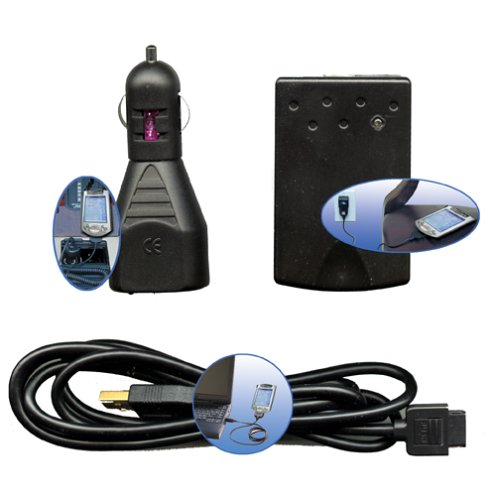
Image: The iConcepts USB Travel Kit showing the main components: a wall charger, a car charger, a USB cable, and various international plug adapters.
Setup
- Connecting the USB Cable: Connect the small end of the USB sync/charge cable to your Compaq iPAQ Pocket PC. Connect the larger USB-A end to either the dual voltage travel charger or the USB cigarette lighter adapter.
- Using the Wall Charger:
- For standard outlets: Plug the dual voltage travel charger directly into a wall outlet.
- For international outlets: Select the appropriate international adapter for your region (UK, Europe, or Australia). Attach the international adapter to the dual voltage travel charger. Ensure it is securely fastened. Then, plug the assembled charger into the wall outlet.
- Using the Car Charger: Insert the USB cigarette lighter adapter into your vehicle's 12V accessory power outlet (cigarette lighter socket).
Operating Instructions
Once the kit components are properly connected as described in the "Setup" section, your Compaq iPAQ Pocket PC will begin charging automatically. The dual voltage travel charger is designed to work with various international power standards without manual voltage selection.
- Charging via Wall Outlet: Plug the wall charger (with or without international adapter) into a live electrical outlet. Connect the USB cable to your iPAQ.
- Charging via Vehicle: Insert the USB cigarette lighter adapter into your vehicle's 12V accessory power outlet. Connect the USB cable to your iPAQ. Ensure your vehicle's ignition is on if the outlet is not continuously powered.
- Data Synchronization: The USB cable included in this kit is primarily for charging. While it may support data synchronization with a computer, its primary function within this travel kit is power delivery. For reliable data sync, refer to your iPAQ's original cradle or dedicated sync cable.
Maintenance
- Cleaning: Disconnect all components from power sources and your device before cleaning. Use a soft, dry cloth to wipe the surfaces of the charger and adapters. Do not use liquid cleaners or abrasive materials.
- Storage: Store the travel kit in a cool, dry place away from direct sunlight and extreme temperatures. Keep the international adapters organized to prevent loss.
- Handling: Avoid dropping the components or subjecting them to strong impacts. Do not attempt to disassemble any part of the kit.
Troubleshooting
If you encounter issues with your iConcepts USB Travel Kit, please refer to the following common solutions:
| Problem | Possible Cause / Solution |
|---|---|
| Device not charging |
|
| USB data sync not working |
|
| International adapter difficult to remove | Some international adapters may require a small tool (like a pen tip or the included wire device, if applicable) to depress a release mechanism before removal. Refer to the adapter's specific design for proper detachment. |
Specifications
- Model Number: 15347
- Brand: iConcepts
- Compatibility: Compaq iPAQ 3800/3900 Series Pocket PCs
- Input Voltage (Wall Charger): Dual Voltage (specific range not provided, but implies universal compatibility)
- Input Voltage (Car Charger): 12V DC (standard cigarette lighter outlet)
- Total USB Ports: 1 (on each charging unit)
- Item Weight: Approximately 0.5 Pounds (8 ounces)
- UPC: 021331153470
Warranty and Support
For warranty information or technical support regarding your iConcepts USB Travel Kit, please refer to the documentation included with your purchase or contact iConcepts customer service directly. Specific warranty terms may vary by region and retailer.
Please retain your proof of purchase for warranty claims.