Introduction
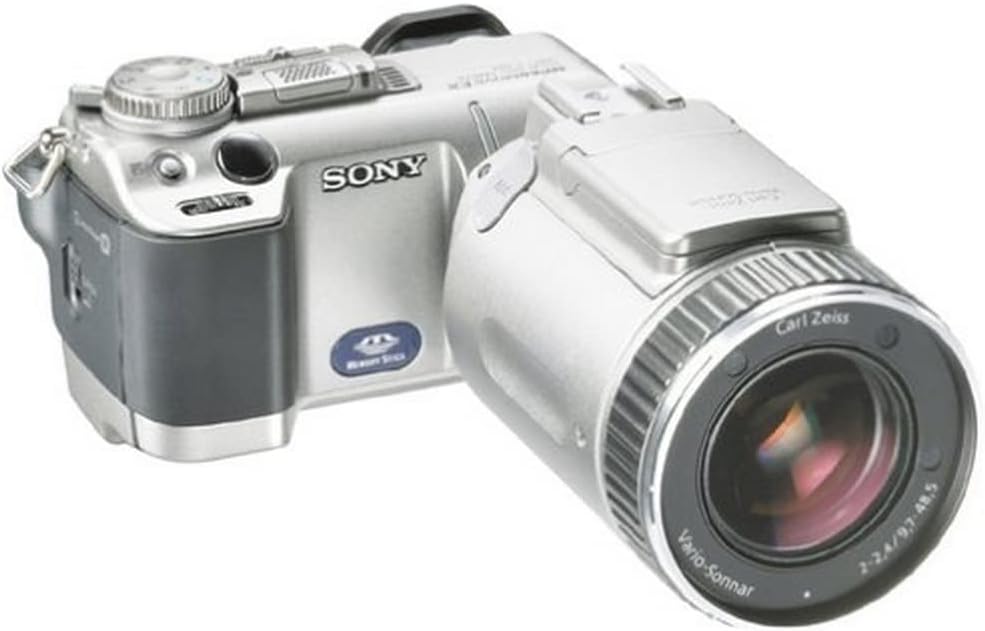
This manual provides detailed instructions for the proper use and maintenance of your Sony DSCF707 Cyber-shot Digital Still Camera. The DSCF707 features a 5.0-megapixel CCD sensor, a high-quality Carl Zeiss Vario-Sonnar lens with 5x optical zoom, and advanced functionalities like NightShot technology for low-light photography. Please read this manual thoroughly to ensure optimal performance and longevity of your device.
Getting Started
1. Battery Installation and Charging
The camera uses a proprietary Infolithium M rechargeable battery. Ensure the battery is fully charged before initial use.
- Open the battery compartment cover located at the bottom of the camera.
- Insert the Infolithium M battery with the correct orientation, matching the terminals.
- Close the battery compartment cover securely.
- Connect the supplied AC adapter to the camera's DC IN terminal and then to a power outlet to charge the battery. The charging indicator will illuminate.
2. Memory Stick Installation
The camera stores images on a Memory Stick. A 16MB Memory Stick is included.
- Locate the Memory Stick slot, typically on the side or bottom of the camera.
- Insert the Memory Stick firmly until it clicks into place, ensuring the correct orientation.
- To remove, press the Memory Stick gently inward, and it will eject slightly.
Basic Operation
1. Powering On and Off
To power on the camera, slide the POWER switch to the 'ON' position. To power off, slide it to 'OFF'.
2. Taking Photos
To capture still images:
- Set the mode dial to the still image capture mode.
- Frame your shot using the LCD monitor or electronic viewfinder.
- Press the shutter button halfway down to activate autofocus and exposure. The focus indicator will confirm focus.
- Press the shutter button fully to take the picture.

3. Using the LCD Monitor and Viewfinder
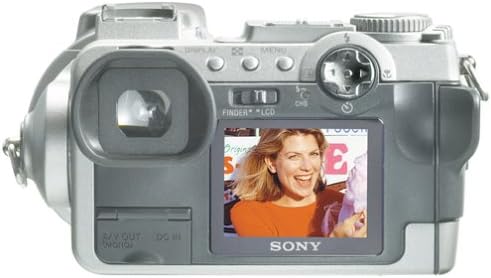
The DSCF707 offers both an LCD monitor and an electronic viewfinder for framing and reviewing shots.
- To switch between the LCD and the viewfinder, use the FINDER/LCD switch located near the LCD screen.
- The LCD monitor can be tilted and rotated for flexible shooting angles.
4. Zoom Function
The camera features a 5x optical zoom and a 2x digital zoom (10x total). Use the zoom lever to adjust the focal length.
- Optical Zoom: Provides high-quality magnification without loss of image detail.
- Digital Zoom: Further magnifies the image electronically, which may result in some loss of image quality.
5. NightShot Technology
The NightShot system allows for infrared photography in complete darkness. To activate:
- Switch the camera to NightShot mode (refer to the mode dial or menu options).
- The camera will use infrared illumination to capture images. Note that images taken in NightShot mode will appear monochromatic.
6. Movie Mode
The DSCF707 can record short video clips.
- Set the mode dial to Movie mode.
- Press the shutter button to start recording. Press it again to stop.
- Video resolution options include 320 x 240 (high quality), 320 x 240 (normal), and 160 x 112. Recording time is limited, typically to 15 seconds in 320 x 240 mode.
Playback and Transfer
1. Viewing Images
To review captured images and videos:
- Set the mode dial to Playback mode.
- Use the control buttons to navigate through your photos and videos on the LCD screen.
2. Transferring Images to a Computer
To transfer files to a computer:
- Connect the camera to your computer using the supplied USB cable.
- Ensure the camera is powered on. Your computer should recognize the camera as a removable storage device.
- Drag and drop files from the camera's Memory Stick folder to your computer's hard drive.
Maintenance and Care
- Cleaning the Camera: Use a soft, dry cloth to clean the camera body. For the lens, use a lens cleaning cloth and solution. Avoid harsh chemicals.
- Battery Care: Store batteries in a cool, dry place. Do not expose to extreme temperatures. Remove the battery if the camera will not be used for an extended period.
- Memory Stick Care: Handle Memory Sticks carefully. Avoid bending or exposing them to static electricity. Keep them away from strong magnetic fields.
- Storage: When not in use, store the camera in a protective case to prevent dust and scratches.
Troubleshooting
If you encounter issues with your camera, refer to the following common problems and solutions:
- Camera does not power on: Ensure the battery is fully charged and correctly inserted. Check if the battery terminals are clean.
- Images are blurry: Verify that the lens is clean. Ensure the camera is focusing correctly by pressing the shutter button halfway. Use a faster shutter speed or tripod in low light.
- Memory Stick error: Reinsert the Memory Stick. Ensure it is not full. Try formatting the Memory Stick (this will erase all data).
- Flash does not fire: Check if the flash mode is set to 'Auto' or 'On'. Ensure the battery has sufficient charge.
- Cannot transfer images to computer: Confirm the USB cable is securely connected to both the camera and computer. Ensure the camera is in the correct mode for USB connection.
Technical Specifications
| Feature | Specification |
|---|---|
| Model Name | Sony DSCF707 |
| Photo Sensor Resolution | 5 MP (Effective Still Resolution) |
| Lens Type | Carl Zeiss Vario-Sonnar autofocus lens |
| Optical Zoom | 5x |
| Digital Zoom | 2x |
| Image Stabilization | Digital, Optical |
| Screen Size | 1.8 Inches (LCD) |
| Storage Media | Memory Stick (16 MB included, supports up to 128 MB) |
| Connectivity | USB |
| Battery Type | Infolithium M (rechargeable) |
| Minimum Shutter Speed | 30 seconds |
| Maximum Shutter Speed | 1/1000 Seconds |
| ISO Range | Auto, 100, 200, 400 |
| Weight | 1.47 Pounds (with battery, Memory Stick, lens cap, and shoulder strap) |
| Dimensions | 4.75 by 2.75 by 6 inches |
Warranty and Support
For warranty information, technical support, or service inquiries regarding your Sony DSCF707 Cyber-shot Digital Still Camera, please refer to the warranty card included with your product or visit the official Sony support website. Keep your proof of purchase for warranty claims.
For further assistance, you may contact Sony customer service through their official channels.