
Bose VCS-10
Bose VCS-10 Center Channel Speaker
User Manual
Model: VCS-10 | Brand: Bose
1. Introduction
The Bose VCS-10 center-channel speaker is designed to enhance your home theater audio experience by delivering clear, lifelike movie dialogue. Its slim profile complements most televisions and entertainment centers. Featuring patented Compound Loaded drivers and Articulated Array drivers, the VCS-10 ensures dialogue is "locked" to the screen and provides a wide, even sound field. Magnetic shielding prevents image distortion when placed near a TV or computer monitor.
2. What's in the Box
Upon unpacking, please ensure all the following components are present:
- Bose VCS-10 Center-Channel Speaker
- Adhesive Rubber Feet (4 optional-use, in addition to 4 pre-attached)
- User Manual (this document)
- Warranty Information
3. Setup and Placement
Proper placement and connection are crucial for optimal performance of your VCS-10 speaker.
3.1 Speaker Placement
The VCS-10 is designed as a center-channel speaker and should be placed horizontally, centered above or below your television screen. Its magnetic shielding allows for placement directly on top of or below a TV without causing image distortion.

Figure 3.1: Front view of the Bose VCS-10 Center Channel Speaker, showcasing its sleek black design.
Consider the dimensions of the speaker to ensure it fits your setup:
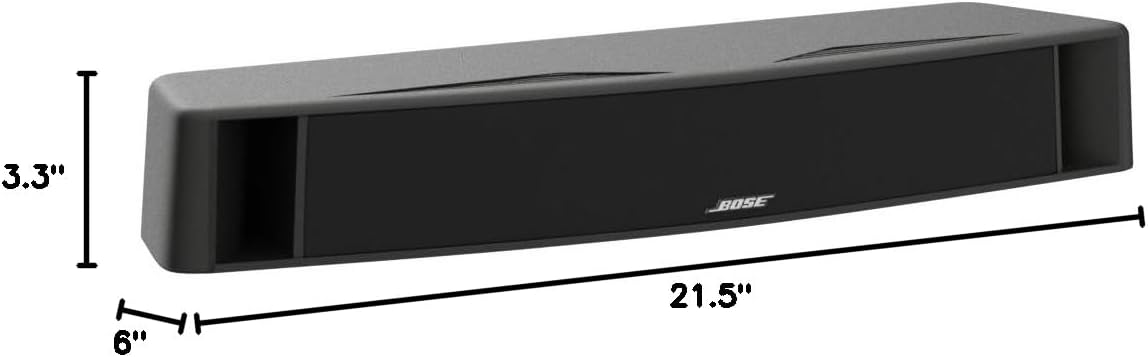
Figure 3.2: Dimensions of the Bose VCS-10 speaker, measuring 6 inches deep, 21.5 inches wide, and 3.3 inches high.
3.2 Wiring Connections
Connect the VCS-10 speaker to the center channel output of your audio/video receiver or amplifier. Ensure correct polarity (+ to + and - to -) for optimal sound performance.
- For most applications, standard 2-conductor, 18-gauge speaker wire is sufficient.
- If the speaker will be more than 30 feet from your receiver/amplifier, Bose recommends using 16-gauge wire (for up to 45 feet) or 14-gauge wire (for up to 70 feet) to maintain sound quality.
Refer to your receiver's manual for specific wiring instructions and speaker calibration settings.
4. Operation
Once connected, the Bose VCS-10 operates in conjunction with your audio/video receiver to deliver clear center channel audio. The speaker does not have independent controls.
- Volume Control: Adjust the overall system volume via your receiver.
- Center Channel Level: Most receivers allow you to adjust the individual volume level of the center channel. This can be useful for making dialogue more prominent.
- Sound Modes: Experiment with different surround sound modes on your receiver to find the optimal audio experience for movies, music, and other content.
For detailed audio adjustments, consult the user manual of your audio/video receiver.
5. Care and Maintenance
To ensure the longevity and performance of your Bose VCS-10 speaker, follow these simple care guidelines:
- Cleaning: Gently wipe the speaker's exterior with a soft, dry cloth. Do not use liquid cleaners, solvents, or abrasive cloths, as they may damage the finish.
- Dust: Regularly dust the speaker grille and cabinet to prevent accumulation that could affect sound quality or appearance.
- Placement: Avoid placing the speaker in direct sunlight, near heat sources, or in areas with high humidity.
- Ventilation: Ensure adequate airflow around the speaker, especially if it is placed in an enclosed cabinet.
Do not attempt to open the speaker enclosure. There are no user-serviceable parts inside.
6. Troubleshooting
If you experience issues with your Bose VCS-10 speaker, please refer to the following common troubleshooting steps:
| Problem | Possible Cause | Solution |
|---|---|---|
| No sound from speaker | Loose or incorrect wiring; Receiver not configured for center channel; Receiver volume too low. | Check all speaker wire connections at both the speaker and the receiver, ensuring correct polarity. Verify your receiver's settings to ensure the center channel is enabled and its volume is adequate. |
| Muffled or unclear dialogue | Incorrect receiver calibration; Speaker placement issues; Room acoustics. | Run your receiver's automatic calibration (e.g., Audyssey, MCACC) if available. Adjust the center channel level on your receiver. Ensure the speaker is not obstructed and is aimed towards the listening area. |
| Distorted sound | Overdriving the speaker; Loose connections; Damaged speaker wire. | Reduce the volume level. Check speaker wire connections for any frayed strands or loose terminals. Inspect speaker wire for damage and replace if necessary. |
| Image distortion on TV (if placed very close) | Interference (unlikely due to magnetic shielding, but possible with older CRT TVs). | While the VCS-10 is magnetically shielded, if you observe distortion on an older CRT television, try moving the speaker slightly further away from the screen. This is generally not an issue with modern LCD/LED displays. |
If the problem persists after trying these steps, please contact Bose customer support or refer to the warranty information.
7. Specifications
| Feature | Detail |
|---|---|
| Model Name | VCS-10 |
| Speaker Type | Center Channel |
| Mounting Type | Tabletop Mount |
| Color | Black |
| Product Dimensions (D x W x H) | 6"D x 21.5"W x 3.3"H |
| Item Weight | 6.91 pounds |
| Impedance | 8 Ohm |
| Speaker Maximum Output Power | 100 Watts |
| Frequency Response | 20 KHz (Note: This is likely the upper limit, not the full range) |
| Connectivity Technology | Wired |
| Recommended Uses For Product | Home Theater |
| Magnetic Shielding | Yes |
8. Warranty and Support
8.1 Warranty Information
This Bose VCS-10 speaker comes with a Limited Warranty. For specific details regarding the terms and conditions of your warranty, please refer to the warranty information included in the product packaging or visit the official Bose website.
Legal Disclaimer: This product is shipped for use within the US only.
8.2 Customer Support
For technical assistance, troubleshooting beyond this manual, or warranty claims, please contact Bose customer support. You can find contact information on the official Bose website or in your product documentation.
You may also find additional resources and FAQs by visiting the Bose Store on Amazon.
Related documentsVCS-10


Ask a question about this manual
Ask about setup, troubleshooting, compatibility, parts, safety, or missing instructions. Manuals+ will review the question and use this page’s manual context to help answer it.