
Introduction to Seconds
"Seconds" is a 1966 American science fiction psychological thriller film directed by John Frankenheimer and starring Rock Hudson. The film explores themes of identity, existentialism, and the pursuit of a second chance at life. It tells the story of a disillusioned middle-aged banker who undergoes a radical procedure to fake his own death and assume a new identity, only to find that his new life comes with its own set of unforeseen challenges and consequences.
This DVD provides access to the critically acclaimed film, allowing viewers to experience its unique visual style and compelling narrative.
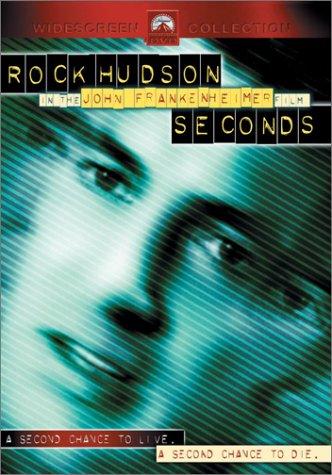
This image displays the official DVD cover for the film 'Seconds'. The artwork features a stylized, greenish-blue close-up of actor Rock Hudson's face, overlaid with diagonal lines, creating a somewhat distorted and unsettling effect. The title 'SECONDS' is prominently displayed in block letters, along with 'ROCK HUDSON IN THE JOHN FRANKENHEIMER FILM'. Below the main image, two taglines read: 'A SECOND CHANCE TO LIVE.' and 'A SECOND CHANCE TO DIE.' This cover art reflects the film's themes of identity, transformation, and psychological tension.
Package Contents
Your "Seconds" DVD package should contain the following items:
- One (1) "Seconds" DVD disc
- One (1) Standard DVD case with cover art
Getting Started: DVD Playback
To begin watching "Seconds", follow these simple steps:
- Ensure your DVD player is connected to your television or display device and powered on. Refer to your DVD player's manual for specific connection instructions.
- Open the disc tray or slot on your DVD player.
- Carefully insert the "Seconds" DVD disc with the label side facing up.
- Close the disc tray or allow the player to draw the disc in.
- The DVD player should automatically begin reading the disc and display the main menu on your screen. If not, press the "Play" or "DVD" button on your remote control.
Operating the DVD
Once the main menu appears, use your DVD player's remote control to navigate the options:
- Play Movie: Select this option to start the film from the beginning.
- Scene Selection: Allows you to jump to specific chapters or scenes within the film.
- Audio Options: Choose between available audio tracks. For "Seconds" DVD, English (Dolby Digital 2.0 Mono) and French (Dolby Digital 2.0 Mono) are available.
- Subtitles: Turn subtitles on or off. English subtitles are available.
- Special Features: Access bonus content related to the film.
Use the arrow keys on your remote to highlight options and the "Enter" or "OK" button to confirm your selection.
Special Features
This DVD includes the following special features:
- Original Theatrical Trailer: View the film's original promotional trailer.
- Commentary Track by Director John Frankenheimer: Listen to an insightful audio commentary by the film's director, providing behind-the-scenes details and artistic perspectives.
Care and Maintenance
To ensure the longevity and optimal performance of your "Seconds" DVD, please observe the following care guidelines:
- Always handle the disc by its edges to avoid fingerprints and smudges on the playing surface.
- Store the disc in its original case when not in use to protect it from dust, scratches, and direct sunlight.
- If the disc becomes dirty, gently wipe it with a soft, lint-free cloth from the center outwards. Do not use abrasive materials or harsh cleaning chemicals.
- Avoid exposing the disc to extreme temperatures or high humidity.
Troubleshooting
If you encounter issues while playing your "Seconds" DVD, consider the following common solutions:
- Disc Not Playing/Recognized:
- Ensure the disc is inserted correctly (label side up).
- Check the disc for visible scratches or smudges and clean if necessary.
- Try playing another DVD to confirm your DVD player is functioning correctly.
- Restart your DVD player.
- Skipping/Freezing Playback:
- Clean the disc thoroughly.
- Ensure the disc is not warped or damaged.
- No Audio/Video:
- Verify all cables connecting your DVD player to your TV are securely attached.
- Check your TV's input/source setting to ensure it's on the correct input for your DVD player.
- Adjust the volume on your TV and DVD player.
Technical Specifications
| Feature | Detail |
|---|---|
| ASIN | B00005RDAJ |
| Director | John Frankenheimer |
| Actors | Rock Hudson, Salome Jens, John Randolph, Will Geer, Jeff Corey |
| Writers | David Ely, Lewis John Carlino |
| Studio | Paramount |
| Release Date | January 8, 2002 |
| Run Time | 1 hour and 47 minutes |
| Media Format | Multiple Formats, Anamorphic, Black & White, NTSC, Widescreen, Subtitled, Closed-captioned |
| Aspect Ratio | 1.85:1 |
| MPAA Rating | R (Restricted) |
| Language | English (Dolby Digital 2.0 Mono), French (Dolby Digital 2.0 Mono) |
| Subtitles | English |
| Number of Discs | 1 |
| Color | Black & White |
Customer Support
For further assistance or inquiries regarding your "Seconds" DVD, please contact Paramount Home Entertainment customer support. Contact information can typically be found on the DVD packaging or on the official Paramount Pictures website.
Please note that specific warranty details for DVDs may vary. Retain your proof of purchase for any potential claims.


