
JVC RX-7000R
JVC RX-7000R AV Receiver User Manual
Model: RX-7000R
Introduction
This manual provides detailed instructions for the setup, operation, and maintenance of your JVC RX-7000R AV Receiver. The RX-7000R is a high-performance audio/video receiver featuring built-in Dolby Digital, DTS, and MPEG multi-channel decoders, housed in a stable Z-chassis. It delivers 100 watts of output power per channel and includes a dedicated subwoofer output.
Additionally, the unit is equipped with an RDS tuner with EON functionality and an electronic S.E.A. 3-band equalizer, offering 5 preset settings and 1 manual adjustment option for various audio sources. For connectivity, it provides an optical digital output, one coaxial digital input, two optical digital inputs, three S-video inputs, two S-video outputs, three A/V inputs, and three audio inputs.
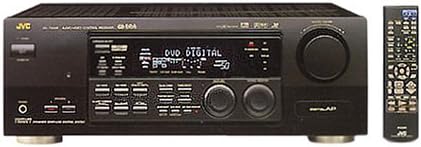
Figure 1: JVC RX-7000R AV Receiver and Remote Control. This image displays the front panel of the receiver, showing the display, various control buttons, input jacks, and the large volume knob. To the right, the accompanying remote control is visible, featuring numerous buttons for comprehensive system control.
Setup
1. Unpacking
Carefully remove the receiver and all accessories from the packaging. Retain the packaging materials for future transport or storage. Ensure all components listed in the packing list are present.
2. Placement
Place the receiver on a stable, flat surface with adequate ventilation. Avoid placing it near heat sources or in direct sunlight. Ensure there is sufficient space around the unit for proper airflow.
3. Connections
Before making any connections, ensure the receiver and all connected devices are turned off and unplugged from the power outlet.
- Speaker Connections: Connect your speakers to the appropriate speaker terminals on the rear of the receiver. Ensure correct polarity (+ to + and - to -) for each speaker. The RX-7000R supports a separate subwoofer output.
- Audio/Video Inputs:
- Connect your audio sources (CD player, tape deck, etc.) to the three dedicated audio inputs.
- Connect video sources (DVD player, VCR, game console) to the three A/V inputs.
- For higher quality video, utilize the three S-video inputs.
- For digital audio, connect compatible devices to the one coaxial digital input or the two optical digital inputs.
- Audio/Video Outputs:
- Connect your TV or monitor to one of the two S-video outputs or the A/V output.
- For digital audio recording or pass-through, use the optical digital output.
- Power Connection: Once all audio and video connections are made, plug the receiver's power cord into a suitable wall outlet.
Operating Instructions
1. Basic Operation
- Power On/Off: Press the POWER button on the front panel or remote control to turn the unit on or off.
- Input Selection: Use the INPUT SELECTOR knob or corresponding buttons on the remote to choose your desired audio/video source (e.g., CD, DVD, TV, Tuner).
- Volume Control: Adjust the master volume using the large VOLUME knob on the front panel or the VOLUME +/- buttons on the remote control.
2. Tuner Operation
The built-in RDS tuner allows for reception of FM/AM radio broadcasts.
- Tuning: Select the TUNER input. Use the tuning buttons to scan for radio stations.
- RDS/EON: The RDS (Radio Data System) and EON (Enhanced Other Networks) features provide additional information such as station name, program type, and traffic announcements (where available). Refer to the display for RDS information.
3. Sound Adjustments
The electronic S.E.A. (Sound Effect Amplifier) 3-band equalizer allows you to customize the sound to your preference.
- Equalizer Presets: Select from 5 pre-programmed equalizer settings optimized for different music genres or listening environments.
- Manual Adjustment: One manual setting is available for fine-tuning bass, midrange, and treble levels across all audio sources. Consult the on-screen display or front panel display for adjustment options.
4. Surround Sound Modes
The RX-7000R features built-in decoders for popular multi-channel audio formats.
- Dolby Digital: For 5.1 channel audio from compatible sources like DVD players.
- DTS: Another high-quality multi-channel audio format.
- MPEG: Multi-channel audio decoding for MPEG-encoded content.
- Use the SURROUND MODE buttons on the remote or front panel to cycle through available sound modes.
Maintenance
1. Cleaning
To maintain the appearance of your receiver, wipe the exterior surfaces with a soft, dry cloth. For stubborn marks, slightly dampen the cloth with water and then wipe dry. Do not use abrasive cleaners, waxes, or solvents as they may damage the finish.
2. Storage
If you plan to store the receiver for an extended period, disconnect it from the power outlet and all connected devices. Store it in a cool, dry place, ideally in its original packaging to protect it from dust and physical damage.
Troubleshooting
Before contacting customer support, please refer to the following common issues and their solutions.
| Problem | Possible Cause | Solution |
|---|---|---|
| No power | Power cord not securely plugged in. | Ensure the power cord is firmly connected to the receiver and the wall outlet. |
| No sound | Incorrect input selected; speaker wires loose; volume too low; Mute function active. | Select the correct input source. Check all speaker wire connections. Increase volume. Deactivate Mute. |
| No picture (from video source) | Incorrect video input selected; video cables loose or incorrectly connected. | Ensure the correct video input is selected. Check all video cable connections between the source, receiver, and TV. |
| Remote control not working | Batteries are dead or incorrectly inserted; obstruction between remote and receiver; remote sensor blocked. | Replace batteries. Ensure line of sight between remote and receiver. Clear any obstructions. |
Specifications
- Model: JVC RX-7000R
- Type: AV Receiver
- Output Power: 100 watts per channel (details may vary by impedance and frequency range)
- Decoders: Dolby Digital, DTS, MPEG Multi-channel
- Chassis: Z-chassis (stable design)
- Subwoofer Output: Yes, separate output
- Tuner: RDS Tuner with EON
- Equalizer: Electronic S.E.A. 3-band equalizer (5 presets, 1 manual setting)
- Digital Inputs: 1 x Coaxial, 2 x Optical
- Digital Outputs: 1 x Optical
- S-Video Inputs: 3
- S-Video Outputs: 2
- A/V Inputs: 3
- Audio Inputs: 3
- Dimensions (approx.): 53 x 41 x 21 cm (Package dimensions from input: 53 x 41 x 21 cm)
- Weight (approx.): 5.5 kg (Package weight from input: 5,5 kg)
Warranty and Support
For specific warranty information, please refer to the warranty card included with your product or contact your local JVC authorized dealer. Keep your purchase receipt as proof of purchase.
For technical support or service inquiries, please visit the official JVC website or contact their customer service department. Contact details can typically be found on the manufacturer's website or in the product packaging.
Related documentsRX-7000R


Ask a question about this manual
Ask about setup, troubleshooting, compatibility, parts, safety, or missing instructions. Manuals+ will review the question and use this page’s manual context to help answer it.