
1. Introduction
Thank you for purchasing the ROYAL WS22 Desktop Weather Station. This device provides accurate indoor and outdoor temperature readings, a digital clock, and temperature alarm functions. This manual will guide you through the setup, operation, and maintenance of your weather station to ensure optimal performance.
2. Package Contents
Please check the package contents carefully. If any items are missing or damaged, contact customer support.
- 1 x ROYAL WS22 Base Unit
- 1 x Wireless Outdoor Sensor
- 1 x User Manual (this document)
3. Key Features
- Displays indoor and outdoor temperature, time and date.
- Wireless outdoor sensor transmits temperature up to 100 feet (30 meters).
- Supports monitoring of up to 3 remote sensors (one included).
- Selectable 12/24 hour time display.
- Selectable Fahrenheit (°F) or Celsius (°C) temperature display.
- Minimum and maximum daily temperature alarm function.
- Digital clock with alarm.
4. Setup
4.1. Base Unit Battery Installation
- Locate the battery compartment on the back of the base unit.
- Open the battery compartment cover.
- Insert one (1) 9V battery, observing the correct polarity (+/-) as indicated inside the compartment.
- Close the battery compartment cover securely.
- The display will illuminate, indicating the unit is powered on.
4.2. Wireless Outdoor Sensor Battery Installation
- Locate the battery compartment on the back of the outdoor sensor.
- Open the battery compartment cover.
- Insert two (2) AA batteries, observing the correct polarity (+/-) as indicated inside the compartment.
- Close the battery compartment cover securely.
- The sensor is now ready to transmit data.
4.3. Sensor Placement
For accurate readings and optimal wireless transmission:
- Place the outdoor sensor in a shaded area, away from direct sunlight and heat sources, to prevent inaccurate temperature readings.
- Ensure the sensor is protected from direct rain and snow, although it is designed to be rugged and waterproof.
- Position the sensor within 100 feet (30 meters) of the base unit. Walls, metal objects, and electronic devices can interfere with the wireless signal.
- Avoid placing the sensor near large metal structures or electrical appliances that may cause interference.
4.4. Synchronization
The base unit will automatically attempt to connect with the outdoor sensor once both are powered on. Allow a few minutes for the units to establish a connection. The outdoor temperature will appear on the base unit's display once connected. If the outdoor temperature does not appear, try repositioning the sensor or base unit, or re-inserting batteries in both units.
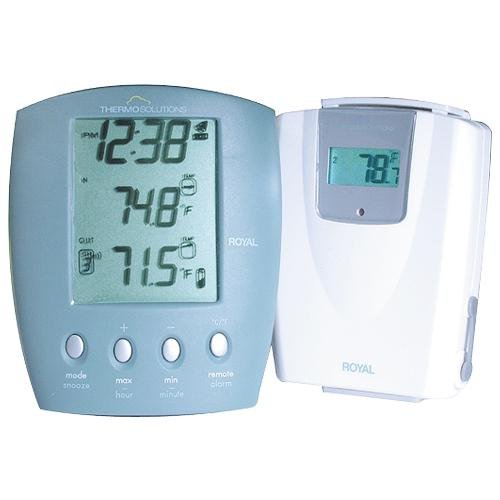
Image 1: ROYAL WS22 Desktop Weather Station showing the main display unit and the compact wireless outdoor sensor.
5. Operation
5.1. Display Overview
The main display shows:
- Indoor Temperature: Current temperature at the base unit's location.
- Outdoor Temperature: Current temperature from the wireless sensor.
- Time: Current time in 12-hour or 24-hour format.
- Date: Current date (if applicable, depending on model display).
5.2. Setting Time and Date
Refer to the buttons on the back or side of the base unit. Typically, there are "SET", "UP", and "DOWN" buttons.
- Press and hold the SET button until the time display starts flashing.
- Use the UP or DOWN buttons to adjust the hour. Press SET to confirm.
- Repeat for minutes, year, month, and day.
- Press SET again to exit the setting mode.
5.3. 12/24 Hour Format Selection
While in time setting mode (or sometimes by a dedicated button), you can toggle between 12-hour (AM/PM) and 24-hour (military) format using the UP or DOWN button when the hour is flashing.
5.4. Fahrenheit/Celsius Selection
Locate the °C/°F button, usually on the back of the base unit. Press this button to switch between Fahrenheit and Celsius temperature displays.
5.5. Minimum/Maximum Temperature Records
The weather station records the minimum and maximum temperatures for both indoor and outdoor readings since the last reset.
- Press the MIN/MAX button once to display the maximum recorded temperatures.
- Press the MIN/MAX button again to display the minimum recorded temperatures.
- To clear the records, press and hold the MIN/MAX button while the min/max temperatures are displayed.
5.6. Temperature Alarms
The unit can alert you when temperatures go above or below a set threshold.
- Press the ALERT button (or similar) to enter alarm setting mode.
- Use UP/DOWN to select whether to set an indoor or outdoor alarm, and then high or low alarm.
- Press SET to confirm your selection.
- Use UP/DOWN to adjust the desired temperature threshold.
- Press SET to confirm and activate the alarm.
- An alarm icon will appear on the display when an alarm is active.
6. Maintenance
6.1. Battery Replacement
Replace batteries when the display becomes dim or the outdoor sensor loses connection frequently. Always replace all batteries in a unit at the same time with new ones of the same type.
- Base Unit: One (1) 9V battery.
- Outdoor Sensor: Two (2) AA batteries.
6.2. Cleaning
Wipe the unit and sensor with a soft, damp cloth. Do not use abrasive cleaners or solvents, as they may damage the plastic parts and display. Ensure the outdoor sensor's vents are clear of debris.
7. Troubleshooting
| Problem | Possible Cause | Solution |
|---|---|---|
| No outdoor temperature reading. | Sensor out of range, low sensor batteries, interference. | Move sensor closer to base unit. Replace sensor batteries. Relocate units away from interference sources. Re-synchronize. |
| Inaccurate temperature readings. | Sensor exposed to direct sunlight/heat, poor ventilation. | Relocate sensor to a shaded, well-ventilated area. Ensure base unit is not near heat sources. |
| Display is dim or blank. | Low base unit battery. | Replace the 9V battery in the base unit. |
| Time/Date incorrect. | Not set correctly. | Follow instructions in Section 5.2 to set time and date. |
8. Specifications
- Model: WS22 (Part Number: 14430F-M)
- Indoor Temperature Range: Not specified, typically 0°C to 50°C (32°F to 122°F)
- Outdoor Temperature Range: Not specified, typically -40°C to 60°C (-40°F to 140°F)
- Temperature Accuracy: ±1°C (±1.8°F)
- Wireless Range: Up to 100 feet (30 meters) in open air
- Base Unit Power: 1 x 9V battery (not included)
- Outdoor Sensor Power: 2 x AA batteries (not included)
- Display Type: Digital
- Material: Metal, Plastic
- Dimensions (Base Unit): Approximately 4.5" H x 3.5" L x 2.25" W
9. Warranty and Support
This ROYAL WS22 Desktop Weather Station is covered by a 90-day limited manufacturer's warranty from the date of purchase. This warranty covers defects in materials and workmanship under normal use.
For warranty claims, technical support, or further assistance, please contact Royal customer service. Please have your model number (WS22) and proof of purchase ready.
Contact information for Royal can typically be found on their official website or product packaging.