
DENON AVR-1601
Contents
Denon AVR-1601 AV Receiver User Manual
Model: AVR-1601
1. Introduction
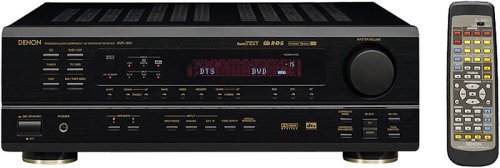
Thank you for purchasing the Denon AVR-1601 AV Receiver. This unit is designed to be the central component of your home theater system, providing high-quality audio and video processing. The AVR-1601 features a 5-channel discrete power amplifier, delivering 90 watts (6 ohms, DIN) per channel, and includes Dolby Digital and DTS decoders for immersive surround sound. It incorporates 24-bit digital signal processing with high-quality 24-bit/96 kHz D/A converters, a virtual surround mode, and an FM stereo/AM tuner with 40 station presets, RDS, and radio text. This manual provides essential information for proper setup, operation, and maintenance of your receiver.
2. Safety Instructions
Please read these safety instructions carefully before operating the unit. Keep this manual for future reference.
- Power Source: Connect the unit only to an AC outlet of the voltage specified on the rear panel.
- Ventilation: Ensure adequate ventilation. Do not block ventilation openings. Allow sufficient space around the unit for proper heat dissipation.
- Water and Moisture: Do not expose the unit to rain or moisture. Do not place objects filled with liquids, such as vases, on the unit.
- Foreign Objects: Do not insert any foreign objects into the unit's openings.
- Servicing: Do not attempt to service the unit yourself. Refer all servicing to qualified service personnel.
- Cleaning: Unplug the unit from the wall outlet before cleaning. Use a dry cloth only.
- Lightning: During a lightning storm or when unused for long periods, unplug the unit from the wall outlet.
3. Setup
3.1 Unpacking and Placement
Carefully remove the receiver from its packaging. Place the unit on a stable, level surface with adequate space for ventilation. Avoid placing it near heat sources or in direct sunlight.
3.2 Connecting Speakers
The AVR-1601 supports a 5.1 channel speaker configuration. Connect your speakers to the corresponding terminals on the rear panel. Ensure correct polarity (+ to + and - to -) for all connections.
- Front Speakers: Connect your main left and right speakers.
- Center Speaker: Connect your center channel speaker for dialogue.
- Surround Speakers: Connect your left and right surround speakers for immersive effects.
- Subwoofer: Connect an active subwoofer to the SUBWOOFER PRE OUT terminal.
3.3 Connecting Audio/Video Sources
Use appropriate cables to connect your audio and video components to the receiver. The AVR-1601 offers various input options.
- HDMI Inputs: Connect HDMI-compatible devices such as Blu-ray players, game consoles, or set-top boxes to the HDMI IN ports.
- Digital Audio Inputs: For devices with digital audio output, use either the OPTICAL or COAXIAL digital audio inputs.
- Analog Audio/Video Inputs: Connect devices like VCRs, older DVD players, or CD players using RCA analog audio and composite video cables to the corresponding input jacks (e.g., DVD, VCR, CD).
3.4 Connecting Antennas
Connect the supplied FM and AM antennas to their respective terminals on the rear panel for radio reception.
3.5 Power Connection
After all other connections are made, plug the power cord into the AC INLET on the rear panel and then into a wall outlet.
This image displays the rear panel of the Denon AVR-1601 AV Receiver. It features a comprehensive array of input and output terminals, including antenna connections for FM/AM, multiple analog audio and video inputs (RCA), digital audio inputs (coaxial and optical), and speaker terminals for front, center, and surround channels. The power input and regulatory information are also visible.
4. Operating Instructions
4.1 Power On/Off
Press the POWER button on the front panel or the remote control to turn the unit on or off.
4.2 Input Selection
Use the INPUT SELECTOR buttons on the front panel or the remote control to choose the desired audio/video source (e.g., DVD, CD, TV, TUNER).
4.3 Volume Control
Adjust the master volume using the large VOLUME knob on the front panel or the VOLUME +/- buttons on the remote control.
4.4 Tuner Operation
Select the TUNER input. Use the TUNING buttons to manually tune to radio stations or the PRESET buttons to recall stored stations. The unit supports FM stereo/AM reception with RDS and radio text features.
4.5 Surround Sound Modes
The AVR-1601 automatically detects Dolby Digital or DTS signals. You can also select various surround modes, including virtual surround, using the MODE buttons on the remote control to optimize your listening experience.
5. Maintenance
5.1 Cleaning
To clean the unit, first disconnect the power cord. Use a soft, dry cloth to wipe the exterior surfaces. Do not use abrasive cleaners, waxes, or solvents as they may damage the finish.
5.2 Storage
If you plan to store the unit for an extended period, disconnect it from the power outlet and all connected devices. Store it in a cool, dry place, preferably in its original packaging to protect it from dust and physical damage.
6. Troubleshooting
If you experience problems with your AVR-1601, refer to the following common issues and solutions before contacting service personnel.
| Problem | Possible Cause | Solution |
|---|---|---|
| No power | Power cord not connected; Power outlet faulty | Ensure power cord is securely plugged in; Try a different outlet. |
| No sound | Incorrect input selected; Speaker wires disconnected; Volume too low; Mute function active | Select correct input source; Check speaker connections; Increase volume; Deactivate mute. |
| No video | Incorrect input selected; Video cables not connected properly | Select correct input source; Check video cable connections between source, receiver, and TV. |
| Remote control not working | Batteries depleted; Obstruction between remote and receiver; Incorrect remote mode | Replace batteries; Remove obstructions; Ensure remote is in the correct operating mode. |
7. Specifications
Technical specifications for the Denon AVR-1601 AV Receiver.
- Power Output: 90 Watts per channel (6 ohms, DIN)
- Total Power Output: 450 Watts
- Channels: 5.1 Surround Sound
- Audio Decoding: Dolby Digital, DTS Surround Sound
- Digital Signal Processing: 24-bit DSP, 24-bit/96 kHz D/A Converters
- Tuner: FM Stereo/AM with 40 station presets, RDS, Radio Text
- Connectivity Technology: HDMI
- HDMI Ports: 3 (Input)
- Digital Audio Inputs: Coaxial, Optical
- Analog Audio/Video Inputs: Multiple RCA inputs (e.g., DVD, VCR, CD)
- Compatible Devices: Smartphone, Tablet, Personal Computer, Game Console, Television
- Control Method: Remote Control
- Dimensions (Package): 53 x 41 x 21 cm
- Weight (Package): 5.5 kg
- Color: Black
- Model Number: AVR-1601
8. Warranty and Support
For information regarding the product warranty, please refer to the warranty card included with your purchase or visit the official Denon website. For technical support or service inquiries, please contact Denon customer service through their official channels. Keep your purchase receipt as proof of purchase for warranty claims.
Documents and downloads
Ask a question about this manual
Ask about setup, troubleshooting, compatibility, parts, safety, or missing instructions. Manuals+ will review the question and use this page’s manual context to help answer it.