
1. Introduction
This manual provides detailed instructions for the safe and effective use of your Nikon AF-S FX NIKKOR 17-35mm f/2.8D IF-ED Zoom Lens. Please read this manual thoroughly before using the lens to ensure optimal performance and longevity. Keep this manual accessible for future reference.
Key Features:
- Designed for precise optical applications by professional photographers.
- Compatible with Nikon SLR cameras.
- Utilizes 77mm size filters (optional).
- Wide-angle zoom lens with a fast f/2.8 maximum aperture.
- Incorporates 2 aspherical lenses (2 molded glass and 1 hybrid) and 2 ED glass elements for superior image quality.
- 9-blade rounded diaphragm for natural background blur.
- Silent Wave Motor (SWM) for quiet and accurate high-speed autofocusing.
2. Product Overview
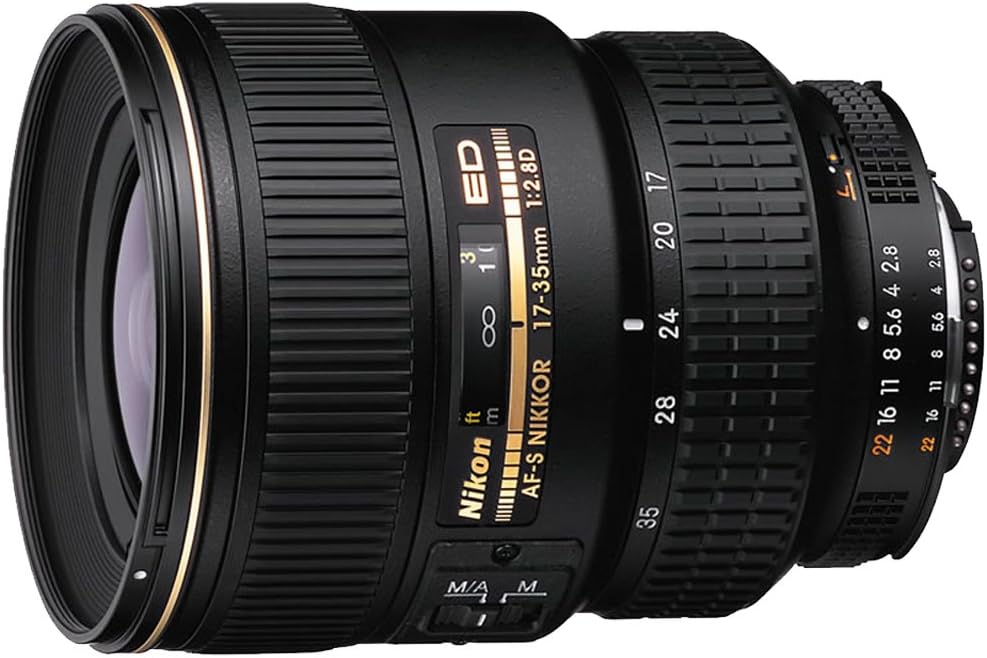
The Nikon AF-S FX NIKKOR 17-35mm f/2.8D IF-ED is a professional-grade wide-angle zoom lens designed for Nikon DSLR cameras. It offers a versatile focal range from 17mm ultrawide to 35mm wide-angle, coupled with a constant f/2.8 maximum aperture for excellent low-light performance and depth of field control. Its robust construction and advanced optical design ensure high image quality and durability.
3. Setup
3.1 Attaching the Lens
- Ensure the camera is turned off.
- Remove the rear lens cap and the camera body cap.
- Align the mounting mark on the lens with the mounting mark on the camera body.
- Rotate the lens counter-clockwise (when viewed from the front) until it clicks into place.
3.2 Detaching the Lens
- Ensure the camera is turned off.
- While pressing the lens release button on the camera body, rotate the lens clockwise until it detaches.
- Attach the front and rear lens caps to protect the lens elements.
3.3 Attaching the Lens Hood (HB-23)
The HB-23 Bayonet Lens Hood is designed to block stray light and protect the front element of the lens. Align the lens hood with the mounting marks on the front of the lens and twist until it locks securely. Ensure it is firmly attached to prevent accidental detachment.
4. Operating the Lens
4.1 Auto Focus (AF) Operation
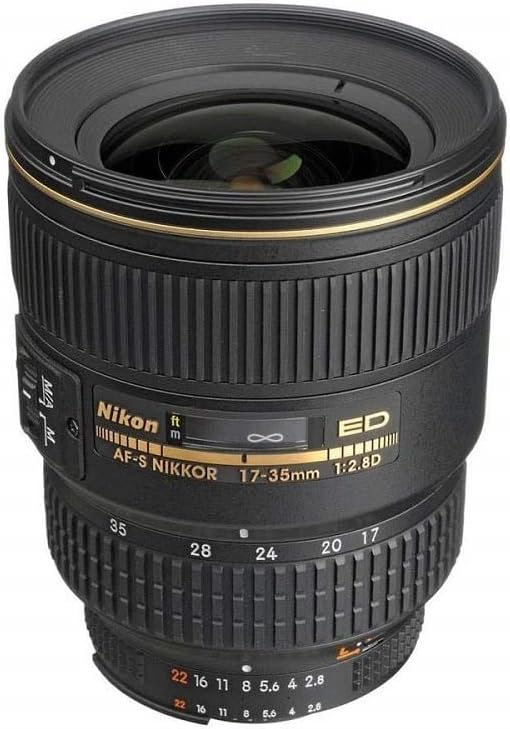
This lens features Nikon's Silent Wave Motor (SWM) for fast, quiet, and precise autofocusing. Set the focus mode switch on the lens to 'M/A' for autofocus with manual override, or 'M' for manual focus only. When set to 'M/A', you can manually adjust focus even when the camera is in autofocus mode by simply rotating the focus ring.
4.2 Manual Focus (M) Operation
To use manual focus, set the focus mode switch on the lens to 'M'. Rotate the focus ring to achieve desired sharpness. The focus distance scale on the lens barrel provides an indication of the current focus distance.
4.3 Zooming
To change the focal length, rotate the zoom ring on the lens barrel. The focal length markings (17, 20, 24, 28, 35mm) indicate the current setting. Ensure a firm grip on the lens while zooming.
4.4 Aperture Control
The lens features a constant maximum aperture of f/2.8 across its entire zoom range. Aperture control is typically managed via the camera body's settings. The 9-blade rounded diaphragm contributes to a pleasing bokeh (background blur) when shooting with shallow depth of field.
4.5 Using Filters
The lens accepts 77mm screw-on filters. To attach a filter, carefully screw it onto the filter threads at the front of the lens. Avoid overtightening. Remove the lens hood before attaching or detaching filters if it obstructs access.
5. Maintenance
5.1 Cleaning the Lens
- Use a blower brush to remove dust and loose particles from the lens surfaces.
- For smudges or fingerprints, use a clean, soft microfiber cloth specifically designed for optics, along with a small amount of lens cleaning solution.
- Never use abrasive materials, solvents, or harsh chemicals.
- Clean the lens body with a soft, dry cloth.
5.2 Storage
- Always attach the front and rear lens caps when the lens is not in use.
- Store the lens in a cool, dry place, away from direct sunlight and extreme temperatures.
- If storing for extended periods, consider using a desiccant to prevent mold growth, especially in humid environments.
- The CL-76 Hard Case is provided for secure transport and storage.
6. Troubleshooting
If you encounter issues with your lens, refer to the following common problems and solutions:
- Lens not focusing: Ensure the camera is turned on and the lens focus mode switch is set to 'M/A' or 'M' as desired. Check camera focus settings.
- Image quality issues (softness, blur): Verify that the lens is clean and free from smudges. Ensure proper focus and appropriate shutter speed for the lighting conditions. Check camera settings for aperture and ISO.
- Lens not attaching/detaching: Ensure proper alignment of mounting marks. Do not force the lens. If resistance is met, re-align and try again.
- Autofocus noise: While the Silent Wave Motor is designed for quiet operation, minor operational sounds are normal. If unusual grinding or squeaking occurs, contact Nikon support.
For persistent issues, consult your camera's instruction manual or contact Nikon customer support.
7. Specifications
| Feature | Specification |
|---|---|
| Brand | Nikon |
| Model Number | 1960 |
| Focal Length | 17-35mm |
| Maximum Aperture | f/2.8 |
| Lens Type | Wide Angle Zoom |
| Compatible Mountings | Nikon F (FX) |
| Filter Size | 77mm |
| Minimum Focus Distance | 0.9 ft. (0.28m) |
| Product Dimensions | 4.17 x 3.27 x 3.27 inches |
| Item Weight | 1.64 pounds |
| Date First Available | November 6, 2002 |
8. What's in the Box
The following items are included with your Nikon AF-S FX NIKKOR 17-35mm f/2.8D IF-ED Zoom Lens:
- AF-S FX NIKKOR 17-35mm f/2.8D IF-ED Zoom Lens for Nikon DSLR Cameras
- CL-76 Hard Case
- HB-23 Bayonet Lens Hood
- LC-77 Snap-on Front Lens Cap
- LF-4 Rear Lens Cap
9. Warranty and Support
9.1 Warranty Information
This Nikon lens comes with a 5-year limited warranty. Please retain your proof of purchase for warranty claims. The warranty covers manufacturing defects under normal use. For full terms and conditions, please refer to the warranty card included with your product or visit the official Nikon website.
9.2 Customer Support
For technical assistance, service, or further inquiries, please visit the official Nikon support website or contact their customer service department. You can find contact information and FAQs on the Nikon Store on Amazon or the main Nikon website.


