
Nikon 1922
Nikon AF FX NIKKOR 28mm f/2.8D Lens User Manual
Model: 1922
Brand: Nikon
1. Product Overview
The Nikon AF FX NIKKOR 28mm f/2.8D Lens is a compact and lightweight wide-angle prime lens designed for Nikon DSLR cameras. It is ideal for a variety of photographic situations, including travel, candid shots, and portraits, offering a broad field of view. This lens features Nikon's Super Integrated Coating to minimize flare and ghosting, ensuring excellent color balance and image clarity. Its robust construction and precise optics make it a reliable choice for photographers seeking a versatile wide-angle option.

Figure 1: Front view of the Nikon AF FX NIKKOR 28mm f/2.8D Lens, showing the focus and aperture rings.
2. Key Features
- Compact and Lightweight Design: Exceptionally light at only 7.4 ounces, making it easy to carry for extended periods.
- Wide Angle Perspective: Offers a 74-degree picture angle (53 degrees with Nikon DX format) suitable for landscapes, architecture, and group photos.
- Nikon Super Integrated Coating: Reduces flare and ghosting, enhancing image contrast and color fidelity.
- Close Focusing Distance: Capable of focusing as close as 0.85 feet (0.26 meters) for detailed close-up shots.
- Fixed Focal Length: A 28mm prime lens, not zoomable, designed for optical sharpness and clarity.
3. What's in the Box
Upon unboxing, please verify that all the following components are present:
- AF FX NIKKOR 28mm f/2.8D Fixed Zoom Lens for Nikon DSLR Cameras
- LC-52 Snap-on Front Lens Cap
- LF-4 Rear Lens Cap

Figure 2: The Nikon 28mm f/2.8D lens alongside its snap-on front lens cap.
4. Setup and Installation
Attaching the Lens to Your Camera
- Ensure your camera is turned off before attaching or detaching any lens.
- Remove the rear lens cap (LF-4) from the lens and the body cap from your camera.
- Align the mounting mark on the lens (usually a white dot) with the corresponding mounting mark on your camera body.
- Gently insert the lens into the camera's lens mount.
- Rotate the lens clockwise (when viewed from the front) until it clicks into place. Do not force the lens.
- Remove the front lens cap (LC-52) before use.
Detaching the Lens
- Turn off your camera.
- Attach the front lens cap (LC-52) to protect the front element.
- While pressing the lens release button on your camera body, rotate the lens counter-clockwise until it detaches.
- Immediately attach the rear lens cap (LF-4) to the lens and the body cap to your camera to prevent dust from entering.
5. Operating the Lens
Autofocus Operation
This lens supports autofocus (AF) with compatible Nikon DSLR cameras. Ensure the camera's focus mode is set to AF. The lens will automatically adjust focus when the shutter button is half-pressed.
Manual Focus Operation
To use manual focus, set your camera's focus mode to Manual Focus (MF). Rotate the focus ring on the lens to achieve sharp focus. Use your camera's viewfinder or live view display to assist with accurate focusing.
Aperture Control
The lens features an aperture ring for controlling the depth of field and exposure. For most modern Nikon DSLRs, aperture control is typically managed through the camera body. Ensure the aperture ring on the lens is set to its minimum aperture (f/22) and locked in place if your camera requires it for electronic aperture control. Consult your camera's manual for specific instructions on lens compatibility and aperture control settings.
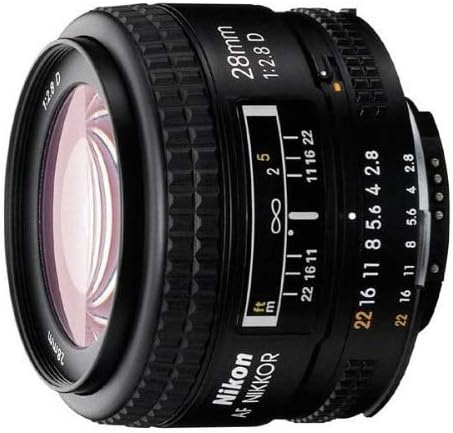
Figure 3: Side view of the Nikon 28mm f/2.8D lens, highlighting the aperture and distance scales.
6. Maintenance and Care
- Cleaning the Lens Elements: Use a soft, lint-free microfiber cloth specifically designed for optics. For stubborn smudges, use a small amount of lens cleaning fluid applied to the cloth, not directly to the lens.
- Cleaning the Lens Body: Wipe the lens body with a clean, dry cloth. Avoid using harsh chemicals or solvents.
- Dust Prevention: Always keep the front and rear lens caps on when the lens is not in use. Store the lens in a dry, dust-free environment, preferably in a lens pouch or camera bag.
- Temperature and Humidity: Avoid exposing the lens to extreme temperatures or high humidity, which can lead to condensation or mold growth.
- Handling: Handle the lens carefully to avoid dropping it or subjecting it to strong impacts.
7. Troubleshooting
Common Issues and Solutions
- Lens not focusing:
- Ensure the camera's focus mode is set correctly (AF for autofocus, MF for manual focus).
- Check if the lens is securely mounted to the camera body.
- Verify there is sufficient light for the autofocus system to operate.
- Images appear blurry:
- Check if the lens elements are clean and free of smudges or dust.
- Ensure the lens is properly focused on your subject.
- Verify that the shutter speed is fast enough to prevent camera shake, especially in low light.
- Dust inside the lens:
Minor dust particles inside the lens are common and rarely affect image quality. If large particles or significant debris are visible and impacting images, professional cleaning may be required. Do not attempt to disassemble the lens yourself.
8. Specifications
| Brand | Nikon |
| Model Number | 1922 |
| Focal Length | 28 mm (Fixed) |
| Lens Type | Wide Angle |
| Compatible Mountings | Nikon F (FX) |
| Maximum Aperture | f/2.8 |
| Minimum Focusing Distance | 0.85 feet (0.26 meters) |
| Product Dimensions | 1.77 x 2.56 x 2.56 inches |
| Item Weight | 7.2 ounces |
| Manufacturer | Nikon |
| Date First Available | September 22, 2002 |
9. Warranty and Support
This product comes with a 90-day parts and labor warranty from the date of purchase, along with a 14-day satisfaction guarantee. For warranty claims or technical support, please contact Nikon customer service.
For a comprehensive guide and detailed instructions, please refer to the official User Manual PDF:
Related documents1922


Ask a question about this manual
Ask about setup, troubleshooting, compatibility, parts, safety, or missing instructions. Manuals+ will review the question and use this page’s manual context to help answer it.