Introduction
The Panasonic SL-SX285 is a portable compact disc player designed for reliable audio playback. It features a 40-second anti-skip buffer, compatibility with CD-R and CD-RW discs, and a wired remote control for convenient operation. This manual provides essential information for setting up, operating, and maintaining your device.
Safety Precautions
- Hearing Protection: Avoid listening at excessively high volume levels for extended periods to prevent hearing damage.
- Moisture and Heat: Do not expose the unit to rain, moisture, or direct sunlight. Avoid placing it near heat sources.
- Ventilation: Ensure proper ventilation. Do not block ventilation openings.
- Power Source: Use only the specified power supply (AA batteries or optional 4.5V AC/DC adapter).
- Servicing: Do not attempt to service the unit yourself. Refer all servicing to qualified personnel.
Package Contents
Verify that all items are present in the package:
- Panasonic SL-SX285 Portable CD Player
- Wired Remote Control
- Stereo Headphones
- Belt Clip
- User's Manual (this document)

Image: The Panasonic SL-SX285 Portable CD Player shown with its wired remote control and stereo headphones.
Setup
Battery Installation
The unit operates on two AA batteries (not included) or an optional 4.5V AC/DC adapter.
- Locate the battery compartment on the bottom of the unit.
- Slide the battery compartment cover open.
- Insert two AA batteries, ensuring correct polarity (+/-) as indicated inside the compartment.
- Close the battery compartment cover securely.
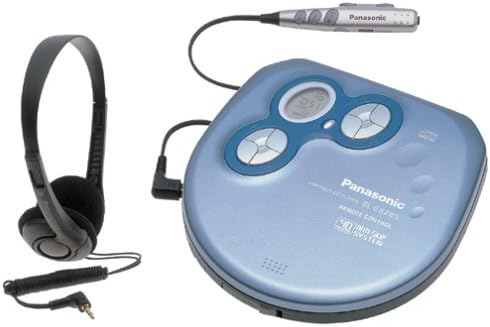
Image: The underside of the Panasonic SL-SX285, displaying the battery compartment and product information label.
Powering the Unit
- Battery Power: Insert two AA batteries as described above.
- AC Power (Optional): Connect an optional 4.5V AC/DC adapter to the DC IN 4.5V jack on the unit and plug the adapter into a standard wall outlet.
Connecting Headphones and Remote Control
- Plug the wired remote control into the REMOTE jack on the CD player.
- Plug the stereo headphones into the headphone jack on the wired remote control.
- Alternatively, you can plug headphones directly into the PHONES jack on the CD player if not using the remote.
Operating Instructions
Loading a CD
- Press the OPEN button to open the CD compartment lid.
- Place a CD onto the center spindle with the label side facing up.
- Gently press the CD until it clicks into place.
- Close the CD compartment lid firmly until it latches.

Image: The Panasonic SL-SX285 with its lid open, revealing the CD placement area and optical pickup.
Basic Playback
- Play/Pause: Press the PLAY/PAUSE (►/‖) button to start or pause playback.
- Stop: Press the STOP (■) button to stop playback.
- Skip Tracks: Press the SKIP (►►| / |◄◄) buttons to skip to the next or previous track.
- Fast Forward/Rewind: Press and hold the SKIP buttons during playback to fast forward or rewind within a track.
Volume Control
Adjust the volume using the VOLUME control dial located on the unit or the remote control.
Anti-Skip Protection (40-second buffer)
The SL-SX285 features a 40-second digital anti-skip buffer. This system stores audio data in memory to prevent interruptions during minor shocks or vibrations. If a shock occurs, the player will continue playback from the buffered data while the laser re-reads the disc.
CD-R and CD-RW Playback
This unit is compatible with commercially recorded audio CDs, as well as CD-R and CD-RW discs recorded in the audio CD format.
Programmed Playback (24-track)
You can program up to 24 tracks to play in a specific order:
- With the unit stopped, press the PROGRAM button.
- Use the SKIP buttons to select the desired track number.
- Press PROGRAM again to confirm the selection.
- Repeat steps 2 and 3 for up to 24 tracks.
- Press PLAY (►) to start programmed playback.
Random Play
Press the MODE button repeatedly until "RANDOM" or a shuffle icon appears on the display to play tracks in a random order.
Repeat Play
Press the MODE button repeatedly to cycle through repeat options:
- Repeat 1: Repeats the current track.
- Repeat All: Repeats the entire disc or programmed sequence.
XBS (Extra Bass System)
Activate the XBS function to enhance bass frequencies. This feature can be toggled on or off using the dedicated button or menu option.
Hold Function
Slide the HOLD switch to the ON position to disable all buttons on the unit and remote control. This prevents accidental operation during transport.
Using the Wired Remote Control
The wired remote control provides convenient access to basic playback functions (Play, Pause, Stop, Skip, Volume) without needing to access the main unit. Refer to the remote control's button labels for specific functions.
Maintenance
Cleaning the Unit
- Wipe the exterior of the unit with a soft, dry cloth.
- Do not use abrasive cleaners, waxes, or solvents.
- For the optical lens, use a commercially available CD lens cleaner if necessary. Avoid touching the lens directly.
Battery Care
- Remove batteries if the unit will not be used for an extended period to prevent leakage.
- Do not mix old and new batteries, or different types of batteries.
- Dispose of used batteries according to local regulations.
Disc Handling
- Handle discs by their edges to avoid fingerprints on the playing surface.
- Store discs in their cases when not in use.
- Clean dirty discs with a soft, lint-free cloth, wiping from the center outwards.
Troubleshooting
| Problem | Solution |
|---|---|
| Unit does not power on. |
|
| Disc does not play or skips frequently. |
|
| No sound from headphones. |
|
| Buttons do not respond. |
|
Specifications
| Feature | Detail |
|---|---|
| Model Number | SL-SX285 |
| Power Source | DC 3V (2 x AA batteries) or DC 4.5V (AC adapter, optional) |
| Battery Life | Up to 35 hours (with AA batteries, depending on usage) |
| Anti-Skip Memory | 40 seconds |
| Disc Compatibility | Audio CD, CD-R, CD-RW |
| Programmable Tracks | 24 tracks |
| Digital-to-Analog Converter | 1-bit MASH |
| Dimensions (approx.) | 5.9 x 5.5 x 1.5 inches (Package Dimensions, actual unit may vary slightly) |
| Weight (approx.) | 9.6 ounces (without batteries) |
| Special Features | XBS (Extra Bass System), Hold switch, Wired remote control |
Warranty and Support
For warranty information or technical support, please refer to the warranty card included with your product or visit the official Panasonic website. Keep your purchase receipt as proof of purchase.


