Introduction
The Canon EOS Elan 7 is a sophisticated 35mm Single-Lens Reflex (SLR) camera designed for both advanced enthusiasts and professionals. It features a highly advanced autofocus system, precise metering capabilities, and robust construction, making it suitable for a wide range of photographic situations. This manual provides detailed instructions for the proper setup, operation, and maintenance of your camera.
Camera Components
Familiarize yourself with the main components of your Canon EOS Elan 7 camera.

Figure 1: Front view of the Canon EOS Elan 7 camera with the lens cap attached. This view shows the camera body, grip, and strap attachment points.

Figure 2: Top view of the Canon EOS Elan 7 camera. This perspective highlights the mode dial, shutter button, and top LCD panel for settings display.

Figure 3: Rear view of the Canon EOS Elan 7 camera. Visible elements include the viewfinder, various control buttons, and the main command dial.
Setup
Battery Installation
The Canon EOS Elan 7 requires Lithium batteries for operation. Ensure the camera is powered off before installing or replacing batteries.
- Locate the battery compartment cover, typically on the bottom of the camera body.
- Open the cover by sliding or rotating the latch.
- Insert the new Lithium batteries, ensuring correct polarity (+/-) as indicated inside the compartment.
- Close the battery compartment cover securely until it latches.
Lens Attachment
The EOS Elan 7 uses Canon EF mount lenses. Always handle lenses by their barrel and avoid touching the glass elements or electrical contacts.

Figure 4: Front view of the Canon EOS Elan 7 camera with the lens cap removed, revealing the EF lens mount and mirror box.
- Remove the body cap from the camera and the rear cap from the lens.
- Align the red index mark on the lens with the red index mark on the camera's lens mount.
- Rotate the lens clockwise (when viewed from the front) until it clicks into place. Do not force the lens.
To detach a lens, press the lens release button on the camera body and rotate the lens counter-clockwise until it stops, then remove it.
Film Loading
The EOS Elan 7 uses standard 35mm film cartridges.
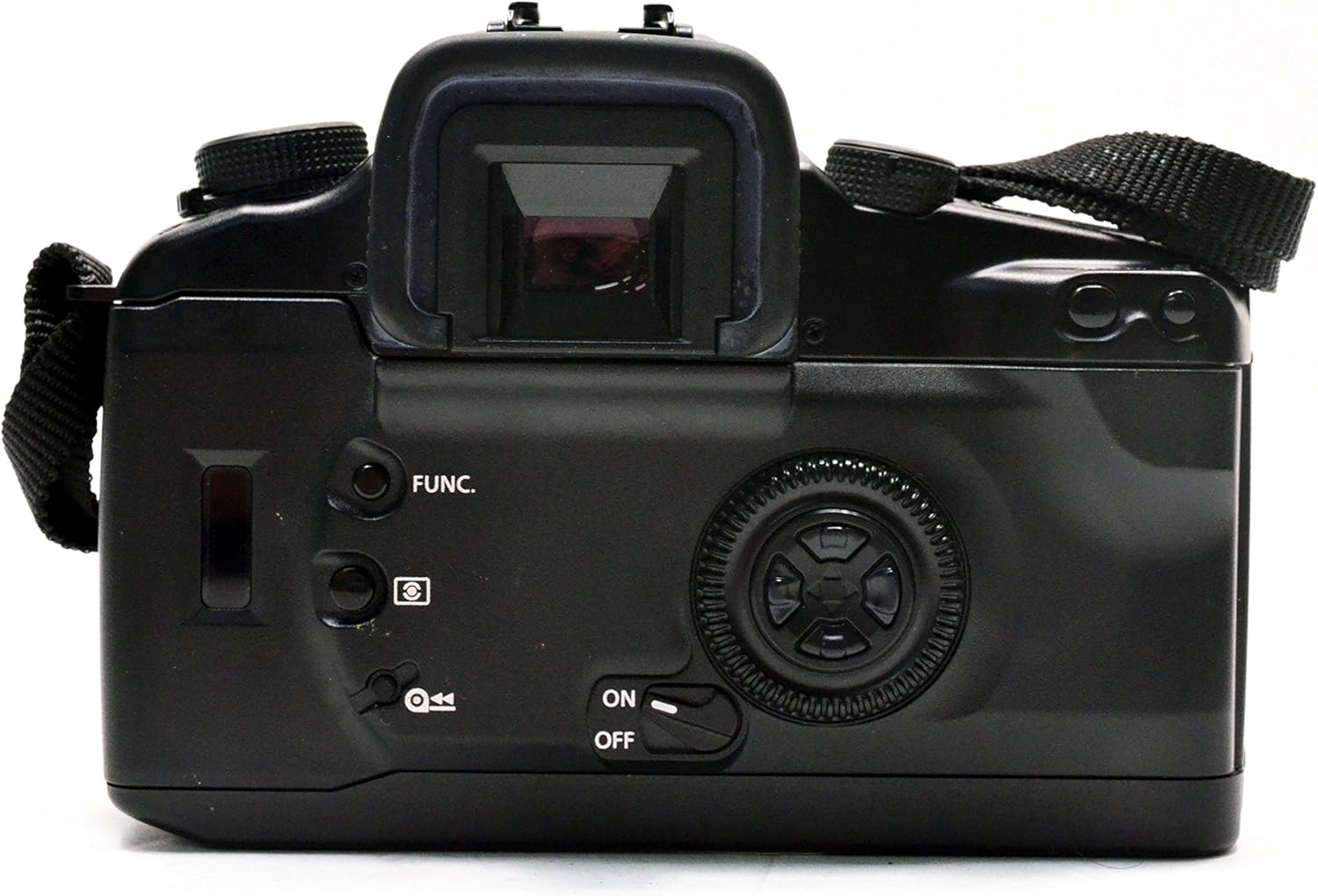
Figure 5: Rear view of the Canon EOS Elan 7 camera with the film compartment door open, showing the film chamber and take-up spool.

Figure 6: Close-up view of the film compartment, detailing the film take-up spool, film pressure plate, and film guides.
- Open the camera back by sliding the film door release latch (usually on the side).
- Place the film cartridge into the film chamber on the left side.
- Pull the film leader across to the right, aligning it with the red mark on the take-up spool.
- Ensure the film perforations engage with the sprockets.
- Close the camera back firmly until it latches. The camera will automatically advance the film to the first frame.
Operating the Camera
Powering On/Off
Use the ON/OFF switch, typically located near the main control dial, to power the camera on or off.
Focusing System
The EOS Elan 7 features a 7-point wide-area autofocus system with a central cross-type sensor. This system provides fast and accurate focusing even with off-center subjects or in low-light conditions.
- Automatic Focus Point Selection: The camera automatically selects the optimal focus point.
- Manual Focus Point Selection: Use the focusing-point selection keys (often a multi-controller on the back) to manually choose one of the seven focus points.
- Focus Modes: The camera supports Continuous-Servo AF (AI Servo AF) for moving subjects and One-Shot AF for stationary subjects.
Metering Modes
The camera's 35-zone evaluative metering system is linked to the focusing points, ensuring accurate exposure. Available metering modes include:
- Evaluative Metering: Measures light across the entire scene, giving priority to the active focus point.
- Partial Metering: Measures approximately 10% of the viewfinder area around the center, useful for backlit subjects.
- Center-Weighted Average Metering: Measures the entire scene with a greater emphasis on the central area.
Exposure Control
The command dial allows for various exposure control options:
- Program AE (P): Camera automatically sets both shutter speed and aperture for optimal exposure.
- Shutter-Priority AE (Tv): You select the shutter speed, and the camera automatically sets the aperture. Ideal for controlling motion blur.
- Aperture-Priority AE (Av): You select the aperture, and the camera automatically sets the shutter speed. Useful for controlling depth of field.
- Manual Exposure (M): You set both shutter speed and aperture independently.
Shutter Speed and Aperture Adjustment
Adjust these settings using the main dial and sub-dial, typically located near the shutter button and on the back of the camera, respectively. The maximum shutter speed is 1/4000 second.
Film Advance and Rewind
The camera automatically advances film after each shot. Once a roll is complete, the camera will automatically rewind the film. You can also manually initiate rewind, with options for high-speed or silent rewind modes.
Self-Timer
Activate the self-timer function for a delayed shutter release, typically 10 seconds, allowing the photographer to be included in the shot.
Advanced Features
Shooting Modes
Beyond the basic exposure modes, the Elan 7 may offer specialized shooting modes such as 'Sports' mode, optimized for capturing fast-moving subjects with appropriate shutter speeds.
White Balance Settings
While film cameras primarily rely on film type for color balance, the Elan 7 may offer settings to optimize exposure for different light sources, such as Auto, Cloudy, Daylight, and Flash torch, influencing the metering system.
Flash Usage
The camera includes a built-in flash with various modes:
- Automatic: Flash fires automatically in low light.
- Fill Flash: Flash fires regardless of ambient light, useful for brightening shadows.
- Flash Override: Disables the flash.
Care and Maintenance
Proper care ensures the longevity and performance of your camera.
- Cleaning: Use a soft, lint-free cloth to clean the camera body. For lenses, use a specialized lens cleaning solution and cloth. Avoid touching the mirror or shutter curtain.
- Storage: Store the camera in a cool, dry place, away from direct sunlight and extreme temperatures. If storing for extended periods, remove the batteries.
- Battery Replacement: Replace batteries promptly when the low battery indicator appears to avoid interruption during shooting.
- Film Handling: Store film in a cool, dry place. Load and unload film in subdued light to prevent accidental exposure.
Troubleshooting
If you encounter issues with your Canon EOS Elan 7, refer to the following common problems and solutions:
| Problem | Possible Cause | Solution |
|---|---|---|
| Camera does not power on | Dead or incorrectly installed batteries | Replace batteries or re-install them with correct polarity. |
| Film does not advance | Film not loaded correctly; film leader not engaged | Open camera back in subdued light, re-load film ensuring leader is properly engaged with take-up spool. |
| Autofocus is slow or inaccurate | Low light conditions; low contrast subject; dirty lens contacts | Use flash or focus assist lamp; try manual focus; clean lens and camera contacts. |
| Flash does not fire | Flash disabled; insufficient charge; camera mode prevents flash | Check flash settings; allow time for flash to recharge; switch to a flash-compatible shooting mode. |
Specifications
Key technical specifications for the Canon EOS Elan 7 35mm SLR Camera.
- Model Name: Canon EOS Elan 7
- Model Number: 4587A005
- Compatible Mountings: Canon EF
- Photo Sensor Technology: N/A (35mm FILM SLR camera)
- Aspect Ratio: 3:2
- Expanded ISO Minimum: 100
- Metering Description: Average, Center Weighted, Multi-Zone, Partial, Spot
- Maximum Shutter Speed: 1/4000 sec
- Minimum Shutter Speed: 30 seconds
- Autofocus Points: 7
- Focus Type: Manual-and-Auto
- Continuous Shooting: 4 FPS
- Self Timer: 10 Seconds
- White Balance Settings: Auto, Cloudy, Daylight, Flash torch
- Camera Flash: Built-In (Automatic, Fill Flash, Flash Override)
- Viewfinder: Optical
- Battery Type: Lithium
- Item Weight: Approximately 0.01 Pounds (body only)
- Color: Black
Warranty and Support
For information regarding warranty coverage, service, or technical support for your Canon EOS Elan 7 camera, please refer to the warranty card included with your purchase or visit the official Canon support website. Contacting Canon customer service directly will provide the most accurate and up-to-date assistance.