
Lutron TG-600PH-WH
Lutron Toggler Incandescent 600-Watt Single-Pole Dimmer Switch
Model: TG-600PH-WH | Brand: Lutron
Introduction
This manual provides detailed instructions for the safe installation, operation, and maintenance of your Lutron Toggler Incandescent 600-Watt Single-Pole Dimmer Switch (Model TG-600PH-WH). This dimmer switch is designed to control incandescent and halogen lighting fixtures, allowing you to adjust light levels for various activities and save energy.

Image: Front view of the Lutron Toggler Incandescent 600-Watt Single-Pole Dimmer Switch in white.
Important Safety Information
WARNING: RISK OF ELECTRIC SHOCK. Improper installation can result in serious injury or death. Always turn off power at the circuit breaker or fuse box before installing. Consult a qualified electrician if you are unsure about any part of the installation process.
- For use with incandescent and halogen bulbs ONLY. Do NOT use with LED bulbs, CFL bulbs, or other non-incandescent/halogen loads.
- Install in accordance with all national and local electrical codes.
- Do not install if the product appears damaged.
- Operating Voltage: 120 Volts AC, 60 Hz.
- Maximum Load: 600 Watts incandescent/halogen.
For more detailed safety guidelines, please refer to the official Safety Information PDF.
Package Contents
The package for the Lutron Toggler Dimmer Switch (Model TG-600PH-WH) typically includes:
- One (1) Lutron Toggler Incandescent 600-Watt Single-Pole Dimmer Switch.
Note: Coordinating wall plates are sold separately and are not included with this dimmer switch.
Setup and Installation
- Turn Off Power: Before beginning any electrical work, ensure the power is OFF at the circuit breaker or fuse box for the circuit you are working on. Verify power is off by attempting to turn on the light controlled by the switch you are replacing.
- Remove Existing Switch: Carefully remove the wall plate and unscrew the existing switch from the wall box. Disconnect the wires from the old switch. Note the wiring configuration.
- Identify Wires:
- Hot (Line) Wire: Typically black, brings power from the circuit breaker.
- Load Wire: Typically black, goes to the light fixture.
- Ground Wire: Bare copper or green.
- Neutral Wire: (Not typically used for single-pole dimmers, but good to be aware of).
- Wire the Dimmer Switch:
The Lutron Toggler Dimmer Switch has screw terminals for wiring. Connect the wires as follows:
- Connect the hot (line) wire to one of the dimmer's screw terminals.
- Connect the load wire (to the light fixture) to the other dimmer's screw terminal.
- Connect the ground wire from the wall box to the green ground screw on the dimmer switch.

Image: Rear view of the dimmer switch, illustrating the wiring terminals for connection.
- Mount the Dimmer: Carefully fold the wires into the wall box. Secure the dimmer switch to the wall box using the provided screws.
- Install Wall Plate: Attach your coordinating wall plate (sold separately) over the dimmer switch.
- Restore Power: Turn the power back ON at the circuit breaker or fuse box.
- Test Operation: Test the dimmer switch to ensure proper functionality.
For a visual guide, you may refer to the official User Manual (PDF).
Operating Instructions
The Lutron Toggler Dimmer Switch combines a traditional toggle switch with a convenient slide dimmer for precise light control.

Image: An installed dimmer switch in a home environment, demonstrating its aesthetic integration.
- Turning Lights On/Off: Use the large toggle switch to turn the lights ON or OFF. When turned ON, the lights will return to the previously set dimming level.
- Adjusting Brightness: Use the small slider control located next to the toggle switch to adjust the brightness level of your lights. Slide it up to increase brightness and down to decrease brightness.
- Preset Level: The toggle switch allows you to turn lights on to a favorite preset level, which is determined by the position of the slider when the lights were last on.
Maintenance
The Lutron Toggler Dimmer Switch requires minimal maintenance.
- Cleaning: To clean the dimmer switch and wall plate, wipe with a soft, damp cloth. Do not use abrasive cleaners or solvents.
- Bulb Replacement: Ensure power is turned off at the circuit breaker before replacing any bulbs connected to the dimmer. Only use incandescent or halogen bulbs within the dimmer's wattage rating (600W maximum).
Troubleshooting
| Problem | Possible Cause | Solution |
|---|---|---|
| Lights do not turn ON. |
|
|
| Lights do not dim or flicker. |
|
|
| Dimmer switch is warm to the touch. | Normal operation for dimmers. | This is normal and generally not a cause for concern, provided it is not excessively hot or emitting smoke/odors. Ensure proper ventilation in the wall box. |
Specifications
| Model Number | TG-600PH-WH |
| Type of Bulb | Incandescent or Halogen |
| Wattage | 600 watts (maximum) |
| Operating Voltage | 120 Volts AC, 60 Hz |
| Operation Mode | ON-OFF-ON |
| Current Rating | 20 Amps |
| Circuit Type | 1-way (Single-Pole) |
| Dimensions (L x W x H) | 2.25 x 4.2 x 4.25 inches |
| Item Weight | 3.2 ounces |
| Color | White |
| Contact Material | Brass |
| International Protection Rating | IP30 |
| Manufacturer | Lutron |
| UPC | 027557684651 |
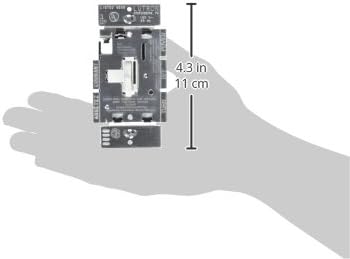
Image: The dimmer switch shown with approximate dimensions for reference.
Warranty Information
The Lutron Toggler Incandescent 600-Watt Single-Pole Dimmer Switch (Model TG-600PH-WH) comes with a 1-year limited warranty on materials and manufacture.
For specific details regarding warranty claims or coverage, please refer to the official Warranty PDF or contact Lutron customer support.
Customer Support
If you have any questions, require technical assistance, or need to report an issue with your Lutron Toggler Dimmer Switch, please contact Lutron customer support.
- Online Resources: Visit the official Lutron Store on Amazon for product information and additional resources.
- Official Documents:
Please have your model number (TG-600PH-WH) ready when contacting support.
Ask a question about this manual
Ask about setup, troubleshooting, compatibility, parts, safety, or missing instructions. Manuals+ will review the question and use this page’s manual context to help answer it.