
1. Introduction
Thank you for choosing the Bemis 200-001 True HEPA Air Purifier. This manual provides essential information for the safe and efficient operation, maintenance, and troubleshooting of your air purifier. Please read this manual thoroughly before using the product and retain it for future reference.
2. Important Safety Instructions
To reduce the risk of fire, electric shock, or injury, always follow these basic safety precautions:
- Read all instructions before operating the air purifier.
- Always unplug the air purifier from the power outlet before moving, cleaning, or replacing filters.
- Do not operate any air purifier with a damaged cord or plug. If the cord or plug is damaged, contact qualified service personnel.
- Keep the cord away from heated surfaces.
- Do not use the air purifier outdoors or on wet surfaces.
- Do not block air openings or place the unit on a soft surface where openings may be blocked.
- Do not insert foreign objects into any ventilation or exhaust opening.
- This appliance has a polarized plug (one blade is wider than the other). To reduce the risk of electric shock, this plug is intended to fit in a polarized outlet only one way. If the plug does not fit fully in the outlet, reverse the plug. If it still does not fit, contact a qualified electrician. Do not attempt to defeat this safety feature.
3. Product Overview
The Bemis 200-001 is a True HEPA air purifying system designed to significantly improve indoor air quality. It effectively removes airborne particles such as pollen, dust, smoke, bacteria, viruses, pet dander, dust mites, and mold.
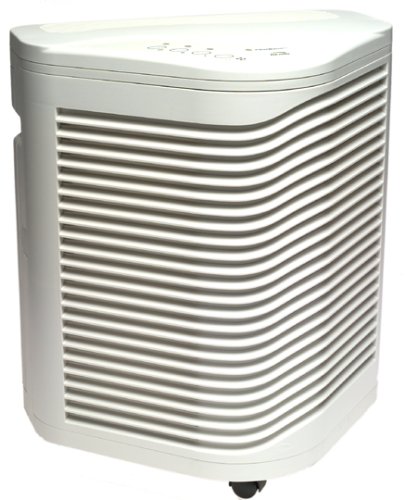
Figure 1: Bemis 200-001 True HEPA Air Purifier. This image shows the compact, contemporary design of the air purifier, featuring its main body and control panel.
Key Features:
- True HEPA Filtration: Removes up to 99.97% of airborne particulates as small as 0.3 microns.
- Dual Pre-filters: Targets odors and larger particles, extending the life of the HEPA filters.
- 3-Speed Airflow Control: Allows adjustment for various air quality needs, including a quiet NightSpeed setting.
- FilterWatch Sensor: Illuminates to signal when filters require changing.
- CADR Ratings: Pollen 215, Dust 220, Smoke 220.
- Coverage: Cleans air in a 17x20-foot room five times per hour.
- Portability: Equipped with EZ-roll casters for easy movement.
4. Setup Instructions
4.1 Unpacking
- Carefully remove the air purifier from its packaging.
- Remove all packing materials, including any protective films or tapes.
- Verify that all components are present: air purifier unit, filters (pre-installed or separate), and this user manual.
4.2 Filter Installation/Preparation
Your Bemis 200-001 air purifier comes with True HEPA filters and pre-filters. These may be pre-installed or require installation before first use.
- Locate the filter compartment access panel, typically on the back or side of the unit.
- Open the access panel.
- If filters are pre-installed, remove any plastic packaging from around them. If not, insert the pre-filters first, followed by the True HEPA filters, ensuring they are correctly oriented according to the markings on the filters or unit.
- Close the filter compartment access panel securely.
4.3 Placement
For optimal performance, place the air purifier in a location where air can circulate freely around it. Avoid placing it directly against walls or furniture that might obstruct air intake or output.
- Ensure there is at least 6-12 inches of space around all sides of the unit.
- Place the unit on a firm, level surface. The triangular design allows it to fit well against walls if necessary, but ensure adequate clearance.
- Utilize the EZ-roll casters for easy positioning within your room.
4.4 Power Connection
Plug the power cord into a standard 120V AC electrical outlet. Ensure the plug is fully inserted.
5. Operating Instructions
The Bemis 200-001 features an electronic touch pad for easy control.
5.1 Power On/Off
- To turn the unit ON, press the Power button on the electronic touch pad. The unit will start operating at the default speed setting.
- To turn the unit OFF, press the Power button again.
5.2 Adjusting Fan Speed
Your air purifier has three fan speed settings:
- Press the Fan Speed button (often indicated by fan icon or 'Speed') to cycle through the available speeds: Low, Medium, High.
- The Low speed setting is designed for quiet operation, often referred to as 'NightSpeed', suitable for bedrooms or quiet environments.
- Select the speed that best suits your air purification needs and noise preference.
5.3 FilterWatch Sensor
The illuminated FilterWatch sensor will light up to indicate when it is time to check or replace the filters. Refer to the Maintenance section for filter replacement procedures.
6. Maintenance
Regular maintenance ensures optimal performance and extends the life of your Bemis 200-001 air purifier.
6.1 Filter Replacement
The FilterWatch sensor will indicate when filter replacement is needed. The frequency of replacement depends on usage and air quality, but generally:
- Pre-filters: Should be checked and cleaned monthly, and replaced every 3-6 months.
- True HEPA Filters: Typically last 12-18 months.
To replace filters:
- Unplug the air purifier from the power outlet.
- Open the filter compartment access panel.
- Remove the old filters. Dispose of them properly.
- Insert new filters, ensuring they are correctly oriented.
- Close the access panel securely.
- Plug the unit back in. Some models may require resetting the FilterWatch sensor by pressing and holding the sensor button for a few seconds. Refer to your unit's specific instructions if the light does not turn off automatically.
6.2 Cleaning the Unit
- Always unplug the unit before cleaning.
- Wipe the exterior surfaces of the air purifier with a soft, damp cloth. Do not use abrasive cleaners or solvents.
- Gently vacuum the air intake and output vents to remove any accumulated dust.
- Do not allow water to enter the interior of the unit.
7. Troubleshooting
If you experience issues with your air purifier, consult the following table before contacting customer support.
| Problem | Possible Cause | Solution |
|---|---|---|
| Unit does not turn on | No power supply Power cord not securely plugged in | Check power outlet and ensure unit is plugged in securely. Check household fuse/circuit breaker. |
| Reduced airflow or purification efficiency | Clogged filters Air intake/output blocked | Check and replace filters as indicated by FilterWatch sensor or maintenance schedule. Ensure unit is not obstructed by walls or furniture. |
| Unusual noise | Loose filter Foreign object inside unit | Unplug unit and check that filters are properly seated. Unplug unit and carefully inspect for any foreign objects. |
| FilterWatch sensor remains on after filter change | Sensor not reset | Refer to specific instructions for your model to reset the FilterWatch sensor (usually press and hold the button). |
8. Specifications
| Feature | Detail |
|---|---|
| Model Number | 200-001 |
| Product Dimensions (L x W x H) | 20.5 x 19.2 x 14.4 inches (16-1/2 x 12 x 19-1/2 inches as per description) |
| Item Weight | 12.4 pounds (16 pounds as per description) |
| Filter Type | True HEPA |
| CADR (Pollen) | 215 |
| CADR (Dust) | 220 |
| CADR (Smoke) | 220 |
| Room Coverage | 17x20-foot room, 5 air changes per hour |
| Airflow Control | 3-speed |
| Manufacturer | Bemis |
| UPC | 073088080967, 043129080966 |
9. Warranty and Customer Support
9.1 Warranty Information
The Bemis 200-001 True HEPA Air Purifier comes with a 5-year limited warranty. This warranty covers defects in materials and workmanship under normal use. Please retain your proof of purchase for warranty claims. For full warranty terms and conditions, please refer to the warranty card included with your product or contact Bemis customer support.
9.2 Customer Support
If you have any questions, require assistance, or need to make a warranty claim, please contact Bemis customer support. Contact information can typically be found on the manufacturer's website or on the product packaging.
