Introduction
The Panasonic PV-V4620 is a 4-Head Hi-Fi VCR designed for home entertainment. It features hi-fi stereo audio outputs and four-head tracking for optimal video and audio playback. This VCR includes several convenience features to enhance your viewing and recording experience.
- VCR Plus+ Silver Programming: Simplifies recording setup by allowing you to enter codes from TV listings.
- Universal, Illuminated Remote Control: Provides easy control over the VCR and other compatible devices, even in low light.
- Auto Clock Set with 24-Hour Backup: Automatically sets and maintains the correct time and date by receiving data from your local PBS channel.
- Commercial Advance and Movie Advance: Functions designed to help navigate through recorded content efficiently.
- 1-Month, 8-Program Timer: Allows for scheduling up to 8 recordings over a one-month period.
- Trilingual Onscreen Display: Offers menu navigation in English, Spanish, and French.
- Commercial Skip, Index Search, Program-End Search, and Tape-Position Display: Tools for convenient playback and navigation of recorded tapes.
Setup
Follow these steps to properly set up your Panasonic PV-V4620 VCR:
- Unpack the VCR: Carefully remove the VCR, A/V hookup cable, and remote control from the packaging.
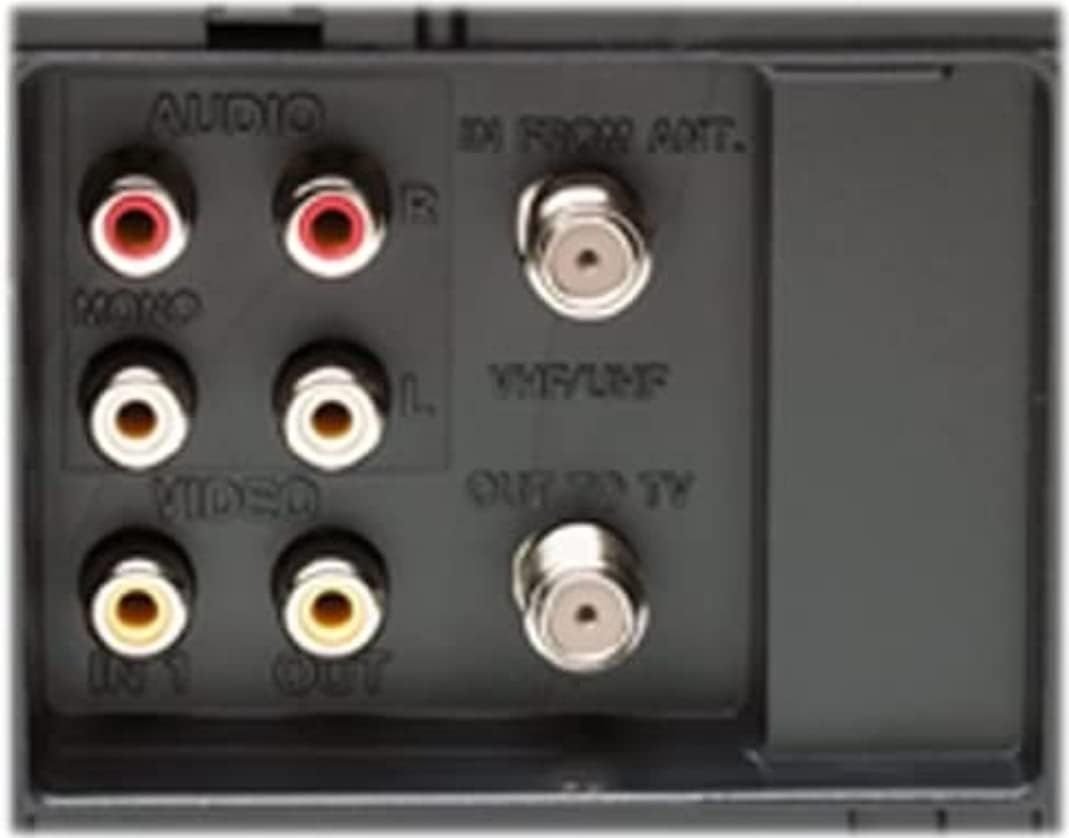
- Connect to Television: Use the supplied A/V hookup cable to connect the VCR's audio/video output jacks to the corresponding input jacks on your television. Ensure the yellow video cable connects to the yellow video input, and the red and white audio cables connect to the red (right) and white (left) audio inputs respectively.
- Antenna/Cable Connection (Optional): If connecting an antenna or cable directly to the VCR, use a coaxial cable to connect the 'IN FROM ANT.' port on the VCR's rear panel to your antenna or cable source. Then, connect the 'OUT TO TV' port to your television's antenna input.
- Power Connection: Plug the VCR's power cord into a standard electrical outlet.
- Remote Control Batteries: Insert two AA batteries (not included) into the remote control, ensuring correct polarity.
- Auto Clock Set: The VCR is equipped with an auto clock-set function that receives data from your local PBS channel to set the clock and date automatically. Allow time for this process to complete upon initial power-up.

This image displays the rear panel of the VCR, highlighting the audio (red and white RCA) and video (yellow RCA) input and output jacks, along with the RF coaxial antenna connections for VHF/UHF.
Operating
This section outlines the basic operation of your Panasonic PV-V4620 VCR.
Basic Playback
- Power On: Press the POWER button on the VCR or the remote control to turn on the unit.
- Insert Tape: Gently insert a VHS tape into the tape slot. The VCR will automatically load the tape.
- Select Input: Ensure your television is set to the correct video input channel (e.g., Video 1, AV, HDMI 1) where the VCR is connected.
- Play: Press the PLAY button on the VCR or remote control to begin playback.
- Stop/Pause/Rewind/Fast Forward: Use the corresponding buttons on the VCR or remote for these functions.
VCR Plus+ Silver Programming
To program a recording using VCR Plus+ Silver:
- Locate the VCR Plus+ code for your desired program in your local TV listings (newspaper or TV Guide).
- On the remote control, press the VCR Plus+ button (refer to the remote image for button location).
- Enter the VCR Plus+ code using the numeric keypad on the remote.
- Confirm the program details on the onscreen display and follow any additional prompts to finalize the recording.
Commercial Skip
During playback of a recorded tape, press the COMMERCIAL SKIP button on the remote control to quickly advance past commercial breaks. The VCR will skip forward a preset amount of time.
The universal remote control features various buttons for VCR and TV operation, including power, channel, volume, play, stop, fast forward, rewind, record, and special functions like Commercial Skip and VCR Plus+ Silver programming.
Maintenance
Proper maintenance ensures the longevity and optimal performance of your VCR.
- Cleaning: Regularly wipe the exterior of the VCR with a soft, dry cloth. Avoid using liquid cleaners or abrasive materials.
- Head Cleaning: If video quality degrades (e.g., snowy picture, distorted sound), the video heads may need cleaning. Use a dry-type VCR head cleaning cassette (available separately) according to its instructions. Do not use wet-type cleaners as they can damage the heads.
- Tape Care: Store VHS tapes in their cases, away from direct sunlight, extreme temperatures, and magnetic fields. Avoid touching the tape surface.
- Ventilation: Ensure the VCR has adequate ventilation. Do not block the ventilation slots on the top or sides of the unit.
Troubleshooting
If you encounter issues with your VCR, refer to the following common problems and solutions:
| Problem | Possible Cause | Solution |
|---|---|---|
| No power | Power cord disconnected; power outlet not active. | Ensure power cord is securely plugged in. Check if the power outlet is working. |
| No picture/sound | Incorrect TV input selected; A/V cables loose or incorrectly connected. | Select the correct video input on your TV. Check all A/V cable connections. |
| Tape will not play/eject | Tape jammed; VCR mechanism error. | Do not force the tape. Try pressing EJECT multiple times. If the issue persists, consult a service technician. |
| Poor picture quality (snowy, distorted) | Dirty video heads; old or damaged tape. | Use a VCR head cleaning cassette. Try a different tape to rule out tape damage. |
| Remote control not working | Dead batteries; obstruction between remote and VCR. | Replace batteries. Ensure no objects are blocking the remote's signal path to the VCR's IR sensor. |
Specifications
| Feature | Detail |
|---|---|
| Brand Name | Panasonic |
| Item Model Number | PVV4620 |
| Item Weight | 7.1 pounds |
| Product Dimensions | 10 x 16.88 x 3.88 inches |
| ASIN | B00004R8UC |
| Date First Available | September 4, 1973 |
| Discontinued By Manufacturer | Yes |
Warranty & Support
The Panasonic PV-V4620 VCR typically includes a warranty covering parts for one year and labor for 90 days from the date of purchase. Please refer to your purchase documentation for specific warranty terms and conditions.
For technical support, service, or further assistance, please contact Panasonic customer service. Contact information can usually be found on the official Panasonic website or in your product's original packaging.
CONSUMER ALERT:
This television receiver has only an analog broadcast tuner and will require a converter box after February 17, 2009, to receive over-the-air broadcasts with an antenna because of the U.S.'s transition to digital broadcasting. Analog-only TVs should continue to work as before with cable and satellite TV services, gaming consoles, VCRs, DVD players, and similar products. For more information, call the Federal Communications Commission at 1-888-225-5322 (TTY: 1-888-835-5322), or visit the commission's digital-television Web site at: www.dtv.gov.


