
Code CRA-C514
Code CRA-C514 Coiled USB Affinity Cable User Manual
Model: CRA-C514
Introduction
This user manual provides comprehensive instructions for the proper installation, operation, and maintenance of the Code CRA-C514 Coiled USB Affinity Cable. This cable is specifically designed to ensure reliable data transfer and power supply for Code CR1000 and CR1400 barcode scanners, facilitating efficient point-of-sale and data capture operations.
Product Overview
The Code CRA-C514 is a 14-foot (approximately 4.27 meters) coiled USB cable, engineered for durability and flexibility in various operational environments. Its coiled design helps manage cable length, reducing clutter and potential tripping hazards. The cable features standard USB Type A and proprietary connectors compatible with Code CR1000 and CR1400 series scanners.
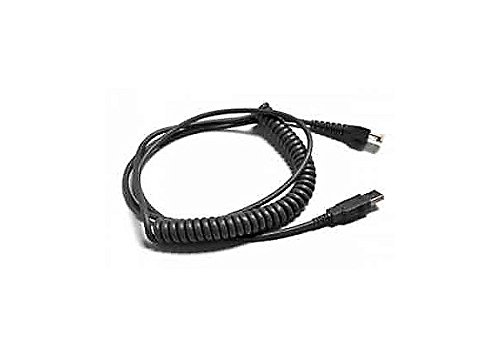
Figure 1: Code CRA-C514 Coiled USB Affinity Cable. This image displays the black coiled cable with its two distinct connectors at either end, one being a standard USB Type A and the other a proprietary connector for Code scanners.
Setup
- Unpack the Cable: Carefully remove the CRA-C514 cable from its packaging. Inspect it for any visible damage.
- Identify Connectors:
- One end is a standard USB Type A connector, typically rectangular. This end connects to your host device (e.g., computer, POS system).
- The other end is a proprietary connector designed to fit the Code CR1000 or CR1400 scanner. This connector is often smaller and specifically shaped.
- Connect to Scanner: Gently insert the proprietary connector into the corresponding port on your Code CR1000 or CR1400 barcode scanner. Ensure it clicks securely into place. Do not force the connection.
- Connect to Host Device: Insert the USB Type A connector into an available USB port on your computer or POS system.
- Verify Connection: Once connected, the scanner should power on and be recognized by your host device. Refer to your scanner's manual for specific indicator lights or sounds that confirm a successful connection.
Operating
The CRA-C514 cable facilitates the communication and power supply between your Code CR1000 or CR1400 scanner and the host system. Once properly connected, the cable operates passively, transmitting data scanned by the device and providing necessary power.
- Data Transmission: The cable ensures high-speed and reliable transmission of barcode data from the scanner to the connected computer or POS system.
- Power Supply: It draws power from the USB port of the host device to operate the scanner, eliminating the need for a separate power adapter for the scanner in most configurations.
- Coiled Design Benefits: The coiled nature of the cable allows for flexible reach while minimizing excess cable length, which is beneficial in environments where space management and neatness are important.
Maintenance
Proper maintenance extends the lifespan of your CRA-C514 cable and ensures consistent performance.
- Cleaning: Use a soft, dry, lint-free cloth to gently wipe the cable and connectors. Avoid using harsh chemicals, solvents, or abrasive materials.
- Storage: When not in use, store the cable in a clean, dry environment, away from extreme temperatures and direct sunlight. Avoid tightly coiling or bending the cable sharply, which can damage internal wires.
- Handling: Always grasp the connector housing when plugging or unplugging the cable. Never pull directly on the cable itself, as this can strain the connections and lead to internal damage.
- Inspection: Periodically inspect the cable for any signs of wear, fraying, cuts, or bent pins on the connectors. Replace the cable if any damage is observed to prevent potential issues with your scanner or host device.
Troubleshooting
If you encounter issues with your CRA-C514 cable, refer to the following common troubleshooting steps:
| Problem | Possible Cause | Solution |
|---|---|---|
| Scanner not powering on or recognized. | Loose connection, faulty USB port, damaged cable. |
|
| Intermittent connection or data transfer errors. | Cable strain, internal damage, electromagnetic interference. |
|
| Cable appears physically damaged. | Wear and tear, improper handling, accidental damage. |
|
Specifications
| Model Number | CRA-C514 |
| Brand | Code |
| Cable Type | Coiled USB Affinity Cable |
| Length | 14 feet (approx. 4.27 meters) |
| Connectors | USB Type A (Male) to Proprietary Code Scanner Connector (Male) |
| Compatible Devices | Code CR1000 and CR1400 Barcode Scanners |
| Color | Black |
Warranty and Support
For information regarding warranty coverage, technical support, or service for your Code CRA-C514 cable, please refer to the official Code website or contact Code customer service directly. Keep your purchase receipt as proof of purchase for warranty claims.
Code Official Website: www.codecorp.com
Note: Product specifications and information are subject to change without notice.
Ask a question about this manual
Ask about setup, troubleshooting, compatibility, parts, safety, or missing instructions. Manuals+ will review the question and use this page’s manual context to help answer it.