Introduction
Welcome to Race Drivin' for Game Boy. This manual provides essential information for setting up, playing, and maintaining your game cartridge. Prepare to experience high-speed racing challenges with various sports cars on tracks designed to test your driving skills.
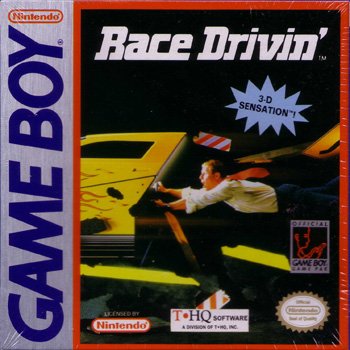
Image: The front of the Race Drivin' game cartridge and its original packaging, featuring a sports car on a track. This image illustrates the product.
Setup
- Insert Game Cartridge: Ensure your Game Boy system is powered off. Gently insert the Race Drivin' game cartridge into the cartridge slot on your Game Boy until it clicks into place.
- Power On: Turn on your Game Boy system. The game should load automatically. If the game does not start, ensure the cartridge is fully inserted and clean the contacts if necessary (see Maintenance section).
- Adjust Volume: Use the volume control on your Game Boy to set the audio to a comfortable level.
Operating Instructions (Gameplay)
Race Drivin' offers a single-player racing experience. Your objective is to master various tracks and achieve the best possible times.
Basic Controls:
- Directional Pad (D-Pad): Use to steer your vehicle left or right.
- A Button: Accelerate.
- B Button: Brake/Reverse.
- START Button: Pause game, access menu options.
- SELECT Button: May be used for camera views or other in-game options depending on the specific game mode.
Game Modes:
The game features different course types, including Autocross for speed challenges and Stunt courses for jumps and aerial maneuvers. Select your preferred mode from the main menu.
Game Features
- Diverse Vehicles: Choose from four distinct sports cars, each with unique handling characteristics.
- Challenging Tracks: Navigate courses featuring 360-degree loops, daring leaps, and tough competition.
- 3-D Sensation: Experience a simulated 3-D cockpit view, enhancing the driving immersion.
- Single-Player Action: Focus on improving your skills and setting new track records.
Maintenance
Proper care will ensure the longevity of your Race Drivin' game cartridge.
- Storage: Store the cartridge in its original case or a protective sleeve when not in use to prevent dust and damage.
- Cleaning Contacts: If the game fails to start, gently clean the gold-colored connector pins on the bottom of the cartridge with a cotton swab lightly dampened with isopropyl alcohol. Allow to dry completely before re-inserting.
- Avoid Extreme Conditions: Do not expose the cartridge to extreme temperatures, direct sunlight, or moisture.
Troubleshooting
| Problem | Solution |
|---|---|
| Game does not start or freezes. |
|
| Graphics or sound are distorted. |
|
Specifications
| Feature | Detail |
|---|---|
| Product Name | Race Drivin' |
| Platform | Game Boy (Compatible with Game Boy Color) |
| Model Number | 719575020138 |
| ASIN | B00002ST4A |
| Dimensions | 2.4 x 2.1 x 0.3 inches |
| Item Weight | 1.6 ounces |
| Manufacturer | SPIG |
| Rated | Everyone |
| Date First Available | September 1, 2001 |
Warranty and Support
Specific warranty information for the Race Drivin' Game Boy game is not provided within this manual. For details regarding warranty coverage or technical support, please refer to the original product packaging or contact the manufacturer, SPIG, directly.
For general information about Nintendo Game Boy systems, please visit the official Nintendo website or consult your Game Boy system's instruction manual.


