
Intermatic TN811C
Intermatic TN811C Programmable Lamp and Appliance Timer
Instruction Manual
Introduction
The Intermatic TN811C Programmable Lamp and Appliance Timer is designed to provide automated control over your lighting and appliances, enhancing safety, security, and convenience. This timer features two on/off settings per day and utilizes non-removable trippers for programming. It has a 15 Amp capacity, suitable for controlling various electrical devices, and includes a manual override switch for immediate control.
Safety Information
- Read all instructions before use.
- Do not immerse the timer in water or expose it to excessive moisture.
- Do not exceed the maximum electrical rating of 15 Amps or 1750 Watts.
- Ensure the timer is securely plugged into a grounded outlet.
- Unplug the timer from the outlet before cleaning or performing any maintenance.
- This timer is intended for indoor use only. If used in a protected outdoor location, ensure it is shielded from direct weather exposure.
Product Overview
The Intermatic TN811C timer is a compact, white, cube-shaped device with a central rotating dial for time setting and programming. It features a standard two-prong plug for wall outlets and a three-prong receptacle for the appliance to be controlled.

Front view of the Intermatic TN811C timer, showing the central programming dial and manual override switch.
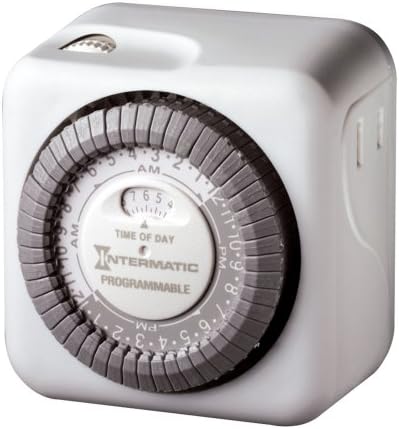
Side view of the Intermatic TN811C timer, illustrating the appliance receptacle.
Key Components:
- Time Dial: The large central dial used to set the current time and program on/off cycles.
- Trippers: Small, non-removable pins around the time dial that are pushed in or pulled out to set specific on/off times.
- Manual Override Switch: A small switch, typically located on the top or side, allowing you to manually turn the connected appliance on or off, overriding the programmed settings.
- Outlet Receptacle: The socket on the timer where you plug in your lamp or appliance.
Setup
- Set Current Time: Rotate the large central dial clockwise until the current time aligns with the "TIME OF DAY" indicator arrow. The dial is marked with AM and PM hours.
- Program ON/OFF Times: The dial has small, non-removable trippers around its circumference. Each tripper represents a specific time interval. To set an "ON" time, push the corresponding tripper(s) inward. To set an "OFF" time, pull the corresponding tripper(s) outward. The timer allows for 48 on/off settings per day.
- Plug in Timer: Insert the timer into a standard 120V wall outlet.
- Connect Appliance: Plug the lamp or appliance you wish to control into the outlet receptacle on the timer.
Operating
Automatic Operation:
Once the current time is set and the on/off trippers are programmed, the timer will automatically turn the connected appliance on and off according to your settings. The dial will continuously rotate, advancing the time.
Manual Override:
The timer is equipped with a manual override switch. This switch allows you to temporarily turn the connected appliance on or off, regardless of the programmed settings. Be aware that on some models, using the manual override switch may advance the internal time setting. If you notice the programmed times shifting, re-verify and reset the current time as needed.
Maintenance
- Cleaning: Unplug the timer from the wall outlet. Wipe the exterior with a soft, dry cloth. Do not use liquid cleaners or abrasive materials.
- Storage: If storing the timer for an extended period, unplug it and keep it in a cool, dry place away from direct sunlight.
- Inspection: Periodically inspect the timer and its cord for any signs of damage, such as frayed wires or cracked casing. If damage is found, discontinue use and replace the unit.
Troubleshooting
- Appliance does not turn ON/OFF at programmed times:
- Ensure the timer is securely plugged into a live outlet.
- Verify the appliance is properly plugged into the timer and is in working order.
- Check that the current time is correctly set on the dial.
- Confirm that the ON/OFF trippers are correctly pushed in or pulled out for the desired times.
- Ensure the manual override switch is not in a position that is overriding the programmed settings.
- Timer dial is not moving:
- Ensure the timer is plugged into a live electrical outlet.
- The timer may be faulty and require replacement.
- Appliance turns ON/OFF at incorrect times:
- Re-check the current time setting and adjust if necessary.
- Re-verify the positions of the ON/OFF trippers.
- If the manual override was recently used, it might have advanced the time. Reset the current time.
Specifications
| Feature | Detail |
|---|---|
| Model Number | TN811C |
| Brand | Intermatic |
| Color | White |
| Material | Plastic |
| Item Weight | 6.4 ounces |
| Product Dimensions | 3 x 5 x 7 inches |
| Number of Settings | 48 on/off settings per day |
| Electrical Rating | 15 Amps; 1750 Watts |
| UPC | 785577061424, 078275047532 |
Warranty and Support
Warranty Information:
The Intermatic TN811C Programmable Lamp and Appliance Timer comes with a 1-year limited warranty. This warranty covers defects in materials and workmanship under normal use. Please retain your proof of purchase for warranty claims.
Customer Support:
For technical assistance, troubleshooting beyond this manual, or warranty inquiries, please visit the official Intermatic website or contact their customer service department. You can often find contact information and additional resources on the manufacturer's website or through the retailer where you purchased the product.
Visit the Intermatic Store on Amazon for more information.
Related documentsTN811C


Ask a question about this manual
Ask about setup, troubleshooting, compatibility, parts, safety, or missing instructions. Manuals+ will review the question and use this page’s manual context to help answer it.