
Introduction
Welcome to your Nikon Nice Touch Zoom QD Date 35mm Camera. This manual provides essential instructions for the proper setup, operation, and maintenance of your camera to ensure optimal performance and longevity.
Camera Components
Familiarize yourself with the main parts of your camera for effective use.

Figure 1: Front view of the Nikon Nice Touch Zoom QD Date 35mm Camera, showing the lens and flash unit.
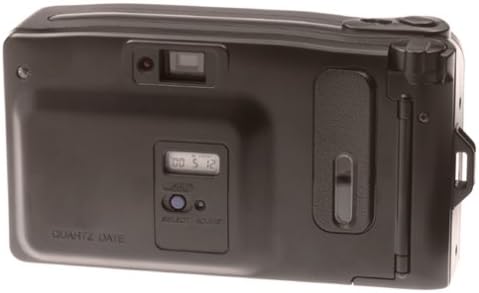
Figure 2: Rear view of the Nikon Nice Touch Zoom QD Date 35mm Camera, highlighting the viewfinder, Quartz Date display, and control buttons.
Key Features
- Automatic flash for various lighting conditions.
- 29mm wide-angle lens for broader scene capture.
- Red-eye reduction feature to improve portrait photos.
- Quartz Date (QD) function for imprinting date and time on photos.
Setup
1. Battery Installation
The camera requires a rechargeable battery for operation.
- Locate the battery compartment cover, typically on the bottom or side of the camera.
- Open the cover by sliding or lifting it.
- Insert the battery according to the polarity indicators (+/-) inside the compartment.
- Close the battery compartment cover securely.
2. Loading Film
- Open the camera back cover.
- Place the film cartridge into the film chamber.
- Pull the film leader across to the film take-up spool.
- Ensure the film perforations engage with the sprockets.
- Close the camera back cover. The camera will automatically advance the film to the first frame.
3. Setting the Quartz Date (QD Models Only)
For models with the Quartz Date function, you can set the date and time to be imprinted on your photos.
- Locate the QD display and control buttons on the camera back (refer to Figure 2).
- Use the SELECT button to cycle through date/time display modes (Year, Month, Day, Hour, Minute).
- Use the ADJUST button to change the selected value.
- Once set, the date will be imprinted on your photos.
Operating the Camera
1. Power On/Off
To turn the camera on, slide the power switch or press the power button. To turn it off, repeat the action.
2. Taking a Picture
- Look through the viewfinder to frame your shot.
- Gently press the shutter button halfway down to activate the autofocus system. The focus indicator in the viewfinder will confirm focus.
- Press the shutter button fully down to take the picture.
3. Using the Zoom
The camera features a zoom lens. Use the zoom lever or buttons, typically located near the shutter button, to zoom in (telephoto) or zoom out (wide-angle).
4. Flash Modes
The camera has an automatic flash system.
- Automatic Flash: The flash fires automatically in low-light conditions.
- Red-Eye Reduction: This mode fires a pre-flash before the main flash to reduce the red-eye effect.
Consult the camera's flash mode button (if present) to cycle through available flash settings.
5. Unloading Film
Once all frames on the film roll have been exposed, the camera will automatically rewind the film into its cartridge.
- Wait for the camera to complete the automatic rewind process.
- Open the camera back cover.
- Remove the film cartridge.
- Close the camera back cover.
Maintenance
Cleaning the Camera
- Use a soft, lint-free cloth to clean the camera body.
- For the lens, use a lens brush or a blower to remove dust, then gently wipe with a lens cleaning cloth and lens cleaning solution if necessary.
- Do not use organic solvents or strong chemicals.
Storage
Store the camera in a cool, dry place away from direct sunlight and extreme temperatures. Remove batteries if the camera will not be used for an extended period.
Troubleshooting
| Problem | Solution |
|---|---|
| Camera does not power on. | Check battery installation and ensure batteries are charged or replaced. |
| Film does not advance. | Ensure film is correctly loaded and the camera back is securely closed. |
| Flash does not fire. | Check if the flash is set to an appropriate mode for current lighting conditions. Ensure batteries have sufficient power. |
| Photos are blurry. | Ensure the camera is held steady during exposure. Allow the autofocus to lock before fully pressing the shutter. |
Specifications
- Brand: Nikon
- Model: Nice Touch Zoom QD
- Camera Type: Point & Shoot Film Camera
- Film Type: 35mm
- Lens: Zoom Lens (e.g., 29mm wide-angle)
- Flash: Built-in, Automatic with Red-eye Reduction
- Focus: Auto Focus (Contrast Detection)
- Exposure Control: Automatic
- Date Imprint: Quartz Date (QD) function
- Power Source: Rechargeable battery (not included)
- Form Factor: Compact
Warranty Information
This Nikon product comes with a limited warranty.
- Parts: 1 year
- Labor: 90 days
For detailed warranty terms and conditions, please refer to the warranty card included with your product or visit the official Nikon website.
Customer Support
For technical assistance, service, or further inquiries, please contact Nikon customer support.
Visit the official Nikon website for contact information and support resources: Nikon Support