1. Introduction
This manual provides detailed instructions for the safe and efficient operation of your Aiwa HS-SP370 Cross Trainer Sports Personal Stereo. Designed for active use, this water-resistant unit features an AM/FM radio, an auto-reverse cassette player, and enhanced bass capabilities. Please read this manual thoroughly before using the device.
2. Safety Information
- Do not expose the unit to extreme temperatures, direct sunlight, or high humidity.
- The unit is water-resistant, not waterproof. Do not immerse it in water.
- Avoid dropping the unit or subjecting it to strong impacts.
- Use only the specified battery type (2 AA batteries).
- Do not attempt to disassemble or modify the unit. Refer all servicing to qualified personnel.
- Clean the unit with a soft, dry cloth. Do not use abrasive cleaners or solvents.
- Listening at high volume levels for extended periods can cause hearing damage.
3. Package Contents
Please check that all items are present:
- Aiwa HS-SP370 Personal Stereo Unit
- Water-resistant Headphones
- Instruction Manual (this document)
Note: A DC power cord is not included and must be purchased separately if desired.
4. Product Features
- AM/FM 2-band tuner for radio reception.
- Auto-reverse cassette mechanism for continuous playback.
- Water-resistant construction, including headphones, for outdoor and active use.
- Super Bass function for enhanced low-frequency sound.
- Anti-roll mechanism to stabilize tape playback during movement.
- Up to 18 hours of playback on a single set of batteries.
- DC jack for optional external power supply.
5. Component Identification
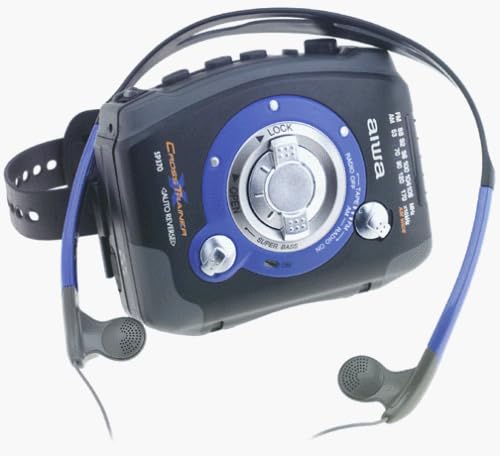
Figure 1: Front view of the Aiwa HS-SP370 personal stereo, showing the cassette compartment, radio tuner dial, function switch, volume control, and attached water-resistant headphones.
- Cassette Compartment Door: Press OPEN to access.
- LOCK Switch: Secures the cassette compartment door.
- Function Selector: Switches between TAPE, RADIO OFF, AM, and FM modes.
- Tuning Dial: Adjusts radio frequency.
- Volume Control: Adjusts audio output level.
- Super Bass Switch: Activates or deactivates bass enhancement.
- Playback Controls: (e.g., Play, Stop, Fast Forward, Rewind - typically located near the cassette door, though not explicitly visible in the provided image, common for such devices).
- DC In Jack: For optional external power adapter (not included).
- Headphone Jack: For connecting the included water-resistant headphones.
6. Setup
6.1 Battery Installation
- Locate the battery compartment cover on the unit.
- Open the cover and insert two (2) AA batteries, ensuring correct polarity (+/-).
- Close the battery compartment cover securely.
6.2 Connecting Headphones
Plug the attached water-resistant headphones into the headphone jack on the unit. Ensure the plug is fully inserted for proper audio output.
6.3 External Power (Optional)
If using an optional DC power adapter (not included), connect it to the DC In jack. This will bypass battery power. Ensure the adapter meets the specified voltage and current requirements for the unit.
7. Operating Instructions
7.1 Cassette Playback
- Slide the LOCK switch to the OPEN position.
- Press the OPEN button to open the cassette compartment door.
- Insert a cassette tape with the desired side facing up.
- Close the cassette compartment door firmly until it clicks.
- Set the Function Selector to TAPE.
- Press the PLAY button to begin playback.
- Adjust the VOLUME control to your desired listening level.
- To reverse tape direction, the unit features Auto-Reverse. This will automatically switch sides at the end of a tape.
- Use the FAST FORWARD or REWIND buttons to navigate the tape.
- Press the STOP button to end playback.
7.2 Radio Operation
- Set the Function Selector to AM for Amplitude Modulation radio or FM for Frequency Modulation radio.
- Rotate the TUNING DIAL to select your desired radio station.
- Adjust the VOLUME control to your desired listening level.
- For optimal FM reception, extend the headphone cord as it acts as the antenna.
- To turn off the radio, set the Function Selector to RADIO OFF or TAPE.
7.3 Super Bass Function
To enhance the bass frequencies in your audio, slide the SUPER BASS switch to the ON position. Slide it to the OFF position to return to standard audio output.
7.4 Water Resistance
The Aiwa HS-SP370 is designed with water-resistant features, making it suitable for use in light rain or sweaty conditions. This includes the main unit and the provided headphones. However, it is not designed for submersion in water. Ensure all covers and jacks are securely closed to maintain water resistance.
8. Maintenance
- Cleaning: Wipe the unit with a soft, slightly damp cloth. Do not use harsh chemicals or solvents.
- Battery Care: Remove batteries if the unit will not be used for an extended period to prevent leakage.
- Cassette Head Cleaning: Periodically clean the cassette heads and pinch rollers with a specialized cleaning kit to ensure optimal sound quality and tape longevity.
- Storage: Store the unit in a cool, dry place away from direct sunlight.
9. Troubleshooting
| Problem | Possible Cause | Solution |
|---|---|---|
| No power | Batteries are dead or incorrectly inserted. | Replace batteries with new AA batteries, ensuring correct polarity. |
| No sound from headphones | Headphones not fully plugged in; Volume too low; Function selector in wrong position. | Ensure headphones are securely connected. Increase volume. Set function selector to TAPE or AM/FM. |
| Poor radio reception | Weak signal; Headphone cord not extended. | Relocate to an area with better reception. Fully extend the headphone cord. |
| Cassette tape not playing or poor sound | Tape inserted incorrectly; Dirty tape heads; Worn tape. | Reinsert tape correctly. Clean tape heads. Try a different tape. |
10. Specifications
- Model: HS-SP370
- Power Source: 2 x AA Batteries or DC 3V (via optional adapter)
- Radio Frequencies: AM, FM (2-band tuner)
- Cassette Features: Auto-reverse, Anti-rolling mechanism
- Audio Features: Super Bass
- Water Resistance: Yes (splash-proof)
- Dimensions (Approx.): 5 x 4 x 1 inches (12.7 x 10.16 x 2.54 cm)
- Weight (Approx.): 1.3 pounds (0.59 kg) (without batteries)
- Manufacturer: Aiwa
- Date First Available: September 4, 1973
11. Warranty and Support
For warranty information and technical support, please refer to the documentation provided at the time of purchase or contact Aiwa customer service directly. Keep your proof of purchase for warranty claims.
You may also visit the official Aiwa website for further assistance: Aiwa Store on Amazon


