
1. Introduction
This manual provides detailed instructions for the safe and efficient operation of your Sanyo MGR-711 Personal Headphone Cassette Player. Please read this manual thoroughly before using the device and retain it for future reference.
The Sanyo MGR-711 is designed for portable audio playback, featuring a cassette player, AM/FM radio reception, and the BassXpander sound system for enhanced low-frequency audio. It operates on AA batteries and includes stereo headphones for immediate use.
2. Package Contents
Verify that all items are present in the package:
- Sanyo MGR-711 Personal Headphone Cassette Player
- Stereo Headphones
- User Manual (this document)
3. Product Features
- 3-button cassette operation for Play, Fast Forward, and Rewind.
- Integrated AM/FM radio tuner for broadcast reception.
- BassXpander enhanced sound system for improved bass response.
- Standard 3.5mm headphone jack.
- DC jack for optional external power adapter (not included).
- Compact and portable design.
4. Setup
4.1. Battery Installation
- Locate the battery compartment cover on the back of the unit.
- Slide the cover in the direction indicated by the arrow to open it.
- Insert four (4) AA batteries, ensuring correct polarity (+/-) as marked inside the compartment.
- Replace the battery compartment cover, sliding it until it clicks securely into place.
Note: Use only new, high-quality alkaline batteries. Remove batteries if the unit will not be used for an extended period to prevent leakage.
4.2. Connecting Headphones
- Insert the 3.5mm stereo plug of the included headphones into the headphone jack on the side of the player.
- Adjust the headphones for comfortable listening.
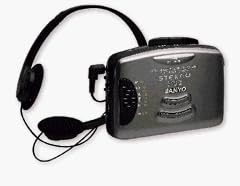
An image showing the Sanyo MGR-711 personal cassette player, a compact gray unit with control buttons, connected to a pair of black over-ear stereo headphones.
5. Operating Instructions
5.1. Cassette Playback
- Open the cassette compartment door by pressing the "STOP/EJECT" button.
- Insert a cassette tape with the open edge facing upwards and the tape side facing the player. Close the compartment door firmly.
- Press the "PLAY" button to begin playback.
- Adjust the volume control dial to your desired listening level.
- To fast forward, press the "FF" button. To rewind, press the "REW" button. Press "STOP/EJECT" to stop.
- To stop playback and eject the tape, press the "STOP/EJECT" button.
5.2. Radio Operation
- Slide the function switch to "RADIO" mode.
- Select either "AM" or "FM" using the band selector switch.
- Rotate the "TUNING" dial to select your desired radio station.
- Adjust the volume control dial to your desired listening level.
- For optimal FM reception, extend the telescopic antenna. For AM reception, rotate the unit for best signal.
5.3. BassXpander System
The BassXpander system enhances the low-frequency audio output. To activate or deactivate this feature, locate the "BASSXPANDER" switch and slide it to the ON or OFF position as desired. This feature is available for both cassette playback and radio listening.
6. Maintenance
6.1. Cleaning the Unit
- Wipe the exterior of the player with a soft, dry cloth.
- Do not use abrasive cleaners, waxes, or solvents as they may damage the finish.
6.2. Cleaning the Cassette Head
- Periodically clean the tape head, pinch roller, and capstan with a cotton swab lightly moistened with isopropyl alcohol.
- Ensure the unit is powered off and batteries are removed before cleaning.
- Allow components to dry completely before operating the player.
7. Troubleshooting
| Problem | Possible Cause | Solution |
|---|---|---|
| No power / Unit does not turn on. | Batteries are depleted or incorrectly inserted. | Replace with new AA batteries, ensuring correct polarity. |
| No sound from headphones. | Headphones not properly connected; Volume too low; Function switch in wrong position. | Ensure headphones are fully plugged in. Increase volume. Verify function switch is set to "TAPE" or "RADIO". |
| Cassette tape does not play or sounds distorted. | Tape is damaged; Tape head is dirty; Pinch roller/capstan dirty. | Try a different tape. Clean the tape head, pinch roller, and capstan (refer to Maintenance section). |
| Poor radio reception. | Antenna not extended (FM); Unit position (AM); Weak signal. | Extend FM antenna fully. Rotate the unit for better AM reception. Try moving to a different location. |
8. Specifications
- Model: MGR-711
- Power Source: 4 x AA Batteries or DC 6V (via optional adapter)
- Audio Output: Stereo Headphone Jack (3.5mm)
- Radio Bands: AM/FM
- Dimensions (Approx.): 11.4 x 8.2 x 2.7 inches (Package Dimensions)
- Weight (Approx.): 13.6 ounces (Item Weight)
- Manufacturer: SANYO
- Date First Available: September 4, 1999
9. Warranty Information
Sanyo offers a 90-day parts and labor warranty for the MGR-711 Personal Headphone Cassette Player from the original date of purchase. This warranty covers manufacturing defects in materials and workmanship under normal use.
The warranty does not cover damage resulting from accident, misuse, abuse, neglect, improper installation or operation, unauthorized repairs, or modifications. Proof of purchase is required for all warranty claims.
For warranty service, please contact Sanyo customer support.
10. Customer Support
If you have any questions or require assistance with your Sanyo MGR-711 Personal Headphone Cassette Player, please refer to the troubleshooting section of this manual or contact Sanyo customer support.
Please have your model number (MGR-711) and date of purchase available when contacting support.
Contact information (e.g., website, phone number) would typically be provided here by the manufacturer.