
Introduction
Thank you for purchasing the JVC RX-888 Audio/Video Receiver. This manual provides essential information for the safe and efficient operation of your new receiver. Please read it thoroughly before use and retain it for future reference.
Safety Information
- Power Supply: Connect the receiver only to an AC outlet of the specified voltage.
- Ventilation: Ensure adequate ventilation. Do not block ventilation openings.
- Water and Moisture: Do not expose the receiver to rain or moisture.
- Heat Sources: Keep away from radiators, heat registers, stoves, or other heat-producing apparatus.
- Servicing: Refer all servicing to qualified service personnel.
Product Overview
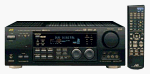
Figure 1: JVC RX-888 Audio/Video Receiver and Remote Control. This image displays the front panel of the receiver, showing the display, control knobs, and various buttons, alongside its dedicated remote control unit.
The JVC RX-888 is a high-performance Audio/Video Receiver designed to be the central hub of your home entertainment system. Key features include:
- 120 watts per channel maximum: Provides robust power output for clear and dynamic audio.
- DTS and Dolby Digital decoding: Supports popular surround sound formats for an immersive audio experience.
- 4 S-video inputs: Offers versatile connectivity for various video sources.
- K2 interface on all channels: Enhances audio quality across all connected speakers.
- High-current design (4-ohm rated): Ensures stable performance with a wide range of speakers.
Setup
1. Connecting Speakers
Ensure the receiver is powered off before making any connections. Connect your speakers to the appropriate speaker terminals on the rear panel. Observe correct polarity (+ to + and - to -) for optimal sound quality.
2. Connecting Audio/Video Components
Use high-quality cables to connect your audio and video sources (e.g., DVD player, CD player, game console) to the corresponding input jacks on the receiver. The RX-888 features multiple S-video inputs for video sources and various analog and digital audio inputs.
3. Power Connection
Once all audio/video and speaker connections are made, plug the receiver's power cord into a suitable AC outlet.
Operating Instructions
1. Powering On/Off
Press the POWER button on the front panel or remote control to turn the receiver on or off.
2. Input Selection
Use the INPUT SELECTOR knob or buttons on the front panel/remote to choose the desired audio/video source (e.g., DVD, CD, TV).
3. Volume Control
Adjust the master volume using the large VOLUME knob on the front panel or the VOLUME +/- buttons on the remote control.
4. Surround Sound Modes
Press the MODE button or specific surround mode buttons (e.g., DOLBY DIGITAL, DTS) on the remote to select your preferred audio processing mode.
Maintenance
- Cleaning: Use a soft, dry cloth to clean the exterior of the receiver. Do not use liquid cleaners or aerosol sprays.
- Ventilation: Periodically check that the ventilation openings are not obstructed by dust or debris.
- Storage: If storing the unit for an extended period, disconnect it from the power outlet and store in a cool, dry place.
Troubleshooting
| Problem | Possible Cause | Solution |
|---|---|---|
| No power | Power cord disconnected; Power outlet faulty | Check power cord connection; Try a different outlet |
| No sound | Incorrect input selected; Speaker wires loose; Volume too low | Select correct input; Check speaker connections; Increase volume |
| No video | Incorrect video input selected; Video cables loose | Select correct video input; Check video cable connections |
Specifications
| Feature | Detail |
|---|---|
| Brand | JVC |
| Model Number | RX-888 |
| RMS Power Range - Amplifiers | 120 Watts per channel |
| Audio Output Mode | Surround |
| Connectivity Technology | HDMI |
| Special Feature | DSP |
| Compatible Devices | Speaker |
| Total HDMI Ports | 1 |
| Item Weight | 13 kg 900 g |
| Colour | Black |
Warranty and Support
This product is covered by a 90 Day Warranty. For warranty claims or technical support, please contact JVC customer service. Keep your purchase receipt as proof of purchase.
For further assistance, you may visit the official JVC support website or contact their customer service hotline. Refer to the product packaging or JVC's official website for the most current contact information.
- Returns Policy: Please refer to the retailer's returns policy for details on product returns.
- Secure Transaction: Your purchase is part of a secure transaction process.


