Introduction
This quick-reference card is designed to help users master the Magellan Triton 500/400 GPS devices efficiently. It provides a concise guide to common actions, helpful tips, and essential functions in an easy-to-use, durable format. This manual expands upon the card's content, offering detailed instructions for various operations.
The Qref card is an ideal companion for your GPS system, providing quick reminders for common tasks and helping to navigate the device's features with ease. Its robust, laminated design ensures longevity and readability in various conditions.
Product Overview
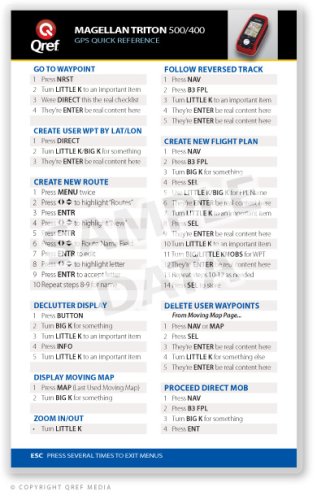
This image displays the front side of the Qref GPS Quick Reference Card for the Magellan Triton 500/400. It provides a concise layout of common operations, including navigation, waypoint creation, route management, and display settings. The card features a black header with the Qref logo and product name, and a white body with instructions organized into distinct sections.
The Magellan Triton 500/400 Qref Card is a compact, double-sided, full-color reference tool. It is hard laminated with a military-spec, sturdy 10mil matte finish, making it waterproof, indestructible, and resistant to UV fading. Its 5" x 8" (13mm x 20mm) size is convenient for portability and quick access.
Operating Instructions
This section details the steps for performing various functions on your Magellan Triton 500/400 GPS device, as outlined on the Qref card.
Go To Waypoint
- Press NRST.
- Turn LITTLE K to select an important item.
- Press DIRECT to confirm.
- Press ENTER to confirm selection.
Follow Reversed Track
- Press NAV.
- Press FPL (Flight Plan button).
- Turn LITTLE K to select an important item.
- Press ENTER to confirm selection.
- Press ENTER again to activate.
Create User Waypoint by Lat/Lon
- Press DIRECT.
- Turn LITTLE K/BIG K to input coordinates.
- Press ENTER to save the waypoint.
Create New Flight Plan
- Press NAV.
- Press FPL (Flight Plan button).
- Turn BIG K to select a flight plan.
- Press SEL (Select).
- Use LITTLE K/BIG K to input flight plan name.
- Turn LITTLE K to select an item.
- Press SEL.
- Press ENTER to confirm.
- Turn LITTLE K to select an important item.
- Turn BIG/LITTLE KNOBS for Waypoint (WPT) entry.
- Press ENTER to confirm content.
- Press SEL to save.
Create New Route
- Press MENU twice.
- Press arrow keys to highlight "Routes".
- Press ENTR (Enter).
- Press arrow keys to highlight a view.
- Press ENTR (Enter).
- Input Route Name.
- Press ENTR (Enter).
- Press arrow keys to highlight a letter.
- Press ENTR to accept.
- Repeat steps 8-9 for name entry.
Declutter Display
- Press BUTTON.
- Turn BIG K for something.
- Turn LITTLE K to select an important item.
- Press INFO.
- Turn LITTLE K to select an important item.
Display Moving Map
- Press MAP (Last Used Moving Map).
- Turn BIG K for something.
Zoom In/Out
- Turn LITTLE K.
Delete User Waypoints
From Moving Map Page:
- Press NAV or MAP.
- Press SEL.
- Press ENTER to confirm.
- Turn LITTLE K for something else.
- Press ENTER to confirm.
Proceed Direct MOB (Man Overboard)
- Press NAV.
- Press FPL (Flight Plan button).
- Turn BIG K for something.
- Press ENT (Enter).
Exit Menus
- Press ESC several times to exit menus.
Specifications
| Feature | Detail |
|---|---|
| Publisher | Qref Quick Reference Media |
| Publication Date | January 1, 2009 |
| ISBN-10 | 1607860902 |
| ISBN-13 | 978-1607860907 |
| Format | Cards |
| Material | Hard laminated with 10mil matte finish |
| Durability | Waterproof, indestructible, UV fading resistant |
| Dimensions | 5" x 8" (13mm x 20mm) |
Maintenance
The Qref card is designed for extreme durability and requires minimal maintenance. To ensure its longevity:
- Wipe clean with a damp cloth if it gets dirty.
- Avoid exposing it to extreme temperatures for prolonged periods, although it is designed to withstand harsh conditions.
- Store in a dry place when not in use to prevent any potential long-term degradation, though it is waterproof.
Troubleshooting
The Qref card is a passive reference tool and does not have electronic components that can malfunction. Troubleshooting primarily relates to its use with your GPS device:
- Difficulty finding a function: Refer to the specific sections in the operating instructions above or on the card. Ensure you are pressing the correct buttons as indicated.
- Instructions unclear: Re-read the steps carefully. The card is designed for quick reference, so some steps might be condensed. This manual provides more detailed explanations.
- Card readability issues: Ensure adequate lighting. The matte finish is designed to reduce glare, but direct sunlight can still affect visibility.
For issues related to the Magellan Triton 500/400 GPS device itself, please consult the official Magellan user manual for that specific device.
Support Information
For further assistance or inquiries regarding the Qref Quick Reference Card, please refer to the publisher's official website or contact their customer support channels. Specific contact details are typically provided with the product packaging or on the publisher's official online presence.


