
Arris TM822 Touchstone Docsis 3.0 8×4 Ultra-High Speed Telephony Modem
Modem InformationDOCSIS 3.0 Internet and Telephone Modem 8×4 channel bonding Cox recommends a DOCSIS 3.1 modem or gateway |
Highest Service LevelCox Business Internet 100 |
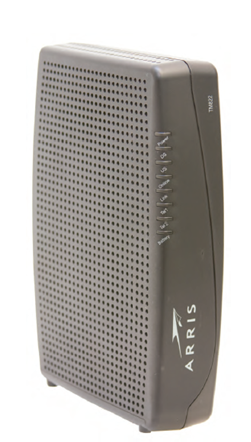
Front View
|
The following indicators are found on the front of the modem.
|
|
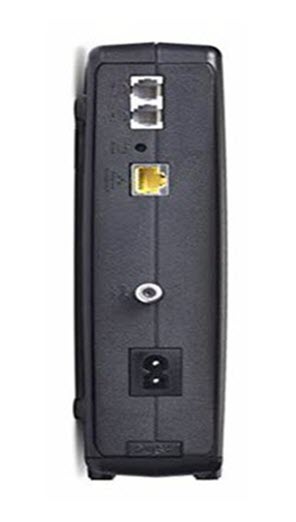
Back View
|
The following ports and buttons are found on the back of the modem.
|
|
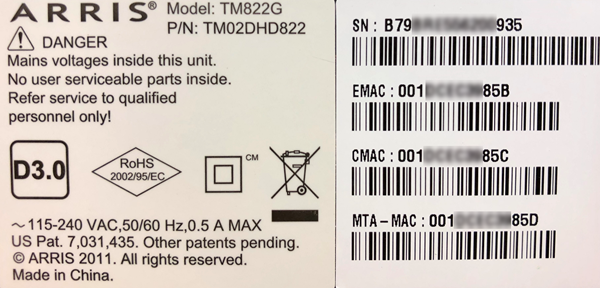
MAC Address
|
MAC addresses are written as 12 digits containing both letters and numbers (0-9, A-F).
|
Troubleshooting
The lights indicate the current status of your modem. To troubleshoot any connection problems, use the table below.
| Modem Light | Status | Problem |
|---|---|---|
| Power | Off | No power. Verify all cable connections and try resetting the modem. |
| Solid Green | None. The modem is receiving power. | |
| DS | Flashing | The modem is not connected to the internet. |
| Solid Yellow | None. The downstream channel is connected. | |
| Solid Green | None. The downstream channel is connected with bonded channels. | |
| US | Flashing | The modem is not connected to the internet. |
| Solid Yellow | None. The upstream channel is connected. | |
| Solid Green | None. The upstream channel is connected with bonded channels. | |
| Online | Off | An internet connection is unavailable. |
| Solid Green | None. The modem is connected to the internet. | |
| Link | Off | Computer is not connected to the modem. |
| Flashing | Computer activity is detected. | |
| Solid Yellow | None. A 10/100 BaseT Ethernet connection is established. | |
| Solid Green | None. A 1000 BaseT Ethernet connection is established. | |
| Tel 1 / 2 | Off | The telephone connection is disabled. |
| Flashing | The telephone connection is off the hook. | |
| Solid Green | None. The telephone connection is established. | |
| Battery | Off | The battery is missing or the MTA is not registered. |
| Solid Green | None. The battery is functioning properly. | |
| Flashing | The battery is incompatible with the modem. Remove and replace with a compatible modem battery. |
Manufacturer Resources
For more detailed technical information on the Arris TM822 modem, refer to the Arris_TM822_User_Guide [PDF].
References
- User Manualmanual.tools
Published: August 10, 2021
Updated: February 11, 2023
Bonjour j’ai reçu le modem Arris TM822 et pouvez vous m’envoyer le plus d’informations que vous avez, moi je n’ai pas encore fait aucune essaie, Merci…
I received the Arris TM822 modem; can you provide more information and instructions before I try to set it up?
The Arris TM822 is a DOCSIS 3.0 Telephony Modem that supports both internet and phone services. Below is a summary of the key information to help you get started:
For more detailed technical specifications and safety instructions, you can refer to the full Arris TM822 User Guide.
Read the full Q&A page