1. المقدمة
Thank you for choosing the HUAYU KL RM-L1710 Universal LCD LED TV Remote Control. This remote is designed to provide seamless control over various LCD and LED televisions, featuring dedicated buttons for popular streaming services. This manual will guide you through the setup, operation, and maintenance of your new remote control.
2. تعليمات السلامة الهامة
- لا تخلط البطاريات القديمة والجديدة.
- لا تخلط البطاريات القلوية، والبطاريات القياسية (الكربون والزنك)، أو البطاريات القابلة لإعادة الشحن (النيكل والكادميوم).
- Always remove exhausted batteries promptly to prevent leakage and damage.
- تخلص من البطاريات المستخدمة وفقا للوائح المحلية.
- احتفظ بجهاز التحكم عن بعد بعيدًا عن أشعة الشمس المباشرة ومصادر الحرارة والرطوبة.
- لا تحاول تفكيك جهاز التحكم عن بعد أو تعديله.
3. محتويات العبوة
- 1 x HUAYU KL RM-L1710 Universal LCD LED TV Remote Control
- 1 × دليل المستخدم (هذه الوثيقة)
4. Remote Control Button Layout
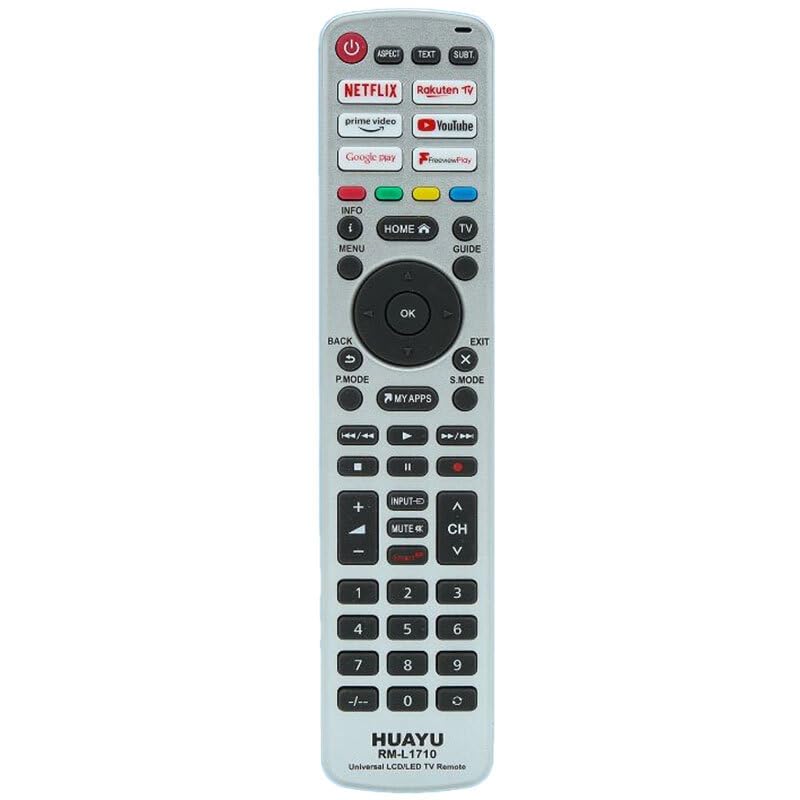
This image displays the full layout of the HUAYU RM-L1710 remote control. It is a silver-colored remote with black buttons. At the top are the power button, aspect ratio, text, and subtitle buttons. Below these are dedicated app buttons for Netflix, Rakuten TV, Prime Video, YouTube, Google Play, and FreeviewPlay. The central navigation cluster includes Home, Info, Menu, TV Guide, and a directional pad with an OK button. Below this are Back, Exit, P.Mode, S.Mode, and My Apps buttons. Media playback controls (rewind, play, fast forward, stop, pause, record) are located next. Further down are volume and channel controls, input, and mute buttons. The bottom section features a numeric keypad from 0-9, along with a dash button. The brand 'HUAYU' and model 'RM-L1710 Universal LCD/LED TV Remote' are printed at the very bottom.
وظائف الأزرار:
- الطاقة (الزر الأحمر): تشغيل التلفزيون أو إيقاف تشغيله.
- وجه: يُغيّر نسبة عرض الشاشة إلى ارتفاعها.
- نص: يقوم بتفعيل أو تعطيل خدمة التليتكست.
- الترجمة: يُفعّل أو يُعطّل الترجمة.
- NETFLIX, Rakuten TV, prime video, YouTube, Google play, Freeviewيلعب: Direct access buttons for respective streaming applications.
- INFO (i): Displays on-screen information.
- HOME (House icon): Returns to the TV's main home screen or smart hub.
- دليل التلفاز: يفتح دليل البرامج الإلكتروني.
- MENU: الوصول إلى القائمة الرئيسية للتلفزيون.
- لوحة الاتجاهات (أعلى، أسفل، يسار، يمين): التنقل عبر القوائم والخيارات.
- OK: يؤكد التحديدات.
- BACK (U-turn arrow): يعود إلى الشاشة أو القائمة السابقة.
- EXIT (X): الخروج من القائمة أو التطبيق الحالي.
- الوضع: Changes picture modes.
- وضع S: Changes sound modes.
- MY APPS: Accesses the TV's applications list.
- Media Playback Controls (Rewind, Play, Fast Forward, Stop, Pause, Record): يتحكم في تشغيل الوسائط.
- INPUT (Arrow into box): تحديد مصادر الإدخال (HDMI، AV، وما إلى ذلك).
- MUTE (Speaker with cross): كتم صوت التلفزيون أو إلغاء كتمه.
- المجلد (+/-): ضبط مستوى الصوت.
- CH (Up/Down arrows): تغيير القنوات التلفزيونية.
- Numeric Keypad (0-9, -/--): Enters channel numbers or other numerical data.
5. الإعداد الأولي
5.1 تركيب البطاريات
- افتح غطاء حجرة البطارية في الجزء الخلفي من جهاز التحكم عن بعد.
- أدخل بطاريتين AAA (غير مرفقتين)، مع التأكد من تطابق الأطراف الموجبة (+) والسالبة (-) مع العلامات الموجودة داخل الحجرة.
- أغلق غطاء حجرة البطارية جيدًا.
5.2 برمجة جهاز التحكم عن بعد
As a universal remote, the RM-L1710 may require programming to operate your specific TV model. There are typically two methods for programming universal remotes:
Method 1: Auto Search
- تأكد من تشغيل التلفزيون.
- Press and hold the 'SET' button (if available, or a combination like 'POWER' + 'SET' for 3 seconds) until the indicator light stays on.
- Point the remote at your TV and repeatedly press the 'POWER' button (or 'CH+' button) until your TV turns off or changes channel.
- Once the TV responds, immediately press the 'SET' or 'OK' button to save the code. The indicator light should turn off.
- Test all functions of the remote. If some functions do not work, repeat the auto-search process to find a more compatible code.
Method 2: Code Entry
- Locate the brand code for your TV from the code list provided with the remote (if applicable). Note: A code list is not provided with this manual. Please refer to the packaging or manufacturer's website for specific codes.
- قم بتشغيل التلفاز الخاص بك.
- Press and hold the 'SET' button (or a similar programming button) until the indicator light stays on.
- Enter the 3 or 4-digit code for your TV brand using the numeric keypad.
- If the code is valid, the indicator light will turn off.
- Test the remote's functions. If it does not work, try another code for your TV brand.
6. تشغيل جهاز التحكم عن بعد
6.1 وظائف التلفزيون الأساسية
- يضعط قوة to turn your TV on or off.
- يستخدم المجلد +/- لضبط مستوى الصوت.
- يستخدم قناة لأعلى/لأسفل to change channels sequentially.
- يضعط كتم الصوت لإسكات التلفاز مؤقتًا.
- يضعط مدخل to cycle through available input sources (e.g., HDMI 1, AV, Component).
6.2 Smart TV and App Functions
The remote features dedicated buttons for quick access to popular streaming services:
- يضعط نيتفليكس to launch the Netflix application.
- يضعط فيديو رئيسي to launch the Amazon Prime Video application.
- يضعط يوتيوب to launch the YouTube application.
- يضعط راكوتن تي في to launch the Rakuten TV application.
- يضعط جوجل بلاي to launch the Google Play Store or Google Play Movies & TV.
- يضعط حرviewيلعب to access the Freeview Play platform (if supported by your TV).
- يضعط تطبيقاتي ل view all installed applications on your TV.
6.3 Navigation and Menu Controls
- استخدم الوسادة الاتجاهية (Up, Down, Left, Right arrows) to move the cursor or highlight items in menus.
- يضعط OK to confirm a selection or open a highlighted item.
- يضعط قائمة طعام to open the TV's main settings menu.
- يضعط بيت to return to the TV's main home screen or smart hub.
- يضعط خلف to go back to the previous screen or menu.
- يضعط EXIT to close the current menu or application.
- يضعط معلومات to display information about the current program or input.
- يضعط دليل التلفزيون to access the electronic program guide.
6.4 عناصر التحكم في تشغيل الوسائط
These buttons control media playback in compatible applications or when viewing content from connected devices:
- يلعب: يبدأ التشغيل.
- يوقف: يوقف التشغيل مؤقتًا.
- توقف: يوقف التشغيل.
- Rewind (Double left arrow): يعيد تشغيل الوسائط.
- Fast Forward (Double right arrow): تقديم سريع للوسائط.
- Skip Back (Double left arrow with line): ينتقل إلى المقطع/الفصل السابق.
- Skip Forward (Double right arrow with line): ينتقل إلى المقطع/الفصل التالي.
- Record (Red dot): Initiates recording (if supported by your TV and connected storage).
6.5 لوحة مفاتيح رقمية
- Use numbers 0-9 to directly enter channel numbers.
- ال -/-- button is used for entering two-digit channel numbers or other specific functions.
7. الرعاية والصيانة
- Clean the remote control with a soft, dry cloth. Do not use liquid or aerosol cleaners.
- تجنب إسقاط جهاز التحكم عن بعد أو تعريضه لصدمات قوية.
- إذا لم يتم استخدام جهاز التحكم عن بعد لفترة طويلة، فقم بإزالة البطاريات لمنع التسرب.
- Store the remote in a cool, dry place.
8. دليل استكشاف الأخطاء وإصلاحها
| مشكلة | السبب المحتمل | حل |
|---|---|---|
| البعيد لا يعمل. | البطاريات فارغة أو تم إدخالها بشكل غير صحيح. | استبدل البطاريات بأخرى جديدة، مع التأكد من القطبية الصحيحة. |
| البعيد لا يعمل. | جهاز التحكم عن بعد غير مبرمج للتلفزيون. | Refer to Section 5.2 "Programming the Remote Control" and try programming again. |
| جهاز التحكم عن بعد ذو مدى قصير أو استجابة متقطعة. | Weak batteries. Obstruction between remote and TV. | استبدل البطاريات. تأكد من وجود خط رؤية واضح لجهاز استقبال الأشعة تحت الحمراء الخاص بالتلفزيون. |
| بعض الأزرار لا تعمل. | Incorrect TV code programmed. | Try reprogramming the remote with a different code for your TV brand (if available). |
| App buttons (Netflix, YouTube, etc.) do not work. | TV does not support the app or is not connected to the internet. | Ensure your Smart TV is connected to the internet and the apps are installed and up-to-date. Some older TVs may not support these direct access buttons. |
9. مواصفات المنتج
- نموذج: RM-L1710
- ماركة: HUAYU
- التوافق: Universal for most LCD/LED TVs
- مصدر الطاقة: 2 بطاريات AAA (غير مدرجة)
- الانتقال: الأشعة تحت الحمراء (IR)
10. معلومات الضمان ودعم العملاء
This product is covered by a standard manufacturer's warranty. Please refer to the warranty card included with your purchase or contact your retailer for specific warranty terms and conditions. For technical support or further assistance, please contact the point of purchase or visit the HUAYU official webموقع لمعلومات الاتصال.


