1. المقدمة
This manual provides essential information for the proper setup, operation, and maintenance of your Nitho V23 PRO Gaming Steering Wheel. Please read this manual thoroughly before using the product to ensure optimal performance and longevity. This racing wheel set is designed to enhance your gaming experience across multiple platforms, offering realistic control and immersive feedback.
2. محتويات العبوة
تأكد من تضمين جميع العناصر المدرجة أدناه في الحزمة الخاصة بك:
- Nitho V23 PRO Steering Wheel
- 3-Pedal Set (Throttle, Brake, Clutch)
- Manual Gear Shifter (H-pattern/Sequential)
- تصاعد Clamps (2x C-shaped)
- كابل توصيل USB
- دليل المستخدم (هذا المستند)

Image 2.1: Complete Nitho V23 PRO Racing Wheel Set, including the steering wheel, three-pedal unit, and external gear shifter.
3. انتهى المنتجview
3.1 عجلة القيادة
The steering wheel features a 10-inch diameter with an ergonomic, textured grip for comfortable and precise control. It offers a 270-degree rotation angle with zero dead zone technology for accurate steering inputs.
- أزرار العمل: Various programmable buttons for in-game functions.
- وسادة D: Directional pad for menu navigation and specific controls.
- زر الصفحة الرئيسة: For system menu access and mode switching.
- Share/Option Buttons: For in-game functions and button programming.
- مؤشر LED: يقدم معلومات عن حالة الخدمة.

الصورة 3.1: تفصيلية view of the steering wheel highlighting ergonomic grip, action buttons, LED indicator, and 270-degree rotation capability.

Image 3.2: Illustration of the 270-degree lock-to-lock steering and the location of programmable buttons on the wheel.
مجموعة دواسات مكونة من 3.2 دواسات
The robust three-pedal base system includes a throttle, brake, and clutch pedal, designed for realistic racing simulation. Each pedal features an adjustable spring load and an anti-slip footrest for stability.
- Throttle Pedal: For acceleration control.
- دواسة الفرامل: For braking control.
- Clutch Pedal: For manual gear shifting in supported games.
- Anti-slip Footrest: Ensures stability during intense gameplay.

الصورة 3.3: تفصيلية view of the adjustable pedal set, indicating the clutch, brake, and throttle pedals, along with the stable rubber feet.
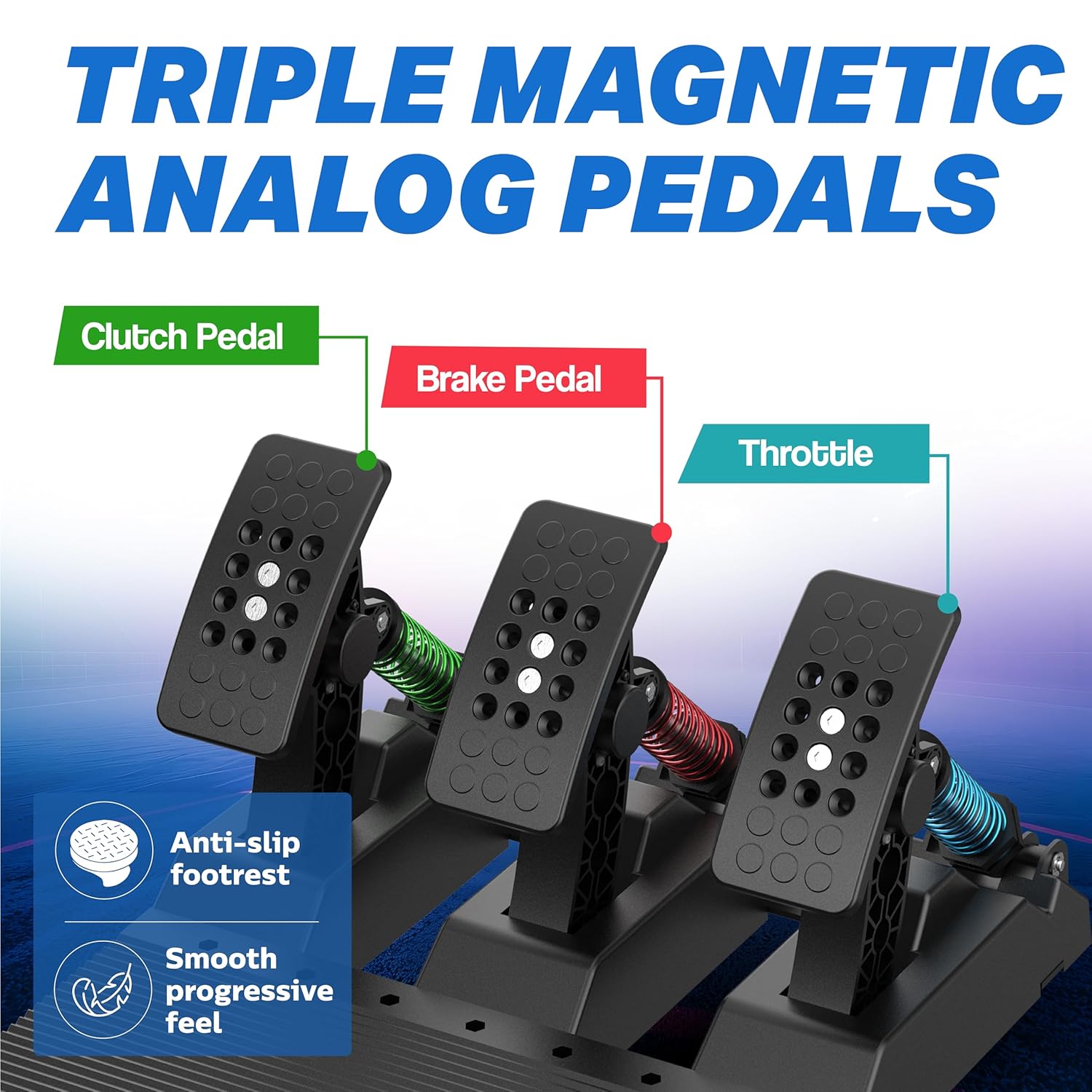
Image 3.4: Close-up of the triple magnetic analog pedals, highlighting the clutch, brake, and throttle pedals with their respective spring mechanisms.
3.3 Manual Gear Shifter
The included gear shifter supports both sequential and H-pattern modes, providing versatility for different racing styles. It features high/low gear switching and a handbrake switch.
- H-Pattern Mode: For traditional manual shifting.
- الوضع التسلسلي: For quick up/down shifts.
- التبديل بين التروس العالية والمنخفضة: Allows for gear range selection.
- مفتاح فرملة اليد: For engaging the handbrake in-game.
- الترس العكسي: To engage reverse, press the gear lever vertically down and move it to the 6th gear position.

Image 3.5: Diagram illustrating the 6-speed manual shifter, showing high/low gear switching, handbrake switch, and reverse gear engagement method.
4. الإعداد
4.1 تركيب عجلة القيادة
The Nitho V23 PRO offers two primary installation methods:
- كؤوس الشفط: For quick and easy attachment to smooth, flat surfaces. Ensure the surface is clean and dry for maximum grip.
- سي- Clamps: For a more secure and stable mounting to desks or racing stands up to 55mm thick. Attach the two C-shaped clamps to the designated slots on the underside of the wheel base and tighten them securely to your surface.

Image 4.1: Illustration of the two available mounting methods: suction cups for flat surfaces and adjustable C-clamps for desks.

Image 4.2: The Nitho V23 PRO Steering Wheel mounted on different desktop configurations, demonstrating its adaptability.
4.2 توصيل الأجهزة الطرفية
- Connect the pedal set cable to the designated port on the rear of the steering wheel base.
- Connect the gear shifter cable to its dedicated port on the steering wheel base.
4.3 الاتصال بنظامك
Connect the main USB cable from the steering wheel to an available USB port on your PC or console (PS4, PS3, Xbox One, Xbox Series X/S, Switch). For console connections, you may need to connect an official controller to the USB port on the rear of the steering wheel for authentication.
5. تعليمات التشغيل
5.1 التوافق
The Nitho V23 PRO Gaming Steering Wheel is compatible with the following platforms:
- كمبيوتر شخصي (Windows)
- بلاي ستيشن 4 (PS4)
- بلاي ستيشن 3 (PS3)
- PlayStation 5 (PS5) - Supports PS4 games only.
- اكس بوكس ون
- اكس بوكس سيريس اكس/اس
- نينتندو سويتش

Image 5.1: Visual representation of the Nitho V23 PRO's compatibility with PC, Switch, PS4, PS5 (PS4 games), Xbox One, and Xbox Series X/S.
5.2 Mode Switching (PC)
For PC gaming, the wheel supports both X-Input and D-Input modes. The default mode is typically D-Input, offering precise control. To switch between modes, press and hold the بيت button for a few seconds. The LED indicator will change color (e.g., from purple to orange) to confirm the mode change.
- وضع الإدخال D: Generally provides more precise control and allows full button configuration for simulation games.
- وضع الإدخال X: Detects the wheel as a standard Xbox controller, which may be suitable for arcade-style games.
برمجة 5.3 أزرار
Certain buttons on the steering wheel can be programmed. To program a button, press and hold the يشارك و خيار buttons simultaneously for a few seconds. The LED indicator may flash to confirm entry into programming mode. Then, press the button you wish to program (e.g., L3/SL, R3/SR, pedals, paddle shifters, upshift/downshift on integrated shifter) followed by the desired target key (e.g., X, Y, A, B, D-pad, LB, LT, RB, RT). Refer to your game's control settings for optimal configuration.
6. الصيانة
To ensure the longevity and optimal performance of your Nitho V23 PRO Gaming Steering Wheel, follow these maintenance guidelines:
- تنظيف: Use a soft, dry cloth to clean the steering wheel, pedals, and shifter. Avoid using abrasive cleaners or solvents, as these can damage the surfaces.
- تخزين: When not in use, store the product in a clean, dry environment away from direct sunlight and extreme temperatures.
- إدارة الكابلات: Avoid sharp bends or kinks in the cables to prevent internal damage.
- التركيب: Periodically check the tightness of the C-clamps or the suction cup adhesion to ensure secure mounting.
7. استكشاف الأخطاء وإصلاحها
If you encounter issues with your Nitho V23 PRO Gaming Steering Wheel, refer to the following common problems and solutions:
| مشكلة | السبب المحتمل | حل |
|---|---|---|
| Wheel is unresponsive or not detected. | Loose connection, incorrect mode, driver issue (PC). | Ensure all cables are securely connected. Try a different USB port. For consoles, ensure an official controller is connected to the wheel's authentication port. On PC, try switching between X-Input and D-Input modes. Update PC drivers if necessary. |
| Pedals or shifter are not working. | Loose connection, game not configured. | Verify that the pedal and shifter cables are firmly connected to the steering wheel base. Check in-game control settings to ensure pedals and shifter are correctly mapped. |
| Steering feels imprecise or has a dead zone. | Game settings, incorrect mode. | The wheel features zero dead zone technology. If experiencing issues, check in-game steering linearity and dead zone settings. On PC, ensure D-Input mode is active for maximum precision. |
| No vibration feedback (PS4/PS5). | System software update, game compatibility. | Some console system software updates may affect vibration compatibility. Verify game support for vibration feedback with third-party wheels. |
| التثبيت غير مستقر. | Improper installation, unsuitable surface. | Ensure suction cups are applied to a clean, smooth, non-porous surface. If using clamps, ensure they are tightened securely to a stable desk or stand within the 55mm thickness limit. |
8. المواصفات
| ميزة | التفاصيل |
|---|---|
| أبعاد المنتج | 40 × 30 × 25 سم |
| وزن العنصر | 4 كجم |
| رقم موديل العنصر | ملت-DP16-ك |
| Steering Rotation | 270 درجة |
| نوع الدواسة | 3-Pedal (Throttle, Brake, Clutch) with adjustable spring load |
| شيفتر والعتاد | Dual-mode (H-pattern/Sequential) with High/Low gear and Handbrake switch |
| تركيب نظام | 6 Suction Cups, 2 C-Clamps (max 55mm desk thickness) |
| التوافق | PC, PS4, PS3, Xbox One, Xbox Series X/S, Switch, PS5 (PS4 games) |
| الشركة المصنعة | MTM Industrial Ltd. |
| تاريخ الافراج عنه | 1 أغسطس 2025 |
9. الضمان والدعم
For warranty information and technical support, please contact the manufacturer or your point of purchase. You can reach MTM Industrial Ltd. via email at nithoamazonin@mtm-t.com.
For inquiries related to packaging and import in India, you may contact Marketgate Technologies Private Limited at marketgateindia@gmail.com.


