1. انتهى المنتجview
The ORICO 40Gbps M.2 NVMe SSD Enclosure (Model CNM2-U4-GY) is designed for high-speed data transfer and external storage. It features a built-in cooling fan and an aluminum alloy shell to ensure optimal thermal management during intensive use. This enclosure supports M-Key NVMe SSDs and is compatible with various interfaces including USB4, Thunderbolt 4/3, USB 3.2, USB 3.1, and USB 3.0.

الصورة 1.1: انتهىview of the ORICO 40Gbps M.2 NVMe SSD Enclosure.
2. محتويات العبوة
يرجى التأكد من وجود جميع العناصر في الحزمة:
- 1 x ORICO 40Gbps NVMe SSD Enclosure
- 1 x 2-in-1 USB Cable (USB-C to USB-C 40Gbps, USB-C to USB-A 10Gbps)
- 1 × وسادة سيليكون حرارية
- 1 × مفك براغي
- Screws for SSD installation
- دليل المستخدم

Image 2.1: Contents included in the ORICO NVMe SSD Enclosure package.
3. المواصفات
| ميزة | وصف |
|---|---|
| رقم الموديل | CNM2-U4-GY |
| الواجهة | USB4 (40Gbps), Thunderbolt 4/3, USB 3.2/3.1/3.0 |
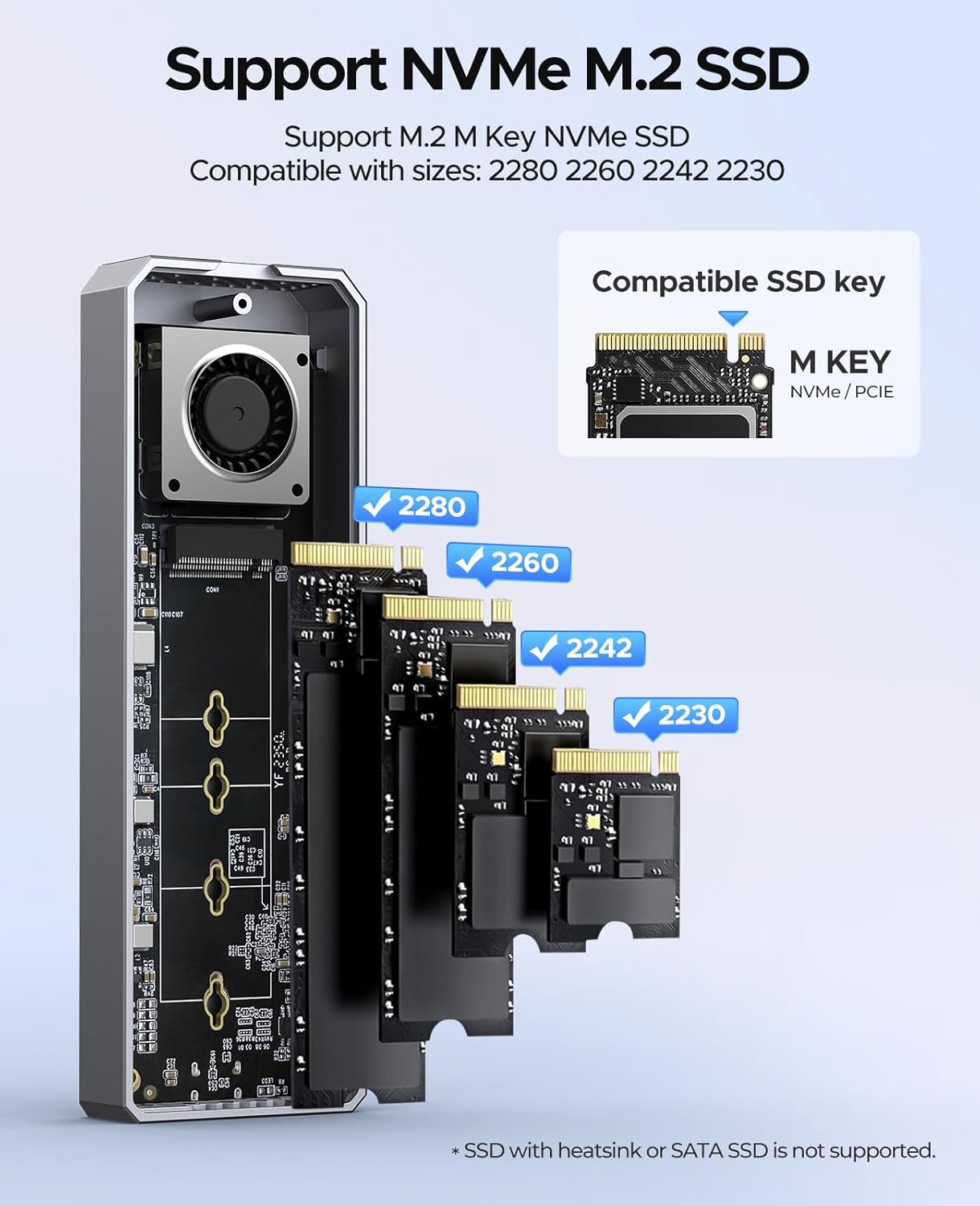
| توافق SSD | M-Key 2230/2242/2260/2280 NVMe SSDs (up to 8TB) |
| نظام التبريد | Built-in Fan, Aluminum Alloy Shell, Silicone Thermal Pads |
| سرعة نقل البيانات | Up to 40Gbps (Read: 3500 MB/s, Write: 3000 MB/s) |
| الأبعاد (الطول × العرض × الارتفاع) | 5.83 × 1.93 × 0.71 بوصة |
| وزن | 9.1 أونصات |
| مادة | سبائك الألومنيوم |
| أنظمة التشغيل المدعومة | ويندوز، ماك، لينكس، أندرويد |
Note: Not compatible with Intel CPUs prior to 12th Gen. Not recommended for SN750, 970 EVO Plus, or P3 SSDs. SATA SSDs are not supported.
4. الإعداد والتثبيت
اتبع هذه الخطوات لتثبيت محرك الأقراص ذي الحالة الصلبة M.2 NVMe في العلبة:
- إزالة الغطاء: Use the provided screwdriver to unscrew the retaining screw and gently slide open the upper cover of the enclosure.
- قم بتثبيت M.2 SSD: Insert your M.2 NVMe SSD into the M.2 interface at a 45-degree angle. Gently push down the SSD and secure it with the provided screw to fix it in place. Ensure the SSD is M-Key compatible and of size 2230, 2242, 2260, or 2280.
- ضع وسادة حرارية: Place the silicone thermal pad onto the installed SSD. This helps in heat dissipation.
- التثبيت الكامل: Close the upper cover and secure it with the retaining screw.

Image 4.1: Step-by-step guide for M.2 NVMe SSD installation.

Image 4.2: Supported M.2 NVMe SSD types and sizes.
5. التشغيل
Once the SSD is installed, connect the enclosure to your host device using the provided 2-in-1 USB cable. The enclosure is plug-and-play and does not require additional drivers for most operating systems.
5.1 نقل البيانات
Utilize the USB-C to USB-C cable for 40Gbps transfer speeds when connecting to compatible Thunderbolt 3/4 or USB4 ports. For devices with USB-A ports, use the USB-C to USB-A cable for speeds up to 10Gbps. The enclosure supports UASP and TRIM commands for optimized performance and SSD longevity.

Image 5.1: Enclosure connected to a laptop for data transfer.
5.2 توصيل الطاقة
The USB-C to USB-C cable also supports 100W Power Delivery (PD) fast charging, allowing for simultaneous data transfer and device charging if your host device supports it.

Image 5.2: The versatile 2-in-1 data cable for the enclosure.
6. نظام التبريد
The ORICO NVMe SSD Enclosure incorporates a multi-level cooling system to maintain optimal operating temperatures for your SSD, preventing performance throttling and ensuring stability during prolonged use.
- مروحة تبريد مدمجة: An integrated fan actively circulates air to dissipate heat. The fan operates at 7000 RPM, producing approximately 40-60 decibels of sound.
- غلاف سبائك الألومنيوم: The entire enclosure is constructed from aluminum alloy, which acts as a large heatsink to draw heat away from the SSD.
- Silicone Thermal Pads: These pads create direct contact between the SSD and the aluminum casing, enhancing thermal conductivity.
الصورة 6.1: داخلي view highlighting the built-in cooling fan.

Image 6.2: Illustration of the multi-level cooling design.
7. التوافق
The enclosure offers broad compatibility with various devices and operating systems:
7.1 Host Device Compatibility
- Intel 12th Gen CPUs and later
- Apple M1/M2/M3/M4 chips
- AMD CPUs
- Compatible with devices featuring Thunderbolt 3/4, USB4, USB 3.2, USB 3.1, and USB 3.0 interfaces.
Note: Not compatible with Intel CPUs prior to 12th Gen, including older Apple devices.
7.2 توافق نظام التشغيل
- نوافذ
- ماك
- نظام تشغيل iPad
- لينكس
- أندرويد

الصورة 7.1: انتهىview of device and system compatibility.
8. استكشاف الأخطاء وإصلاحها
If you encounter issues with your ORICO NVMe SSD Enclosure, consider the following:
- لم يتم اكتشاف الحاوية:
- تأكد من تثبيت محرك الأقراص ذي الحالة الصلبة (SSD) بشكل صحيح وتأمينه داخل العلبة.
- Try connecting the enclosure to a different USB/Thunderbolt port on your device.
- قم بإجراء الاختبار باستخدام كابل USB مختلف إذا كان متاحًا.
- Verify that your host device's operating system is up to date and has the necessary drivers for USB/Thunderbolt.
- تحقق من إدارة الأقراص (ويندوز) أو أداة القرص (ماك أو إس) لمعرفة ما إذا كان محرك الأقراص معترفًا به ولكنه غير مهيأ أو غير منسق.
- سرعات نقل بطيئة:
- Ensure you are using a 40Gbps compatible port (Thunderbolt 3/4 or USB4) and the USB-C to USB-C cable for maximum speed.
- Confirm your SSD is capable of high speeds.
- Close other applications that might be consuming system resources or disk I/O.
- Check for background processes like antivirus scans.
- ارتفاع درجة الحرارة:
- Ensure the thermal silicone pad is correctly placed on the SSD.
- Avoid obstructing the ventilation holes on the enclosure.
- While the fan helps, continuous heavy load can still generate heat. Allow the device to cool if it becomes excessively hot.
- SSD Not Supported:
- Confirm your SSD is an M-Key NVMe SSD and not a SATA M.2 SSD. SATA M.2 SSDs are not compatible.
- Refer to the specifications for specific SSD models that are not recommended (e.g., SN750, 970 EVO Plus, P3).
9. الضمان والدعم
تأتي منتجات أوريكو عادةً مع ضمان من الشركة المصنعة. يُرجى الرجوع إلى بطاقة الضمان المرفقة بالعبوة أو زيارة موقع أوريكو الرسمي. webالموقع للحصول على شروط وأحكام الضمان التفصيلية.
For technical support, product inquiries, or warranty claims, please contact ORICO customer service through their official channels. Contact information can usually be found on the ORICO webالموقع أو في عبوة المنتج.
When contacting support, please have your product model number (CNM2-U4-GY) and purchase information readily available.


