1. انتهى المنتجview
The Nokia G310 5G Smartphone (Model TA-1573) offers lightning-fast 5G connectivity and modern mobile technology. It features a vibrant display for various tasks, a powerful processor for smooth performance, and an advanced camera system for detailed photos. Designed for daily use, it provides a comfortable grip and durable build quality. Enjoy extensive network compatibility, ample storage, a long-lasting battery with quick charging, and a user-friendly interface with regular software updates.
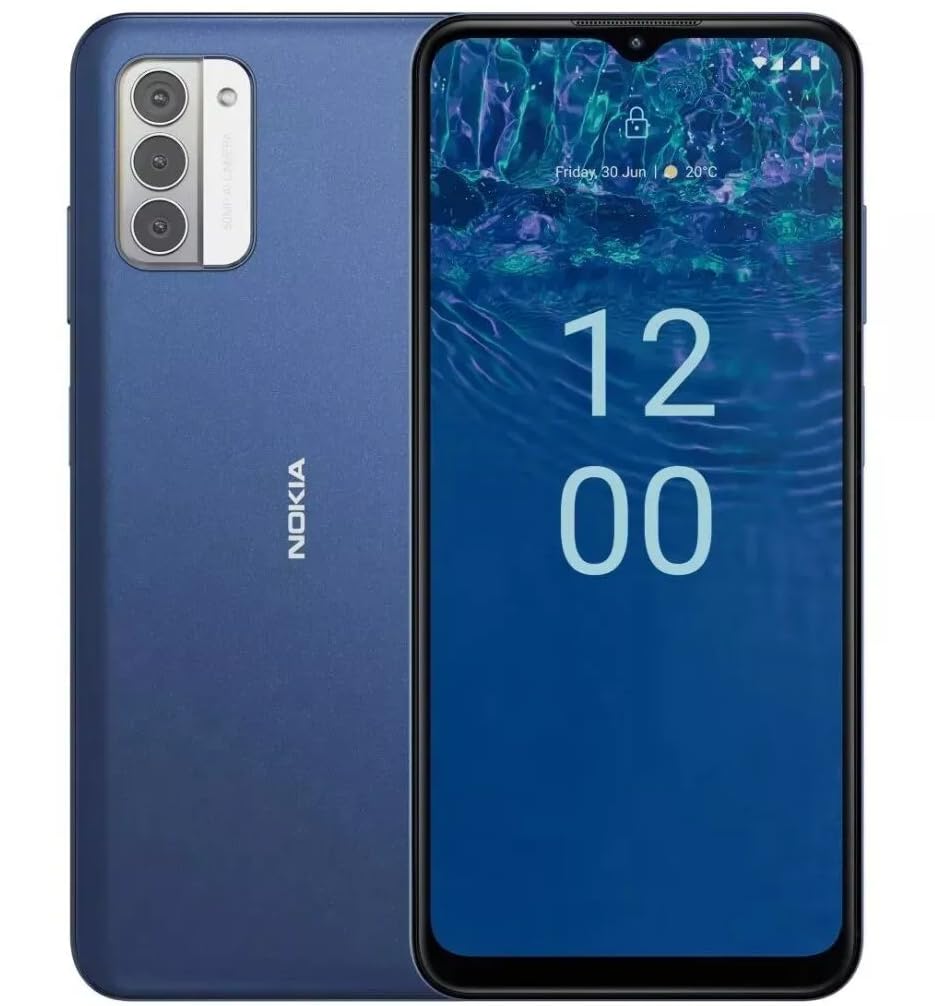
الصورة: الخلفية view of the Nokia G310 5G Smartphone, showcasing the triple camera module and Nokia branding.
الميزات الرئيسية
- اتصال 5G: Experience ultra-fast mobile data speeds and low latency.
- شاشة نابضة بالحياة: Large touchscreen display delivers vibrant colors and sharp visuals.
- الأداء الفعال: Processor handles everyday tasks smoothly, from browsing to gaming.
- تصميم متين: Sleek and modern smartphone design with durable construction.
2. البدء
ماذا يوجد في الصندوق
- هاتف نوكيا G310 5G الذكي
- شاحن
SIM and MicroSD Card Installation
Locate the SIM/MicroSD card tray on the side of your device. Use the provided SIM ejector tool to open the tray. Insert your Nano-SIM card(s) and/or MicroSD card into the designated slots. Ensure the cards are correctly oriented. Gently push the tray back into the device until it clicks into place.
تشغيل/إيقاف التشغيل
To power on your Nokia G310, press and hold the Power/Fingerprint Sensor button located on the right side of the device until the Nokia logo appears. To power off, press and hold the Power/Fingerprint Sensor button, then select 'Power off' from the options that appear on the screen.
3. تخطيط الجهاز
الأزرار والمنافذ المادية
- أزرار التحكم في الصوت: Located on the right side, above the Power/Fingerprint Sensor button, for adjusting media and call volume.
- Power/Fingerprint Sensor Button: Located on the right side, used for powering the device on/off, locking/unlocking the screen, and fingerprint authentication.
- منفذ USB-C: يقع في الجزء السفلي، ويستخدم للشحن ونقل البيانات.
- مقبس صوت 3.5 ملم: يقع في الجزء السفلي، لتوصيل سماعات الرأس السلكية.
- المتحدث: يوجد في الأسفل لإخراج الصوت.
- ميكروفون: مُدمج لإجراء المكالمات والأوامر الصوتية.
وحدة الكاميرا
The rear of the device features a multi-lens camera module, including a main camera, along with a flash for low-light photography. The front-facing camera is discreetly placed within a notch at the top of the display.
4. تعليمات التشغيل
الملاحة الأساسية
The Nokia G310 operates on the Android operating system, offering an intuitive touchscreen interface. Swipe up from the bottom of the screen to access the app drawer, swipe down from the top for notifications and quick settings, and use gestures or navigation buttons (configurable in settings) to move between apps and screens.
الاتصال
- بيانات الجيل الخامس الخلوية: The device supports 5G connectivity for ultra-fast mobile data speeds. Ensure your SIM card and plan support 5G.
- واي فاي: اتصل بالشبكات اللاسلكية للوصول إلى الإنترنت. انتقل إلى الإعدادات > الشبكة والإنترنت > Wi-Fi لإدارة الاتصالات.
- بلوتوث: Pair with other Bluetooth-enabled devices like headphones or speakers. Go to Settings > Connected devices > Bluetooth.
- نظام تحديد المواقع العالمي (GPS): Utilize built-in GPS for location services and navigation.
5. استخدام الكاميرا
The Nokia G310 features an advanced camera system designed to capture memorable moments. Access the camera app from your home screen or app drawer.
التقاط الصور
Open the Camera app, frame your shot, and tap the shutter button on the screen to take a picture. The advanced AI camera assists in optimizing settings for various scenes.
تسجيل مقاطع الفيديو
In the Camera app, switch to video mode, then tap the record button to start and stop recording. The phone supports various video resolutions.
أوضاع الكاميرا
Explore different camera modes available in the camera app, such as Portrait, Panorama, and Night mode, to enhance your photography experience.
6. إدارة البطارية
شحن جهازك
The Nokia G310 is equipped with a 5000 Milliamp Hours (5000.0 Battery Power Rating) battery. Connect the provided USB-C charger to the port at the bottom of the device. The phone supports quick charging for reduced downtime.
تحسين عمر البطارية
- ضبط سطوع الشاشة إلى المستوى المريح.
- قم بتمكين وضع توفير البطارية عندما تكون البطارية منخفضة.
- أغلق التطبيقات غير المستخدمة التي تعمل في الخلفية.
- قم بتعطيل Wi-Fi أو Bluetooth أو GPS عند عدم الاستخدام.
7. المواصفات الفنية
| رقم الموديل | TA-1573 |
| نظام التشغيل | أندرويد |
| نموذج وحدة المعالجة المركزية | ميدياتك هيليو P60T |
| تكنولوجيا الخلوية | 5G |
| شركة نقل لاسلكية | مفتوح |
| سعة تخزين الذاكرة | 4 جيجا بايت |
| دقة | 1080 × 2340 |
| مدخلات واجهة الإنسان | شاشة تعمل باللمس |
| سعة البطارية | 5000 مليamp ساعات |
| مقبس الصوت | 3.5 ملم |
| لون | أزرق |
| الشركة المصنعة | نوكيا |
| تاريخ أول توفر | 31 يناير 2025 |
8. استكشاف الأخطاء وإصلاحها
If you encounter issues with your Nokia G310, try the following common troubleshooting steps:
- الجهاز لا يستجيب: اضغط مع الاستمرار على زر الطاقة لمدة 10-15 ثانية لفرض إعادة التشغيل.
- مشاكل الاتصال: Toggle Wi-Fi or Bluetooth off and on. Restart your device. Check network settings.
- التطبيق لا يعمل: امسح ذاكرة التخزين المؤقت وبيانات التطبيق من الإعدادات > التطبيقات. إذا استمرت المشكلة، فألغِ تثبيت التطبيق وأعد تثبيته.
- استنزاف البطارية بسرعة: Review battery usage in Settings > Battery to identify power-hungry apps. Adjust screen brightness and enable Battery Saver.
- مساحة التخزين ممتلئة: حذف غير ضروري files, photos, or apps. Transfer media to a computer or cloud storage. Consider using a MicroSD card for additional storage.
9. الصيانة والعناية
- تنظيف: استخدم قطعة قماش ناعمة وخالية من الوبر لتنظيف جهازك. تجنب المواد الكيميائية القاسية أو المواد الكاشطة.
- تحديثات البرامج: Regularly check for and install software updates to ensure your device runs optimally and has the latest security features. Go to Settings > System > System update.
- ادارة التخزين: إعادة بشكل دوريview your device's storage to free up space and maintain performance.
- الظروف البيئية: Avoid exposing your device to extreme temperatures, direct sunlight, or excessive moisture.
10. الضمان والدعم
For warranty information, please refer to the warranty card included in your product packaging or visit the official Nokia support website. For further assistance, contact Nokia customer support.


