مقدمة
This manual provides essential information for the safe and efficient use of your Qubo X-10BL mobile phone. Designed with ease of use in mind, this phone is particularly suitable for elderly users, featuring a clear 2.4-inch screen, a robust design, and essential communication functions. Please read this manual thoroughly before operating your device.
المميزات الرئيسية:
- نموذج: X-10BL
- شاشة: 2.4-inch display (6.1 cm diagonal)
- كبش: 32 ميجا بايت
- بطارية: سعة 900 مللي أمبير
- الاتصال: بلوتوث
- الموانئ: 3.5mm Jack, Micro USB
- تصميم: Includes a protective cover
- لون: أزرق
المنتج انتهىview
The Qubo X-10BL is a compact and user-friendly mobile phone. Below is an image illustrating the device's general appearance.
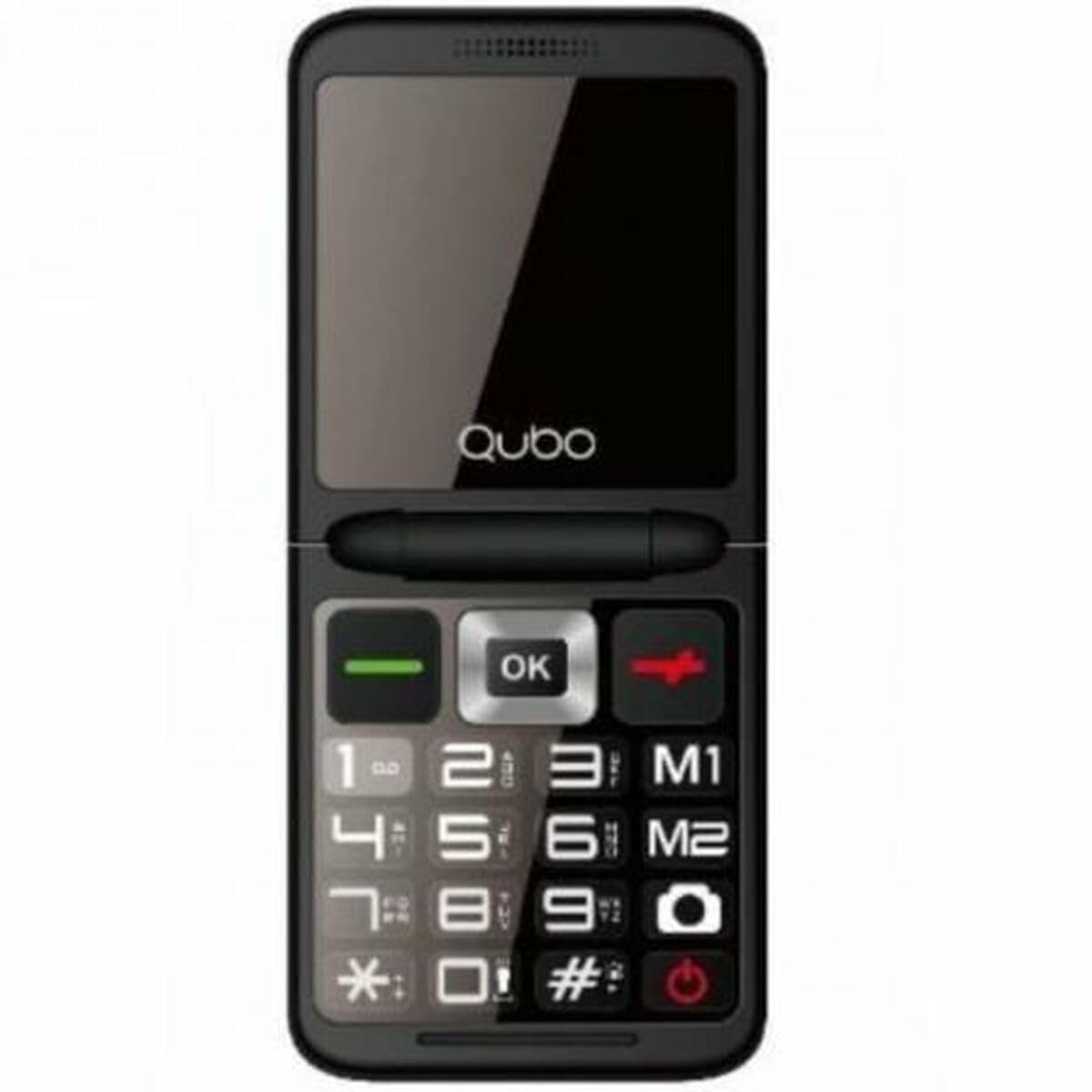
الشكل 1: أمام view of the Qubo X-10BL mobile phone. The image displays the phone in blue, featuring a clear screen, a numerical keypad, and navigation buttons. The phone is designed for straightforward operation.
Familiarize yourself with the phone's buttons and ports before proceeding with setup. Typically, these include a power button, call/end call buttons, navigation keys, a numerical keypad, and charging/headphone ports.
يثبت
1. Install SIM Card and Battery
- قم بإزالة الغطاء الخلفي للهاتف بعناية.
- أدخل شريحة SIM الخاصة بك في الفتحة المخصصة لها. تأكد من وضعها في الاتجاه الصحيح كما هو موضح في الرسم التوضيحي الموجود بجوار الفتحة.
- ضع البطارية في مكانها المخصص، مع محاذاة نقاط التلامس.
- أعد تركيب الغطاء الخلفي حتى يستقر في مكانه بشكل آمن.
2. قم بشحن الجهاز
- Connect the Micro USB cable to the charging port on your phone.
- Plug the other end of the cable into the provided European plug adapter, then into a wall outlet.
- Allow the phone to charge fully before first use. The charging indicator on the screen will show the battery status.
3. تشغيل/إيقاف التشغيل
- لتشغيل: اضغط مع الاستمرار على زر التشغيل/إنهاء المكالمة حتى تضيء الشاشة.
- لإيقاف التشغيل: Press and hold the Power/End Call button until the power-off options appear, then select 'Power Off' or continue holding until the device shuts down.
تعليمات التشغيل
إجراء واستقبال المكالمات
- لإجراء أتصال: Enter the phone number using the keypad and press the Call button (usually a green phone icon).
- للرد على مكالمة: When the phone rings, press the Call button.
- لإنهاء المكالمة: Press the End Call button (usually a red phone icon).
إرسال واستقبال الرسائل النصية القصيرة
- انتقل إلى قائمة "الرسائل".
- حدد "رسالة جديدة" أو "كتابة رسالة".
- أدخل رقم المستلم أو اختر من جهات الاتصال.
- اكتب رسالتك باستخدام لوحة المفاتيح.
- اضغط على "إرسال".
اتصال البلوتوث
The Qubo X-10BL supports Bluetooth for connecting to compatible devices such as headsets or other phones.
- انتقل إلى "الإعدادات" ثم "البلوتوث".
- قم بتشغيل البلوتوث.
- يختار 'بحث عن devices' or 'Pair new device'.
- Choose the desired device from the list and follow the on-screen prompts to pair.
Using the Phone Cover
The phone comes with a protective cover. Ensure the phone is securely placed within the cover to protect it from minor impacts and scratches. The cover may also feature cutouts for easy access to buttons and ports.
صيانة
تنظيف
- استخدم قطعة قماش ناعمة وجافة لتنظيف شاشة الهاتف وجسمه.
- تجنب استخدام المنظفات السائلة أو البخاخات أو المواد الكيميائية القاسية، لأنها قد تتلف الجهاز.
العناية بالبطارية
- لإطالة عمر البطارية، تجنب تعريض الهاتف لدرجات حرارة قصوى.
- لا تترك الهاتف يشحن لفترات طويلة للغاية بعد اكتمال شحنه.
- إذا لم يتم استخدام الهاتف لفترة طويلة، فقم بشحنه إلى حوالي 50% قبل تخزينه.
تخزين
قم بتخزين الهاتف في مكان بارد وجاف بعيدًا عن أشعة الشمس المباشرة والرطوبة عندما لا يكون قيد الاستخدام.
استكشاف الأخطاء وإصلاحها
If you encounter issues with your Qubo X-10BL, refer to the table below for common problems and solutions.
| مشكلة | السبب المحتمل | حل |
|---|---|---|
| الهاتف لا يعمل | انخفاض مستوى البطارية؛ البطارية غير مثبتة بشكل صحيح | Charge the battery; Reinstall the battery |
| لا توجد إشارة شبكة | SIM card issue; Out of network coverage | Check SIM card installation; Move to an area with better coverage |
| لا يمكن إجراء/استقبال المكالمات | No network; Incorrect number dialed; Call barring activated | Check network signal; Verify number; Check call settings |
| البطارية لا تشحن | Charger faulty; Charging port damaged | Try a different charger; Contact support if port is damaged |
تحديد
Detailed technical specifications for the Qubo X-10BL mobile phone.
| ميزة | التفاصيل |
|---|---|
| ماركة | كوبو |
| اسم الموديل | X-10BL |
| رقم موديل العنصر | س9914467 |
| نوع المنتج | شريط الهاتف |
| عامل الشكل | حاجِز |
| حجم الشاشة | 6.1 سنتيمترًا (2.4 بوصة) |
| حجم ذاكرة الوصول العشوائي المثبتة | 32 ميجا بايت |
| تكنولوجيا الشبكات اللاسلكية | بلوتوث |
| الشركة المصنعة | كوبو |
| بلد المنشأ | إسبانيا |
| تاريخ التوفر الأول على Amazon.com.be | 11 يناير 2025 |
| توافر قطع الغيار | المعلومات غير متوفرة |
| تحديثات البرامج مضمونة حتى | المعلومات غير متوفرة |
الضمان والدعم
للحصول على معلومات الضمان ودعم العملاء، يرجى الرجوع إلى الوثائق المرفقة مع عملية الشراء أو الاتصال بالبائع. احتفظ بإثبات الشراء لتقديم أي مطالبات ضمان.


