مقدمة
Thank you for choosing the Ourlife Mini Drone. This drone is equipped with dual 4K cameras, offering high-quality photo and video capture, and can be controlled via a smartphone app for real-time viewing. Designed for ease of use, it features one-button takeoff/landing, altitude hold, headless mode, and gesture control, making it suitable for beginners and enthusiasts alike. Its compact, foldable design ensures portability for all your adventures. Please read this manual carefully before operation to ensure safe and optimal performance.
إرشادات السلامة
Always prioritize safety when operating your drone. Failure to follow these guidelines may result in injury, damage to property, or legal issues.
- اقرأ الدليل: Fully understand all instructions and warnings before first flight.
- مساحة مفتوحة: Always fly in open, unobstructed areas, away from people, animals, buildings, and power lines. Avoid flying in strong winds.
- خط البصر: حافظ على خط الرؤية البصري مع الطائرة بدون طيار في جميع الأوقات.
- سلامة البطارية: Use only original batteries and charging cables. Do not overcharge or short-circuit batteries. Discontinue use if batteries are damaged or swollen.
- سلامة المروحة: Keep fingers, hair, and loose clothing away from rotating propellers. Always turn off the drone before handling propellers.
- قيود العمر: يوصى بهذا المنتج للمستخدمين الذين تبلغ أعمارهم 14 عامًا أو أكثر.
- الامتثال القانوني: Be aware of and comply with local laws and regulations regarding drone operation.
محتويات الحزمة
تأكد من وجود جميع العناصر في الحزمة الخاصة بك:

Image: Contents of the Ourlife Mini Drone package, showing the drone, remote control, two rechargeable batteries, a screwdriver, four protective frames, four main propellers, a USB charging cable, and an instruction manual.
- Ourlife Mini Drone x 1
- جهاز التحكم عن بعد × 1
- Rechargeable Drone Battery x 2
- مفك البراغي x 1
- Protective Frame x 4
- Main Propeller x 4 (spare)
- كابل شحن USB × 1
- دليل التعليمات × 1
Note: The remote control requires 3 AAA batteries, which are not included.
المنتج انتهىview
Familiarize yourself with the drone and remote control components.

Image: The Ourlife Mini Drone in its unfolded state, alongside its remote control, two drone batteries, and the drone in its folded, compact form.
مكونات الطائرات بدون طيار
- أذرع قابلة للطي: للتخزين المدمج وسهولة الحمل.
- مراوح: Four main propellers for flight.
- كاميرات مزدوجة: Front 4K camera (120° adjustable) and bottom optical flow lens for stable flight and diverse shooting angles.
- حجرة البطارية: Located at the rear of the drone.
- أضواء LED: Indicate drone status and orientation.

الصورة: عن قرب view of the Ourlife Mini Drone's dual camera system, highlighting the adjustable front camera and the lower lens for stable flight. The front camera can be adjusted by 120 degrees.
تخطيط التحكم عن بعد
- عصا التحكم اليسرى: يتحكم في الارتفاع (أعلى/أسفل) والدوران (يسار/يمين).
- عصا التحكم اليمنى: يتحكم في الحركة للأمام/للخلف ولليسار/لليمين.
- زر الإقلاع/الهبوط بمفتاح واحد: يبدأ عملية الإقلاع أو الهبوط التلقائي.
- زر وضع مقطوعة الرأس: Activates/deactivates headless mode.
- زر تبديل السرعة: Toggles between different flight speeds (low, medium, high).
- زر قلب بزاوية 360 درجة: Executes a 360-degree flip.
- حامل الهاتف: For mounting your smartphone to view FPV feed.
يثبت
1. شحن بطارية الطائرة بدون طيار
- قم بتوصيل كابل الشحن USB ببطارية الطائرة بدون طيار.
- Plug the USB end into a 5V/1A USB adapter (not included) or a computer USB port.
- The indicator light on the cable will show charging status. It will turn off or change color when fully charged.
2. Installing Drone Battery
- تأكد من إيقاف تشغيل الطائرة بدون طيار.
- Insert the charged battery into the battery compartment at the rear of the drone until it clicks into place.
3. تركيب بطاريات جهاز التحكم عن بعد
- افتح حجرة البطارية الموجودة في الجزء الخلفي من جهاز التحكم عن بعد.
- Insert 3 AAA batteries (not included) according to the polarity markings.
- أغلق غطاء حجرة البطارية جيدًا.
4. Attaching Propeller Guards
- Carefully attach the four protective frames to each motor arm of the drone.
- Ensure they are securely fastened to prevent detachment during flight.
5. App Installation (KY UFO)
- Scan the QR code provided in the manual or search for "KY UFO" in your smartphone's app store (App Store for iOS, Google Play for Android).
- قم بتحميل وتثبيت التطبيق.
- Turn on the drone, then go to your phone's Wi-Fi settings and connect to the drone's Wi-Fi network (usually named "KY-UFO-XXXXXX").
- Open the KY UFO app to access the real-time FPV feed and advanced controls.
تعليمات التشغيل
1. إقران الطائرة بدون طيار وجهاز التحكم عن بعد
- ضع الطائرة بدون طيار على سطح مستوٍ ومستوٍ.
- قم بتشغيل مفتاح الطاقة الخاص بالطائرة بدون طيار. ستومض أضواء المؤشر الخاصة بالطائرة.
- قم بتشغيل جهاز التحكم عن بعد.
- Push the left joystick all the way up, then pull it all the way down. The drone's lights will stop flashing and remain solid, indicating successful pairing.
2. أدوات التحكم الأساسية في الطيران
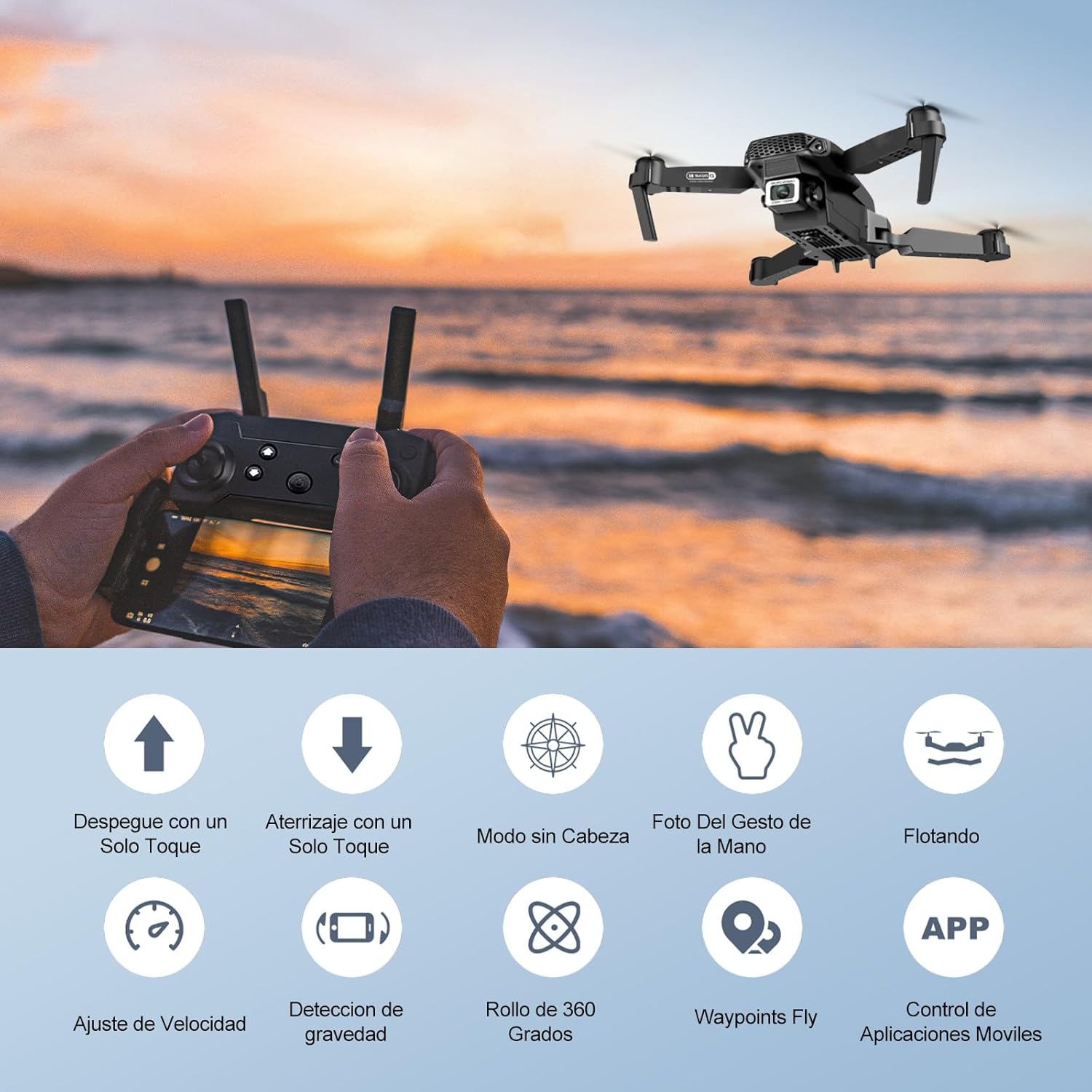
Image: Icons representing various flight features: One-touch takeoff, One-touch landing, Headless Mode, Hand Gesture Photo, Floating (Altitude Hold), Speed Adjustment, Gravity Detection, 360 Degree Roll, Waypoints Fly, and APP Control.
- انطلاق بمفتاح واحد: اضغط على الإقلاع/الهبوط بمفتاح واحد button. The drone will automatically ascend and hover at a certain altitude.
- هبوط بمفتاح واحد: اضغط على الإقلاع/الهبوط بمفتاح واحد button again. The drone will automatically descend and land.
- تثبيت الارتفاع: تحافظ الطائرة بدون طيار على ارتفاعها الحالي تلقائيًا، مما يسمح بالتحليق المستقر.
- عصا التحكم اليسرى (الخانق/الانحراف):
- ادفع لأعلى/لأسفل: لزيادة/تقليل الارتفاع.
- Push left/right: Rotate drone left/right.
- Right Joystick (Forward/Backward/Sideways):
- Push up/down: Fly forward/backward.
- Push left/right: Fly left/right (strafe).

Image: The Ourlife Mini Drone taking off or landing with a single button press, illustrating the ease of use for beginners.
3. ميزات الطيران المتقدمة
- الوضع بدون رأس: اضغط على الوضع بدون رأس button. In this mode, the drone's orientation is relative to the pilot, regardless of the drone's actual front. This simplifies control, especially for beginners.
- الوجه 360 درجة: Fly the drone to a height of at least 2 meters. Press the قلب 360 درجة button, then push the right joystick in any direction to perform a flip in that direction.
- Gesture Control (Photos/Videos): With the KY UFO app open, make specific hand gestures in front of the drone's camera to trigger photo or video recording.
- "V" Gesture: Triggers photo capture.
- إيماءة الكف: Triggers video recording.
- نقطة مسار الرحلة: In the KY UFO app, draw a desired flight path on your smartphone screen. The drone will automatically follow this path.
- تعديل السرعة: اضغط على مفتاح السرعة button to cycle through low, medium, and high-speed modes. Adjust according to your skill level and environmental conditions.
- نقل البيانات في الوقت الحقيقي بتقنية FPV: Connect your smartphone to the drone's Wi-Fi. Open the KY UFO app to view live video feed from the drone's camera on your phone screen.
- الحث بالجاذبية: In the KY UFO app, activate gravity induction mode. You can then control the drone's movement by tilting your smartphone.

Image: The Ourlife Mini Drone performing a 360-degree flip in the air and demonstrating the Waypoints Fly feature, where the drone follows a pre-drawn path.

Image: Demonstrates 1080P FPV Real-Time Transmission, showing a live view from the drone. Also illustrates gesture control for taking photos (V-sign) and recording videos (palm gesture), and the 120-degree adjustable camera angle.
صيانة
- تنظيف: استخدم قطعة قماش ناعمة وجافة لتنظيف الطائرة بدون طيار وجهاز التحكم عن بُعد. لا تستخدم مواد كيميائية أو مذيبات قاسية.
- استبدال المروحة: If propellers are damaged, replace them with spare ones provided. Ensure correct propeller (A or B) is installed on the corresponding motor.
- العناية بالبطارية: Store batteries in a cool, dry place. Do not store fully charged or completely depleted batteries for extended periods. Charge them to about 50% for long-term storage.
- تخزين: When not in use, store the drone and its accessories in a safe, dry place, away from direct sunlight and extreme temperatures.
استكشاف الأخطاء وإصلاحها
| مشكلة | السبب المحتمل | حل |
|---|---|---|
| الطائرة بدون طيار لا تستجيب للتحكم عن بعد. | Not paired; low battery (drone/remote); interference. | Re-pair drone and remote. Charge batteries. Move to an area with less interference. |
| انجرافات الطائرة بدون طيار أثناء الطيران. | Not calibrated; uneven surface at takeoff; wind. | Calibrate the gyroscope (refer to app instructions). Take off from a flat surface. Avoid flying in windy conditions. |
| Camera feed is not showing in app. | Not connected to drone Wi-Fi; app issue. | Ensure phone is connected to the drone's Wi-Fi network. Restart the app and drone. |
| وقت الرحلة قصير. | البطارية غير مشحونة بالكامل؛ البطارية قديمة. | Ensure battery is fully charged before flight. Consider replacing old batteries. |
| تتحطم الطائرات بدون طيار بسهولة. | Lack of experience; strong wind; damaged propellers. | Practice in open areas. Avoid strong winds. Replace damaged propellers. |
تحديد

Image: Diagram showing the dimensions of the Ourlife Mini Drone (unfolded and folded) and its remote control in inches.
| ميزة | التفاصيل |
|---|---|
| ماركة | Ourlإيف |
| رقم الموديل | AF-E88-BK |
| وزن المنتج | 430 جرام (حوالي 0.95 رطل) |
| أبعاد المنتج (بعد التوسيع) | 28 × 22 × 5 سم (تقريبًا 11 × 8.7 × 2 بوصة) |
| أبعاد المنتج (مطوية) | 12.5 × 8.1 × 5.3 سم (تقريبًا 4.9 × 3.2 × 2.1 بوصة) |
| نوع البطارية | ليثيوم أيون (2 متضمنة) |
| دقة التقاط الفيديو | 4K (Dual Cameras) |
| تكنولوجيا الاتصال | واي فاي |
| طريقة التحكم | جهاز تحكم عن بعد، تطبيق للهواتف الذكية |
| لون | أسود |
الضمان والدعم
Ourlife provides post-sale warranty support for this product. If you encounter any issues with the drone, remote control, or the KY UFO application during flight or operation, please do not hesitate to contact the seller directly for assistance.
For optimal performance and to minimize potential issues, it is recommended to conduct initial flight tests in an open space, especially when using the propeller protectors. Please note that wind interference may occur when operating outdoors.


