1. المقدمة
شكرا لك على الشراءasing the Homary Modern Narrow White Nightstand. This manual provides detailed instructions for assembly, operation, maintenance, and troubleshooting to ensure safe and efficient use of your new nightstand. Please read this manual thoroughly before assembly and use, and retain it for future reference.

Image 1: Homary Modern Narrow White Nightstand, showcasing its design and features like the USB port and sensor light.
2. معلومات السلامة
Caution: This product requires assembly. Follow the instructions carefully to avoid injury.
- قم دائمًا بتجميع المنتج على سطح ناعم ونظيف لمنع الخدوش.
- تأكد من ربط جميع البراغي وأدوات التثبيت بشكل آمن قبل الاستخدام.
- لا تقم بتحميل الأدراج أو الأرفف بشكل زائد.
- احتفظ بالأجزاء الصغيرة بعيدًا عن متناول الأطفال أثناء التجميع.
- لا تقف أو تتسلق على المنضدة الجانبية.
- Disconnect from power outlet before cleaning or moving the unit.
3. محتويات العبوة
قبل البدء بالتجميع، تأكد من وجود جميع الأجزاء المذكورة أدناه وسلامتها. في حال وجود أي أجزاء مفقودة أو تالفة، يُرجى التواصل مع خدمة العملاء.
- Nightstand panels (top, bottom, sides, back)
- مكونات الدرج (الأمام، الخلف، الجوانب، الأسفل)
- شرائح الأدراج
- وحدة شحن USB
- Sensor light module
- Nightlight module
- مجموعة أدوات التثبيت (براغي، دبابيس، أقفال كامة، إلخ).
- Wheels (pre-installed or separate)
- دليل التعليمات
4. تعليمات التجميع
Assembly typically requires two people. Please follow the step-by-step diagrams provided in the separate assembly guide included in your package. The following tools are recommended for assembly:
- Allen Key (often included)
- مطرقة
- مفك البراغي (رأس فيليبس)
- وجع
خطوات الجمعية العامة:
- قم بفك جميع المكونات وتحقق منها وفقًا لقائمة الأجزاء.
- Attach drawer slides to the side panels of the nightstand.
- Assemble the main frame of the nightstand (side panels, top, bottom, back).
- Assemble the drawers and install them onto the drawer slides.
- Install the USB charging module into the designated slot on the top panel.
- Install the sensor light module within the drawer area.
- Install the nightlight module on the top surface.
- Connect all electrical components as per the wiring diagram in the assembly guide.
- Ensure all connections are secure and all fasteners are tightened.
5. تعليمات التشغيل
5.1. منفذ شحن USB
The nightstand is equipped with a built-in USB charging station. To use:
- Plug the nightstand's main power cord into a standard wall outlet.
- Connect your electronic devices (e.g., smartphone, tablet) to the USB ports using their respective charging cables.
- Ensure devices are charging correctly.

Image 2: Close-up of the nightstand's top surface showing a smartphone charging via the integrated USB port.
5.2. Sensor Light for Drawers
The drawers feature an automatic sensor light that illuminates when the drawer is opened, providing visibility for stored items.
- The sensor light activates automatically when the drawer is pulled open.
- The light will turn off automatically when the drawer is closed.
- No manual operation is required for the drawer sensor light.

Image 3: An open drawer of the nightstand, showing the sensor light illuminating the interior.
5.3. Top Nightlight with Switch
A nightlight is integrated into the top surface of the nightstand, providing a gentle ambient glow. It is operated by a manual switch.
- Locate the switch on the nightlight module on the top surface.
- Press the switch to turn the nightlight ON or OFF.

Image 4: Illustration of both the top nightlight with its switch and the sensor light within the drawer.
6. الصيانة
- تنظيف: مسح الأسطح بمادة ناعمة، دamp القماش. تجنب المواد الكيميائية القاسية أو المنظفات الكاشطة.
- الغبار: قم بتنظيفه بانتظام بقطعة قماش جافة وناعمة.
- الانسكابات: Immediately wipe up any spills to prevent staining, especially on the wood surfaces. The product is not stain resistant.
- المثبتات: افحص جميع البراغي وأدوات التثبيت دوريًا للتأكد من إحكامها. أعد ربطها إذا لزم الأمر.
- المكونات الكهربائية: Ensure the power cord and USB ports are free from damage. Do not attempt to repair electrical components yourself.
7. استكشاف الأخطاء وإصلاحها
| مشكلة | السبب المحتمل | حل |
|---|---|---|
| منافذ USB لا تشحن. |
|
|
| Drawer sensor light not working. |
|
|
| Top nightlight not turning on. |
|
|
| الأدراج صلبة أو يصعب فتحها/إغلاقها. |
|
|
8. المواصفات
| ميزة | التفاصيل |
|---|---|
| ماركة | هوماري |
| رقم الموديل | JJ763B905B |
| الأبعاد (العرض × العمق × الارتفاع) | 17W x 17D x 23H inches (Approx. 43.2W x 43.2D x 58.4H cm) |
| مادة الإطار | خشب |
| نوع المادة العلوية | خشب |
| لون | White (Off-White) |
| عدد الأدراج | 2 |
| ميزات الشحن | منفذ USB مدمج |
| ميزات الإضاءة | Sensor Light for Drawers, Top Nightlight with Switch |
| الحركة | Hidden Wheels for Smooth Movement |
| الاستدامة | FSC-certified wood |
| مقاوم البقع | لا |
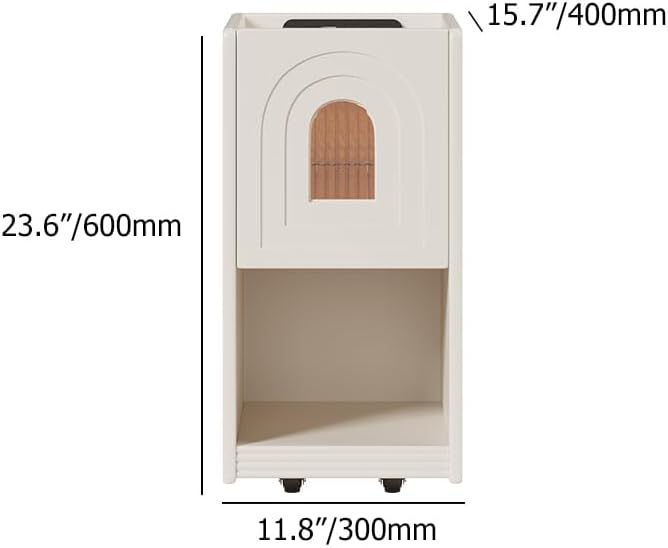
Image 5: Diagram illustrating the dimensions of the nightstand (23.6" H x 11.8" W x 15.7" D).

الصورة 6: عن قرب view of the hidden wheels at the base of the nightstand, indicating easy mobility.
9. الضمان والدعم
Homary products are designed for quality and durability. For warranty information, please refer to the warranty card included with your product or visit the official Homary website. For any questions, missing parts, or technical support, please contact Homary customer service:
- بريد إلكتروني: service@homary.com
- وقت الخدمة: Reply within 24 hours (excluding public holidays).
- Please provide your order number when contacting customer service.


