1. المقدمة
Thank you for choosing the Defender Enjoy S200 Portable Bluetooth Speaker. This manual provides essential information for setting up, operating, and maintaining your speaker to ensure optimal performance and longevity. Please read this manual thoroughly before use.
The Defender Enjoy S200 is a versatile portable speaker featuring Bluetooth 5.3 connectivity, True Wireless Stereo (TWS) pairing, an integrated FM radio, and MP3 playback capabilities via USB flash drive or microSD card. It also includes an LED light and supports hands-free calling. Designed for portability, it offers up to 9 hours of playback on a single charge and convenient USB Type-C charging.
2. انتهى المنتجview
2.1 الميزات الرئيسية
- بلوتوث شنومكس: لبث صوتي لاسلكي مستقر وفعال.
- ستيريو لاسلكي حقيقي (TWS): Connect two Enjoy S200 speakers for a stereo sound experience.
- أوضاع التشغيل المتعددة: Bluetooth, FM Radio, USB Flash Drive, MicroSD Card (up to 32GB).
- ضوء LED متكامل: Provides visual ambiance.
- الاتصال بدون استخدام اليدين: ميكروفون مدمج للمكالمات الهاتفية.
- عمر بطارية طويل: Up to 9 hours of continuous music playback.
- شحن USB من النوع C: منفذ شحن حديث ومريح.
- تصميم محمول: Compact and lightweight with a carrying strap.
2.2 محتويات العبوة
- Defender Enjoy S200 Portable Bluetooth Speaker
- كابل شحن من النوع C
- دليل البدء السريع
- حزام الحمل

Image: The Defender Enjoy S200 Portable Bluetooth Speaker, showcasing its compact design and front grille with an illuminated LED ring.

Image: An infographic highlighting key features such as multi-colored LED lighting, True Wireless Stereo (TWS) pairing, Bluetooth 5.3, MP3 player, FM receiver, and hands-free calling.
3. الإعداد
3.1 شحن السماعة
- Locate the Type-C charging port on the back of the speaker.
- Connect the provided Type-C charging cable to the speaker and the other end to a USB power adapter (not included) or a computer's USB port.
- The LED indicator will show charging status. A full charge typically takes approximately 3-4 hours.
- افصل الكابل بعد شحنه بالكامل.
3.2 تشغيل/إيقاف التشغيل
- To power on, slide the ON/OFF switch located on the back of the speaker to the 'ON' position.
- لإيقاف التشغيل، حرك مفتاح التشغيل/الإيقاف إلى وضع "إيقاف التشغيل".
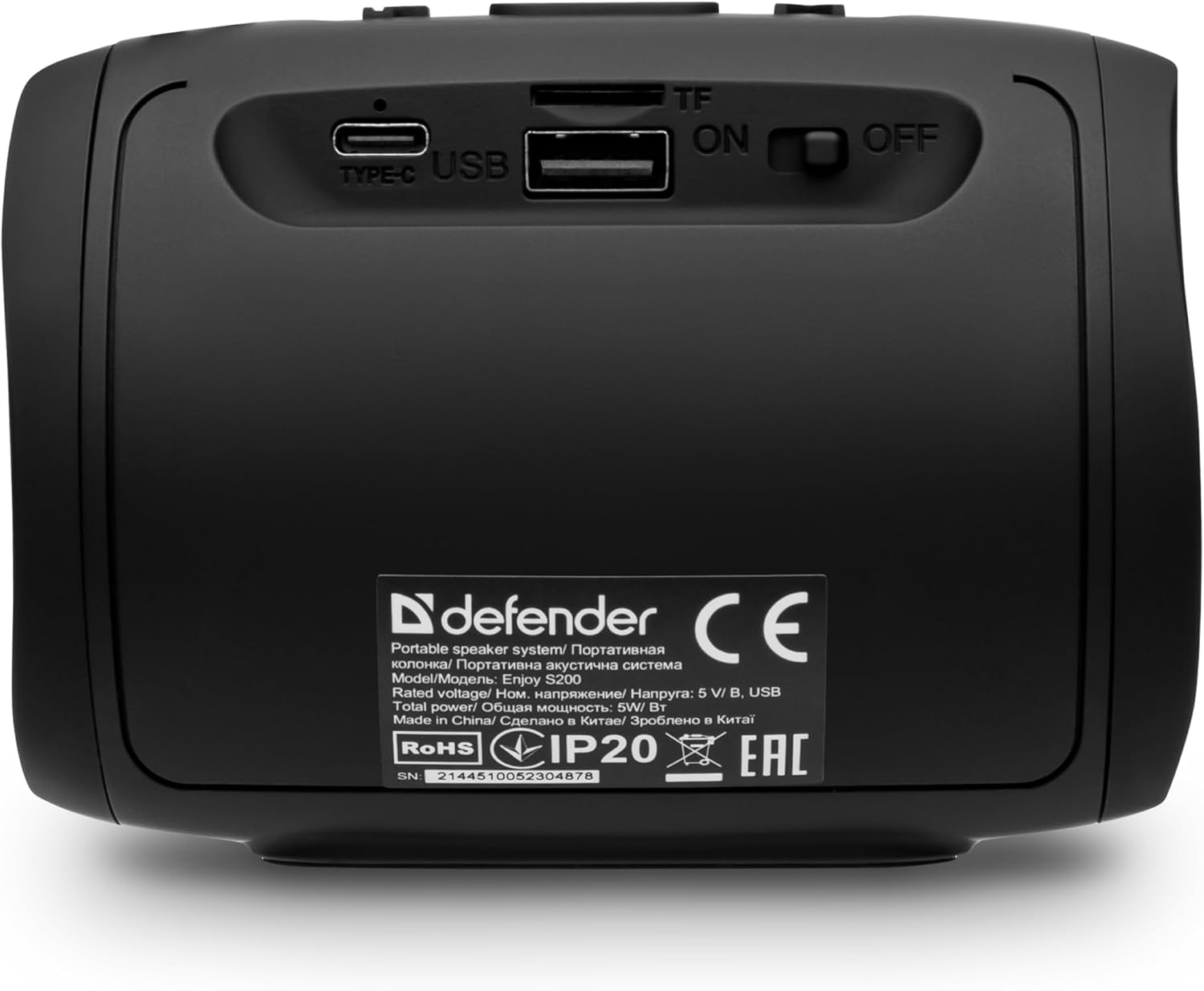
الصورة: الخلفية view of the Defender Enjoy S200 speaker, showing the Type-C charging port, USB port, TF (microSD) card slot, and the ON/OFF power switch.
3.3 اقتران بلوتوث
- تأكد من تشغيل مكبر الصوت ووضع الاقتران عبر البلوتوث (يُشار إلى ذلك بواسطة مؤشر LED وامض).
- على جهازك (الهاتف الذكي، الجهاز اللوحي، وما إلى ذلك)، قم بتمكين البلوتوث وابحث عن الأجهزة المتاحة.
- Select "Defender Enjoy S200" from the list of devices.
- بمجرد الاقتران، سيصدر مكبر الصوت صوت تأكيد، وسيتوقف مؤشر LED عن الوميض.
3.4 إقران ستيريو لاسلكي حقيقي (TWS)
To pair two Defender Enjoy S200 speakers for stereo sound:
- تأكد من تشغيل كلا السماعتين وعدم توصيلهما بأي جهاز بلوتوث.
- On one speaker (this will be the primary speaker), press and hold the TWS button (often indicated by a double-arrow icon) until you hear a pairing tone.
- The two speakers will automatically search and connect to each other. A confirmation tone will sound once connected.
- الآن، وصّل جهازك بالسماعة الرئيسية عبر البلوتوث كما هو موضح في القسم 3.3. سيتم تشغيل الصوت بصوت ستيريو عبر كلتا السماعتين.

Image: A visual representation of two Defender Enjoy S200 speakers pairing wirelessly to create a True Wireless Stereo system, alongside icons for Bluetooth 5.3, MP3 player, FM receiver, and hands-free calling.
4. تعليمات التشغيل
4.1 Button Functions (Refer to top panel controls)
- زر الطاقة: Long press to power on/off. Short press to play/pause in music mode, or answer/end calls.
- رفع الصوت (+): اضغط ضغطة قصيرة لزيادة مستوى الصوت. اضغط ضغطة طويلة للانتقال إلى المقطع/المحطة التالية.
- اخفض الصوت (-): ضغطة قصيرة لخفض مستوى الصوت. ضغطة طويلة للعودة إلى المقطع/المحطة السابقة.
- زر الوضع (M): Short press to switch between Bluetooth, FM Radio, USB, and MicroSD modes.
- زر ضوء LED: Short press to cycle through LED light modes or turn off the LED.
4.2 تشغيل البلوتوث
After successful Bluetooth pairing (Section 3.3), open your music application on your device and begin playback. Use the speaker's volume buttons or your device's volume controls to adjust the audio level.
4.3 وضع راديو FM
- Press the 'M' (Mode) button until you hear the FM radio prompt.
- اضغط مطولاً على زر التشغيل/الإيقاف المؤقت لمسح وحفظ محطات FM المتاحة تلقائيًا.
- استخدم زري رفع الصوت (+) وخفض الصوت (-) (بالضغط المطول) للتنقل بين المحطات المحفوظة.
4.4 USB/MicroSD Playback
- Insert a USB flash drive or a microSD card (up to 32GB) containing MP3 audio files into the respective port on the back of the speaker.
- Press the 'M' (Mode) button until the speaker automatically switches to USB or MicroSD mode and begins playback.
- Use the speaker's control buttons for play/pause, next track, and previous track.
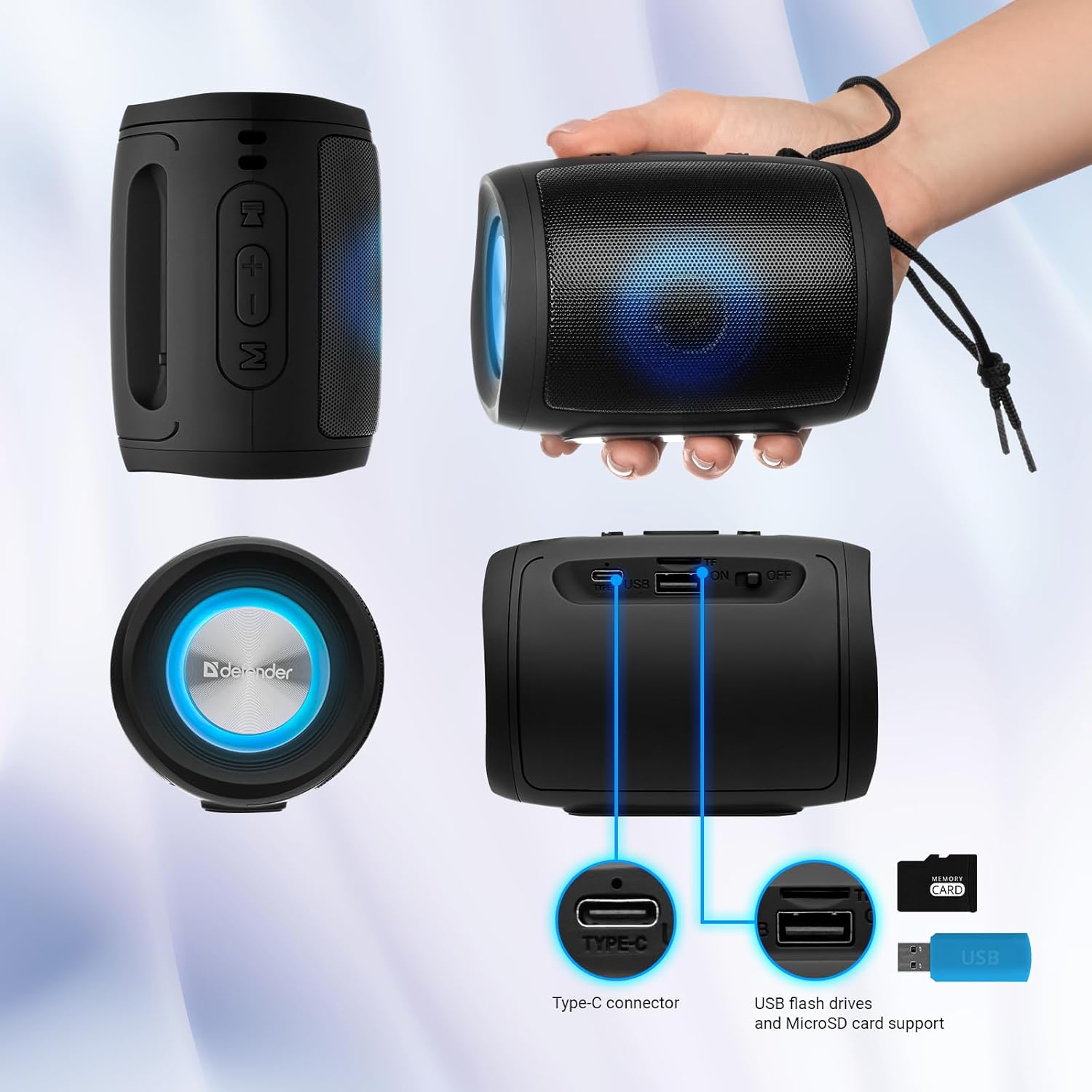
Image: A detailed diagram illustrating the Type-C connector, USB flash drive port, and MicroSD card slot on the Defender Enjoy S200 speaker.
4.5 الاتصال بدون استخدام اليدين
When connected to your smartphone via Bluetooth, the speaker's built-in microphone allows for hands-free calls.
- الرد على المكالمة: اضغط قصيرًا على زر التشغيل / الإيقاف المؤقت.
- إنهاء المكالمة: اضغط قصيرًا على زر التشغيل / الإيقاف المؤقت.
- رفض المكالمة: اضغط لفترة طويلة على زر التشغيل/الإيقاف المؤقت.
5. الصيانة
- تنظيف: استخدم قطعة قماش ناعمة وجافة لتنظيف سطح مكبر الصوت. لا تستخدم منظفات أو مذيبات كاشطة.
- تخزين: قم بتخزين مكبر الصوت في مكان بارد وجاف بعيدًا عن أشعة الشمس المباشرة ودرجات الحرارة القصوى.
- مقاومة الماء: The speaker has an IP20 rating, meaning it is protected against solid objects larger than 12.5mm but has no protection against water. Avoid exposure to rain, splashes, or immersion in water.
- العناية بالبطارية: لإطالة عمر البطارية، اشحن السماعة بالكامل قبل الاستخدام الأول، وأعد شحنها مرة واحدة على الأقل كل ثلاثة أشهر إذا لم يتم استخدامها بانتظام.
6. استكشاف الأخطاء وإصلاحها
- لا يوجد طاقة: Ensure the speaker is charged. Connect the Type-C cable and allow it to charge for a few minutes before attempting to power on again.
- لا يوجد صوت: Check the volume levels on both the speaker and your connected device. Ensure the speaker is in the correct mode (Bluetooth, FM, USB, MicroSD).
- مشكلات الاقتران بالبلوتوث: Ensure the speaker is in pairing mode. Turn off Bluetooth on your device and turn it back on. Try unpairing and re-pairing the speaker. Move closer to the speaker to ensure you are within the 10-meter range.
- استقبال راديو FM ضعيف: Ensure you are in an area with good signal. The charging cable can sometimes act as an antenna; try connecting it for improved reception.
- USB/MicroSD Not Playing: تأكد من الصوت files are in a compatible format (e.g., MP3). Check that the USB drive or microSD card is inserted correctly and is not corrupted.
7. المواصفات
| اسم الموديل | استمتع بـ S200 |
| رقم موديل العنصر | 65200 |
| ماركة | المدافع |
| تكنولوجيا الاتصال | بلوتوث 5.3، يو اس بي |
| تكنولوجيا الاتصالات اللاسلكية | بلوتوث، ترددات الراديو |
| نوع السماعة | الوسائط المتعددة |
| حجم السماعة | 2 بوصة |
| انتاج الطاقة | 5 واط |
| وضع إخراج الصوت | ستيريو |
| مصدر الطاقة | يعمل بالبطارية (بطارية ليثيوم أيون واحدة متضمنة) |
| المميزات الخاصة | Integrated Microphone, USB Port, Portable Bluetooth, LED Light, FM Radio, MicroSD Card Support, TWS |
| أبعاد المنتج (الطول × العرض × الارتفاع) | 8 × 11 × 8 سم |
| وزن | 330 جرام |
| الحد الأقصى للمدى | 10 مترا |
| تصنيف IP | IP20 |
8. الضمان والدعم
8.1 معلومات الضمان
يتم توفير تفاصيل الضمان المحددة عادةً مع وثائق الشراء الخاصة بك أو على الموقع الرسمي للشركة المصنعة website. Please refer to these resources for information regarding warranty coverage and duration.
8.2 دعم العملاء
For technical assistance, troubleshooting beyond this manual, or inquiries about your Defender Enjoy S200 speaker, please contact Defender Global customer support. Contact information can usually be found on the product packaging, the manufacturer's webالموقع أو إيصال الشراء الخاص بك.


