1. المقدمة وما فوقview
Thank you for choosing the FENGE Dual Monitor Stand with Drawers. This manual provides essential information for the safe and effective assembly, operation, and maintenance of your new monitor stand. Designed to elevate your monitors to an ergonomic viewing height, this stand also offers integrated storage solutions to help organize your workspace.
The FENGE Dual Monitor Stand is a versatile accessory suitable for various setups, including dual monitor configurations, single large monitors, laptops, printers, and even as a TV stand. Its robust construction and adjustable features are designed to enhance your comfort and productivity.
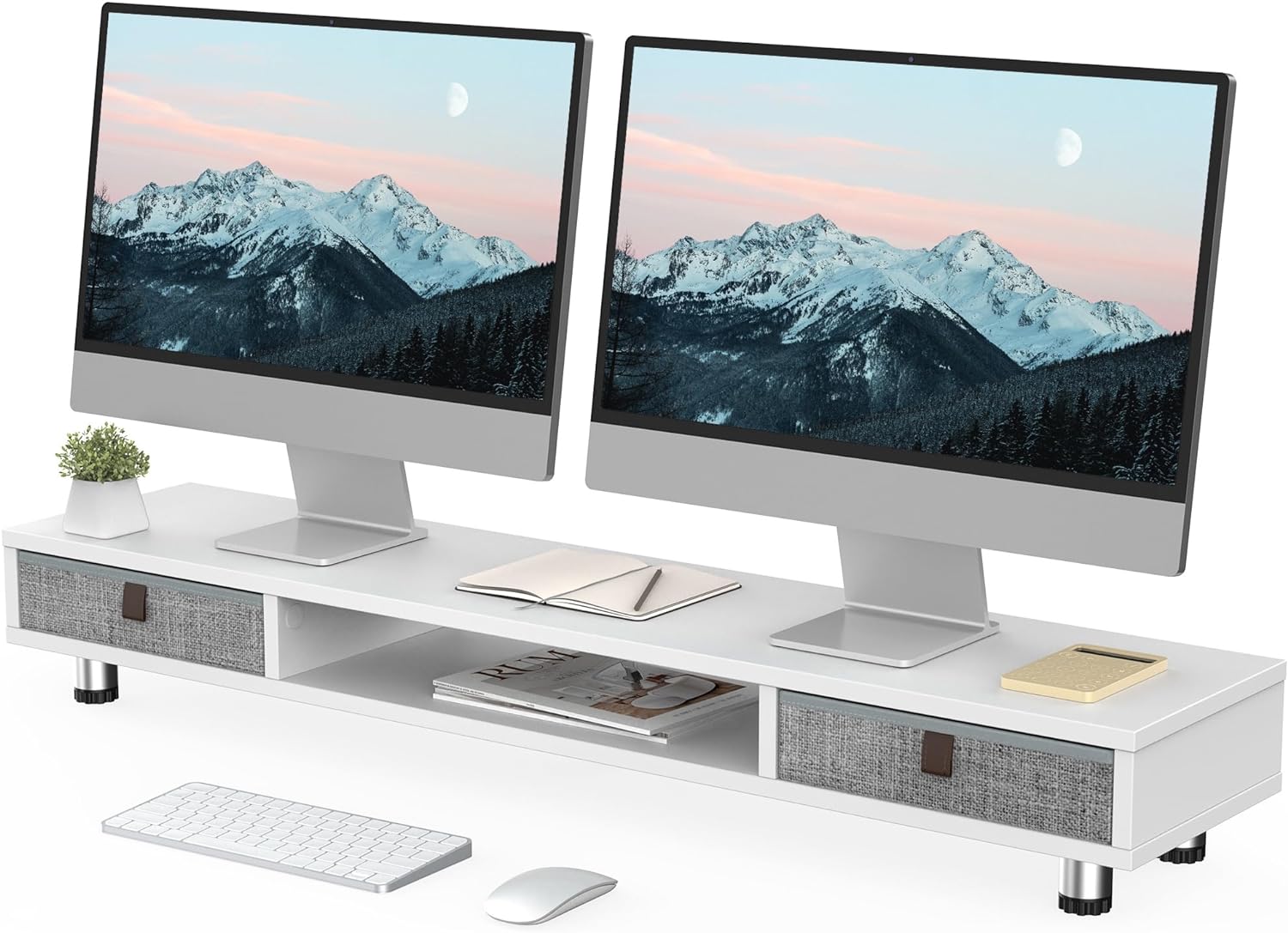
Image 1.1: FENGE Dual Monitor Stand in a typical dual monitor setup, showcasinج- تصميمه ووظائفه.

Image 1.2: Visual representation of the stand's benefits: improved desktop organization, ergonomic monitor elevation, and support for cervical spine health.
2. الإعداد والتجميع
The FENGE Dual Monitor Stand requires minimal assembly. Please follow these steps carefully to ensure proper setup.
- فك مكونات الحزمة: Carefully remove all parts from the packaging. Verify that all components are present according to the included parts list (not provided in this manual).
- ربط الأرجل: Position the main board on a soft, clean surface to prevent scratches. Attach the adjustable legs to the designated points on the underside of the board using the provided screws. Ensure they are securely fastened.
- إدراج الأدراج: Slide the fabric drawers into their respective compartments on the stand.
- ضبط الارتفاع: Once assembled, place the stand on your desk. Adjust the height of the stand by rotating the anti-slip foot mats on the bottom of each leg. Turn clockwise to raise and counter-clockwise to lower. Ensure all legs are adjusted to an even height for stability.

Image 2.1: Detail of the stand's construction, highlighting the sturdy board, solid legs, and adjustable feet for height customization.

Image 2.2: The adjustable foot mechanism allows for precise height tuning.
3. تعليمات التشغيل
Using your FENGE Dual Monitor Stand is straightforward. Follow these guidelines for optimal use.
- Placement of Monitors/Devices: Carefully place your monitors, laptop, printer, or TV on the top surface of the stand. Ensure the weight is evenly distributed and does not exceed the maximum load capacity of 99 lbs (45 kg).
- استخدام أدراج التخزين: The two slide-out fabric drawers are designed for storing small office supplies such as pens, sticky notes, mobile devices, and cables. Gently pull the leather handle to open and push to close.
- Central Compartment: The open central compartment provides additional space for items like notebooks, tablets, or a keyboard when not in use, helping to keep your desk tidy.
- تحديد المواقع مريح: Adjust the stand's height using the adjustable feet to achieve a comfortable eye level for your monitors. This helps reduce neck and eye strain during prolonged use.

Image 3.1: The practical slide-out drawers offer convenient storage for small items, keeping your workspace clutter-free.

Image 3.2: The stand's versatility allows it to function as a printer station, dual monitor riser, or TV stand.
4. الصيانة
Proper care will ensure the longevity and appearance of your FENGE Dual Monitor Stand.
- تنظيف: Wipe the surface of the stand with a soft, damp قطعة قماش. بالنسبة للبقع الصعبة، يمكن استخدام محلول صابون خفيف، ثم المسح بقطعة قماش نظيفة وجافة.
- تجنب المواد الكيميائية القاسية: Do not use abrasive cleaners, solvents, or harsh chemicals, as these can damage the finish of the engineered wood.
- العناية بالدرج: يمكن تنظيف الأدراج القماشية موضعياً باستخدام مواد لاصقة.amp cloth and mild detergent if necessary. Allow them to air dry completely before reinserting.
- الفحوصات الدورية: Periodically check that all leg connections are secure to maintain stability.
5. استكشاف الأخطاء وإصلاحها
If you encounter any issues with your monitor stand, refer to the following common solutions.
- Stand is Unstable/Wobbly:
- Ensure all legs are securely tightened to the main board.
- Verify that the adjustable feet are evenly extended and making full contact with the desk surface. Adjust as needed.
- Check that the desk surface itself is level.
- الأدراج عالقة/يصعب فتحها:
- Remove the drawer and check for any obstructions inside the compartment or along the drawer's edges.
- Ensure the drawer is inserted correctly and aligned within its slot.
- Confirm that the drawer is not overloaded, which could cause it to bind.
- Scratches on Desk Surface:
- The adjustable feet are equipped with anti-slip mats to prevent scratches. Ensure these mats are intact and clean.
- Avoid dragging the stand across the desk; lift it when repositioning.
6. المواصفات
Detailed specifications for the FENGE Dual Monitor Stand (Model G04D2101A-C).
| ميزة | التفاصيل |
|---|---|
| رقم الموديل | G04D2101A-C |
| مادة | Engineered Wood (MDF Board, 15mm thick) |
| لون | أبيض |
| الطول الإجمالي | 42.5 بوصة (1080 مم) |
| العمق الكلي | 9.3 بوصة (235 مم) |
| نطاق الارتفاع القابل للتعديل | 6.0 inches (152mm) to 6.6 inches (167mm) |
| أبعاد الدرج (الداخلية) | Approximately 10.9 inches (277mm) wide |
| Central Compartment Length | Approximately 18.3 inches (464mm) |
| الحد الأقصى لسعة التحميل | 99 رطل (45 كجم) |
| وزن العنصر | 8.3 كيلوغرام |
| مطلوب التجميع | نعم |

Image 6.1: Detailed dimensions and weight capacity of the monitor stand.
7. الضمان والدعم
Information regarding product warranty and customer support was not available in the provided product data. For specific warranty details or to contact customer support, please refer to the product packaging, the manufacturer's official webالموقع الإلكتروني، أو نقطة الشراء الخاصة بك.
Manufacturer: FENGE
Place of Business: No.918 Cidong Avenue Cidong Industrial Zone ningbo


