1. المقدمة
The Panasonic LUMIX S1H is a full-frame mirrorless camera designed for professional film production. It offers extensive recording modes and cinematic image quality, meeting high demands for creators. This camera is built for active filming, compatible with gimbals and drones, and integrates seamlessly into professional workflows. It features a newly developed 24.2-megapixel full-frame image sensor with Dual Native ISO, combined with the Venus Engine for high sensitivity and minimal noise. The LUMIX S1H provides 14+ stops of dynamic range, comparable to cinema cameras, and supports V-Log / V-Gamut for compatibility with "Verica Look" calorimetry. Unique heat dispersion technologies enable unlimited recording time in all modes. It also supports HDR (High Dynamic Range) in HLG (Hybrid Log Gamma), 4:2:2 10-bit internal recording, and HDMI output. Anamorphic 4:3 modes are available, along with practical filmmaking tools like tally lights, a waveform monitor, and a V-Log View Assist function (LUT Viewer). The L-Mount system offers a diverse and future-proof range of interchangeable lenses from Panasonic, Leica Camera, and Sigma.
2. الميزات الرئيسية
- V-Log/V-Gamut: Features a wide 14+ stops of dynamic range, compatible with the Cinema VariCam look, capturing detail from shadows to highlights.
- Rugged Mirrorless Camera Design: Dust, splash, and freeze-resistant construction ensures durability for heavy field use in harsh conditions, enhancing mobility.
- 24MP Full-Frame Sensor: Low light performance with Dual Native ISO.
- Multi-Aspect Ratios and Multi-Formats: Supports 3:2 6K24p, C4K Anamorphic.
- 4:2:2 10-bit Internal plus HDMI Out: Supports post-production color processing.
- Heat Dispersing Fan: Enables non-stop recording without overheating.

3. الإعداد
- فك التعبئة: Carefully remove all components from the packaging. Verify that all items listed in the packing list are present.
- تركيب البطارية:
- افتح غطاء حجرة البطارية الموجود في الجزء السفلي من الكاميرا.
- Insert the supplied battery with the contacts facing the correct direction, as indicated inside the compartment.
- أغلق غطاء حجرة البطارية جيدًا.
- Charge the battery fully before first use using the supplied charger.
- إدخال بطاقة الذاكرة:
- افتح غطاء فتحة بطاقة الذاكرة على جانب الكاميرا.
- Insert a compatible SD card (UHS-II recommended for video recording) into the slot until it clicks into place.
- أغلق غطاء فتحة بطاقة الذاكرة.
- تركيب العدسة:
- قم بإزالة غطاء الجسم من الكاميرا والغطاء الخلفي من العدسة.
- قم بمحاذاة مؤشر التركيب الموجود على العدسة مع مؤشر التركيب الموجود على جسم الكاميرا.
- Attach the lens by rotating it clockwise until it clicks into place.
- الإعدادات الأولية: Power on the camera and follow the on-screen prompts to set the language, date, time, and time zone.
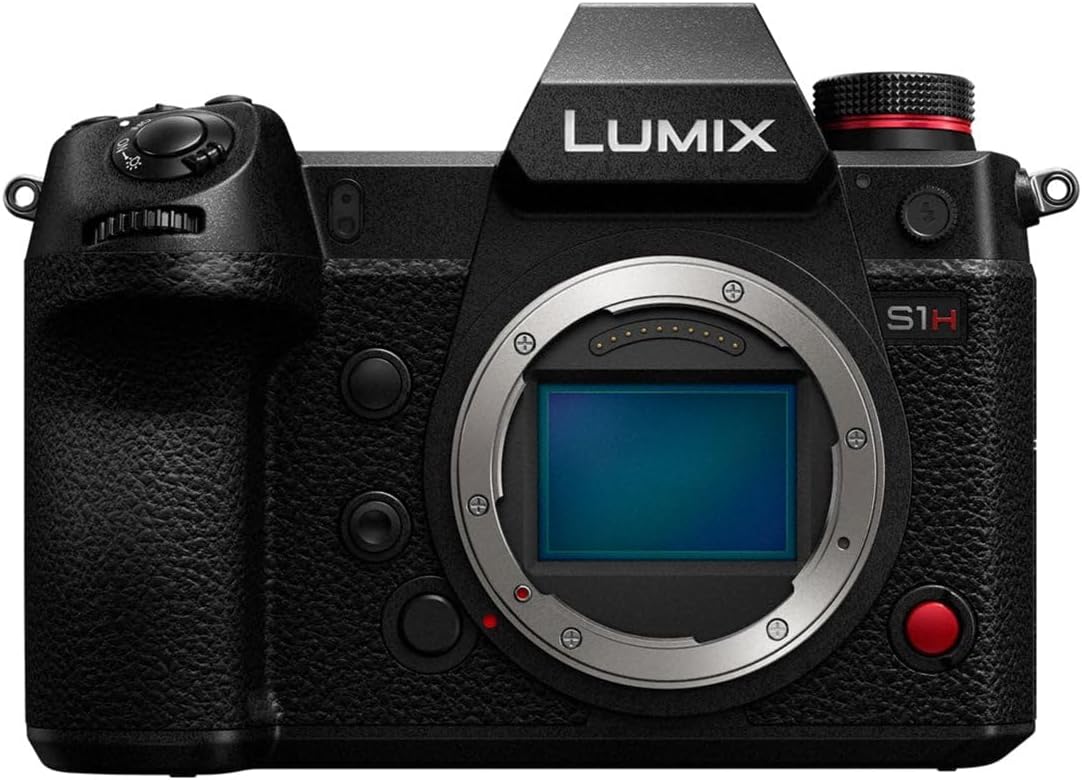
4. تعليمات التشغيل
4.1 تشغيل/إيقاف التشغيل
- To power on, slide the power switch to the "ON" position.
- لإيقاف التشغيل، حرك مفتاح الطاقة إلى وضع "إيقاف التشغيل".
4.2 أوضاع التصوير الأساسية
The LUMIX S1H offers various shooting modes accessible via the mode dial. Rotate the mode dial to select your desired mode:
- البرنامج AE (P): Camera automatically sets aperture and shutter speed for optimal exposure.
- أولوية فتحة العدسة AE (A): أنت تضبط فتحة العدسة، والكاميرا تضبط سرعة الغالق. مثالي للتحكم في عمق المجال.
- أولوية الغالق AE (S): أنت تضبط سرعة الغالق، والكاميرا تضبط فتحة العدسة. مثالي للتحكم في ضبابية الحركة.
- التعريض اليدوي (M): يمكنك التحكم في فتحة العدسة وسرعة الغالق.
- Creative Video Mode: Dedicated mode for advanced video recording settings.
4.3 تسجيل الفيديو
- Set the mode dial to Creative Video Mode or a suitable photo mode if recording short clips.
- Press the dedicated video record button (usually marked with a red dot) to start recording.
- اضغط على زر تسجيل الفيديو مرة أخرى لإيقاف التسجيل.
- Adjust video settings (resolution, frame rate, V-Log, etc.) via the menu system or dedicated buttons. Refer to the on-screen display for current settings.
4.4 التشغيل
- Press the Playback button (usually marked with a triangle icon) to enter playback mode.
- Use the control dial or directional pad to navigate through your photos and videos.
- Press the center button or OK button to view عنصر محدد.
- To exit playback mode, press the Playback button again or half-press the shutter button.
5. الصيانة
5.1 تنظيف جسم الكاميرا
- استخدم قطعة قماش ناعمة وجافة لمسح جسم الكاميرا.
- بالنسبة للأوساخ العنيدة، قم بإزالة الأوساخ برفق.ampen the cloth with water or a mild camera cleaning solution. Avoid using strong solvents.
- Do not use excessive force or rub vigorously, especially on the LCD screen.
5.2 تنظيف العدسة والمستشعر
- عدسة: Use a lens blower to remove dust. For smudges, use a lens cleaning solution and a microfiber lens cloth. Wipe gently from the center outwards.
- المستشعر: Sensor cleaning should be performed with extreme care. If dust spots appear on images, use the camera's sensor cleaning function first. For persistent dust, consult a professional camera service center or use a specialized sensor cleaning kit following instructions carefully.
5.3 التخزين
- قم بتخزين الكاميرا في مكان بارد وجاف بعيدًا عن أشعة الشمس المباشرة ودرجات الحرارة القصوى.
- في حالة التخزين لفترة طويلة، قم بإزالة البطارية لمنع التسرب.
- Use desiccant packs in the storage container to prevent mold and mildew, especially in humid environments.
6. استكشاف الأخطاء وإصلاحها
| مشكلة | السبب المحتمل | حل |
|---|---|---|
| الكاميرا لا تعمل. | تم استنزاف البطارية أو إدخالها بشكل غير صحيح. | اشحن البطارية بالكامل. أعد إدخال البطارية بشكل صحيح. |
| لا يمكن تسجيل الصور/الفيديوهات. | بطاقة الذاكرة ممتلئة أو مقفلة أو غير مُدخلة. | حذف غير ضروري files or insert a new card. Unlock the memory card. Insert the card correctly. |
| الصور ضبابية. | التركيز غير الصحيح، أو اهتزاز الكاميرا، أو العدسة المتسخة. | Ensure proper focus. Use a faster shutter speed or image stabilization. Clean the lens. |
| توقف تسجيل الفيديو بشكل غير متوقع. | Memory card speed is too slow or camera overheats. | Use a faster memory card (UHS-II V90 recommended). Allow the camera to cool down. |
7. المواصفات
| ماركة | باناسونيك |
| اسم الموديل | Panasonic Lumix S1H (DC-S1HBODY) |
| عامل الشكل | محمول باليد |
| الحد الأقصى Webدقة صورة الكاميرا | 20 MP (Effective 24.2 MP Full-Frame Sensor) |
| الحد الأدنى الموسع لـ ISO | 100 |
| تثبيت الصورة | Digital (In-body Image Stabilization) |
| مدعوم File شكل | RAW, JPEG, MOV, MP4 |
| تقنية مستشعر الصور | موس |
| نسبة العرض إلى الارتفاع | 4:3 (also supports 3:2, 16:9, 1:1, 65:24, 2:1) |
| حوامل متوافقة | Leica L-Mount |
| أبعاد المنتج | 10 × 10 × 10 بوصة |
| وزن العنصر | 5.98 رطل |
| تاريخ أول توفر | 8 مارس 2023 |
8. الضمان والدعم
For detailed warranty information, please refer to the warranty card included with your product or visit the official Panasonic support webيوفر موقع باناسونيك دعمًا للعملاء فيما يتعلق باستفسارات المنتجات والمساعدة التقنية وطلبات الخدمة.
الدعم الرسمي من باناسونيك: https://www.panasonic.com/global/consumer/support.html
يرجى الاحتفاظ بإثبات الشراء الخاص بك لمطالبات الضمان.


