مقدمة
The Keychron Q7 is a wired custom mechanical keyboard featuring a 70% layout, designed for versatility and performance. It supports QMK/VIA for extensive customization, includes hot-swappable Gateron G Pro Red switches, and is built with a double-gasket design for an enhanced typing experience. This manual provides instructions for setup, operation, maintenance, and troubleshooting.

Image: The Keychron Q7 Custom Mechanical Keyboard, showcasing its compact 70% layout and aluminum build.
محتويات الحزمة
Verify that all items listed below are included in your Keychron Q7 package:

Image: Diagram illustrating the Keychron Q7 keyboard and its accompanying accessories.
- لوحة المفاتيح: 1x Fully Assembled Keychron Q7 Keyboard (includes Aluminum Case, PCB, Steel Plate, Sound Absorbing Foam, Case Foam, 10 Gaskets (6 installed, 4 in box))
- عناصر: 5 sets x Stabilizers, 1 set x Double-Shot PBT Keycaps, 1 set x Gateron G Pro Switches
- الكابلات: 1x Type-C to Type-C Cable, 1x Type-A to Type-C Adapter
- أدوات: 1x Switch Puller, 1x Keycap Puller, 1x Screwdriver, 1x Hex Key
Note: All tools are located at the bottom of the box.
يثبت
1. توصيل لوحة المفاتيح
- Locate the USB-C port on the back of the Keychron Q7 keyboard.
- Connect one end of the provided Type-C to Type-C cable to the keyboard.
- Connect the other end of the cable to your computer's USB-C port. If your computer only has USB-A ports, use the included Type-A to Type-C adapter.
- ينبغي أن يتعرف نظام التشغيل الخاص بك على لوحة المفاتيح تلقائيًا.
2. Switching Operating System Layout
The Keychron Q7 features a physical switch to toggle between Windows and macOS layouts. This ensures proper key mapping for your specific operating system.
الصورة: الجانب view of the Keychron Q7, showing the physical switch to select between Windows and macOS modes.
- Locate the switch on the side of the keyboard, near the USB-C port.
- Slide the switch to the 'Win' position for Windows/Linux systems.
- Slide the switch to the 'Mac' position for macOS systems.
تعليمات التشغيل
تخصيص QMK و VIA
The Keychron Q7 fully supports QMK and VIA open-source firmware, allowing for extensive customization of key assignments, macros, and backlighting. This functionality is compatible with Mac, Windows, and Linux operating systems.
- To customize your keyboard, download the Keychron Launcher Web App or the VIA software from the official Keychron webموقع.
- The software provides a graphical interface to remap keys, create complex macros, and adjust RGB lighting effects.
- For detailed instructions on using QMK/VIA, refer to the documentation available on the Keychron support page or the QMK/VIA official webالمواقع.

Image: Keychron Launcher Web App interface for key remapping and macro programming.
مفاتيح قابلة للتبديل السريع
The Q7 features a hot-swappable design, allowing you to change switches without soldering. It supports both 3-pin and 5-pin MX-style mechanical switches.

Image: Keyboard PCB with keycaps removed, showing hot-swappable switch sockets and various switch types.
- إزالة مفتاح: Use the included switch puller tool. Gently grip the switch from the top and bottom, then pull straight up with even pressure until the switch detaches from the PCB.
- تثبيت مفتاح: Align the pins of the new switch with the holes on the PCB. Ensure the switch is oriented correctly. Gently press the switch down until it clicks into place. Do not force the switch, as this can bend the pins.
أغطية مفاتيح PBT مزدوجة الحقن
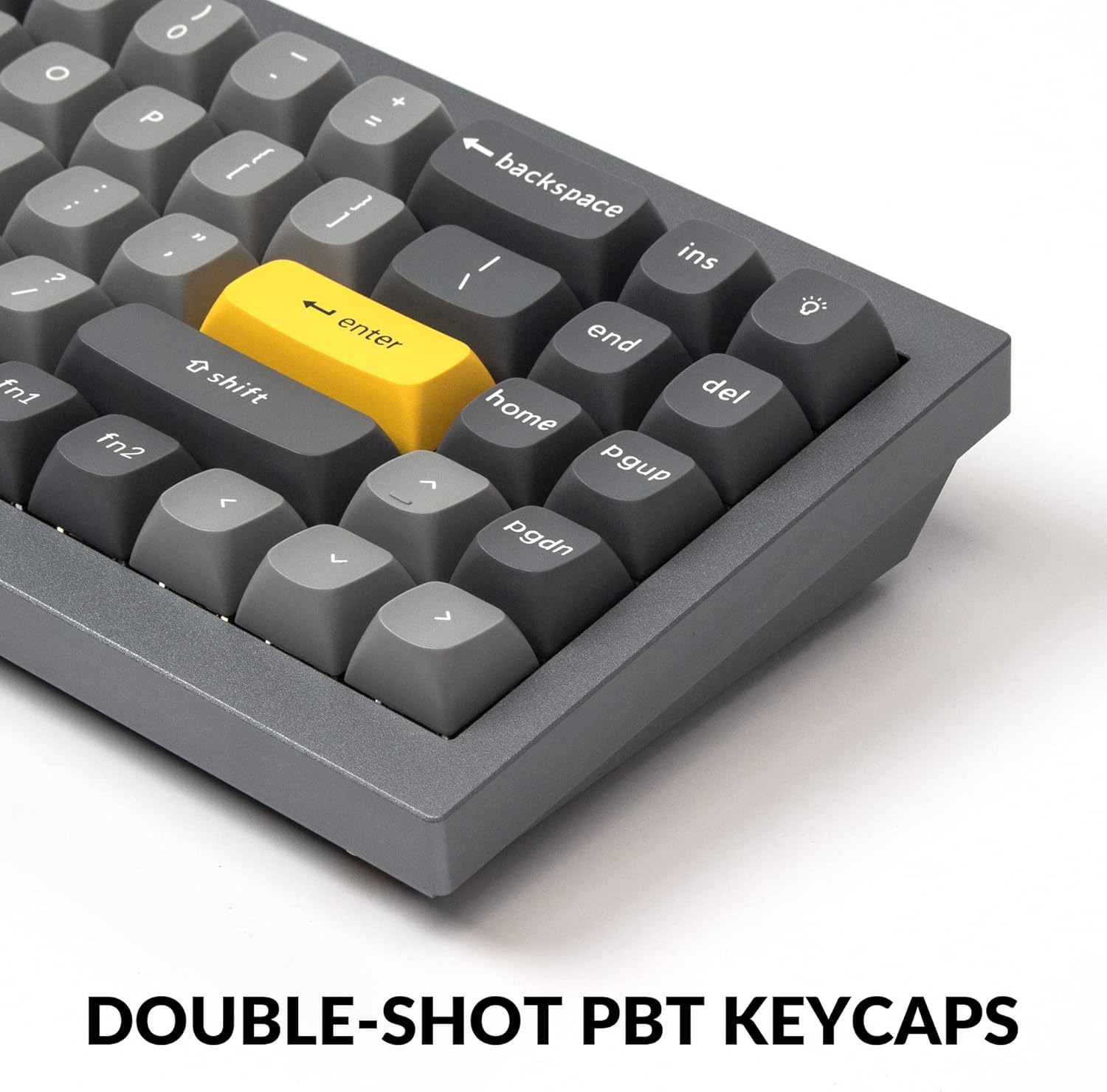
The Q7 comes with durable double-shot PBT keycaps. These keycaps are resistant to shine and wear, ensuring legends remain clear over time.

Image: Close-up of the keyboard's double-shot PBT keycaps.
South-Facing RGB Backlighting
The keyboard features south-facing RGB LEDs, which provide even backlighting and are ideal for compatibility with most custom keycap sets.

Image: Illuminated south-facing RGB switches on the Keychron Q7 keyboard.
صيانة
تنظيف لوحة المفاتيح
- افصل لوحة المفاتيح عن الكمبيوتر قبل التنظيف.
- استخدم قطعة قماش ناعمة وخالية من الوبر وامسحها برفق.ampامسح أغطية المفاتيح والهيكل بالماء أو بمحلول تنظيف خفيف. تجنب الرطوبة الزائدة.
- For cleaning between keycaps, use compressed air to remove dust and debris.
- For deeper cleaning, you may remove keycaps using the included keycap puller. Clean the keycaps separately with water and mild soap, then ensure they are completely dry before reattaching.
العناية بالمفاتيح وأغطية المفاتيح
- When removing or installing switches, apply gentle, even pressure to avoid bending switch pins or damaging the PCB sockets.
- Store spare switches and keycaps in a clean, dry place to prevent dust accumulation or damage.
استكشاف الأخطاء وإصلاحها
If you encounter issues with your Keychron Q7 keyboard, refer to the following common troubleshooting steps:
- لوحة المفاتيح لا تستجيب:
- تأكد من توصيل كابل USB-C بشكل آمن بكل من لوحة المفاتيح والكمبيوتر.
- حاول توصيل لوحة المفاتيح بمنفذ USB مختلف على جهاز الكمبيوتر الخاص بك.
- Verify that the operating system switch (Mac/Win) on the side of the keyboard is set correctly for your system.
- قم باختبار لوحة المفاتيح على جهاز كمبيوتر آخر لاستبعاد وجود مشكلة خاصة بالكمبيوتر.
- المفاتيح غير مسجلة:
- Carefully remove the keycap and switch for the non-functioning key using the provided tools.
- افحص دبابيس المفتاح بحثًا عن أي انحناءات أو تلف. قم بتقويم الدبابيس المنحنية برفق باستخدام ملقط إن أمكن.
- Reinsert the switch firmly into the PCB socket. If the issue persists, try swapping it with a known working switch.
- مشاكل إضاءة RGB:
- Check the Keychron Launcher Web App or VIA software to ensure lighting settings are configured as desired.
- Ensure no software conflicts are interfering with the lighting control.
- تحديث البرامج الثابتة: إذا كنت تواجه مشكلات مستمرة، فتحقق من Keychron الرسمي website for any available firmware updates for the Q7 model. Follow the provided instructions carefully for firmware updates.
For further assistance, please visit the official Keychron support page.
تحديد

الصورة: انفجرت view of the Keychron Q7 keyboard's internal components.
| ميزة | التفاصيل |
|---|---|
| نموذج | كي كرونو Q7 |
| تَخطِيط | تخطيط 70% |
| الاتصال | سلكي (USB-C) |
| نوع المفتاح | Hot-swappable Gateron G Pro Red Switch |
| Operating Force (Gateron G Pro Red) | 45 ± 15 غف |
| Pre-travel (Gateron G Pro Red) | 2 ± 0.6 ملم |
| Travel Distance (Gateron G Pro Red) | 4 ± 0.6 ملم |
| Switch Behavior (Gateron G Pro Red) | خطي |
| Pre-lubed (Gateron G Pro Red) | نعم |
| Sound Level (Gateron G Pro Red) | هادئ |
| ازرار | طلقة مزدوجة PBT |
| الإضاءة الخلفية | RGB المواجه للجنوب |
| مادة الإطار | الألومنيوم |
| أسلوب التركيب | Double Gasket Design |
| دعم البرامج الثابتة | QMK/VIA Programmable |
| نظام التشغيل المتوافق | ماك، ويندوز، لينكس |
| أبعاد المنتج | 13.44 × 4.76 × 1.33 بوصة |
| وزن العنصر | 5.17 رطل |

Image: Detailed specifications for the Gateron G Pro Red switches.
الضمان والدعم
Keychron products are designed for quality and durability. For information regarding warranty coverage, technical support, or to access additional resources such as firmware updates and software downloads, please visit the official Keychron website or their dedicated support pages.
يمكنك العثور على مزيد من المعلومات والتواصل مع الدعم من خلال متجر علامة Keychron التجارية على أمازون.


