1. المقدمة
This manual provides essential instructions for the safe and efficient use of your Xiaomi Mi Portable Bluetooth Speaker. Please read this manual thoroughly before using the product and retain it for future reference. The speaker features high-quality sound, True Wireless Stereo (TWS) capability, Bluetooth 5.0 connectivity, and IPX7 waterproofing, making it suitable for various environments.

الصورة: بزاوية view of the Xiaomi Mi Portable Bluetooth Speaker, highlighting its compact design and control panel.
2. محتويات العبوة
تأكد من وجود جميع العناصر في العبوة:
- Xiaomi Mi Portable Bluetooth Speaker x1
- كابل شحن عدد 1 (USB-C)
- دليل المستخدم x1
3. مواصفات المنتج
- صوت عالي الجودة: Delivers clear and balanced audio.
- ستيريو لاسلكي حقيقي (TWS): Connect two speakers for an immersive stereo experience.
- بلوتوث شنومكس: اتصال لاسلكي مستقر وفعال.
- IPX7 مقاوم للماء: مقاوم للغمر في الماء حتى عمق متر واحد لمدة 30 دقيقة.
- وقت اللعب الطويل: Approximately 13 hours of playback at 50% volume.
- ميكروفون مدمج: لإجراء مكالمات بدون استخدام اليدين.
- مدخلات AUX: للاتصال الصوتي السلكي.
4. الضوابط والمؤشرات
Familiarize yourself with the speaker's control buttons and indicators:
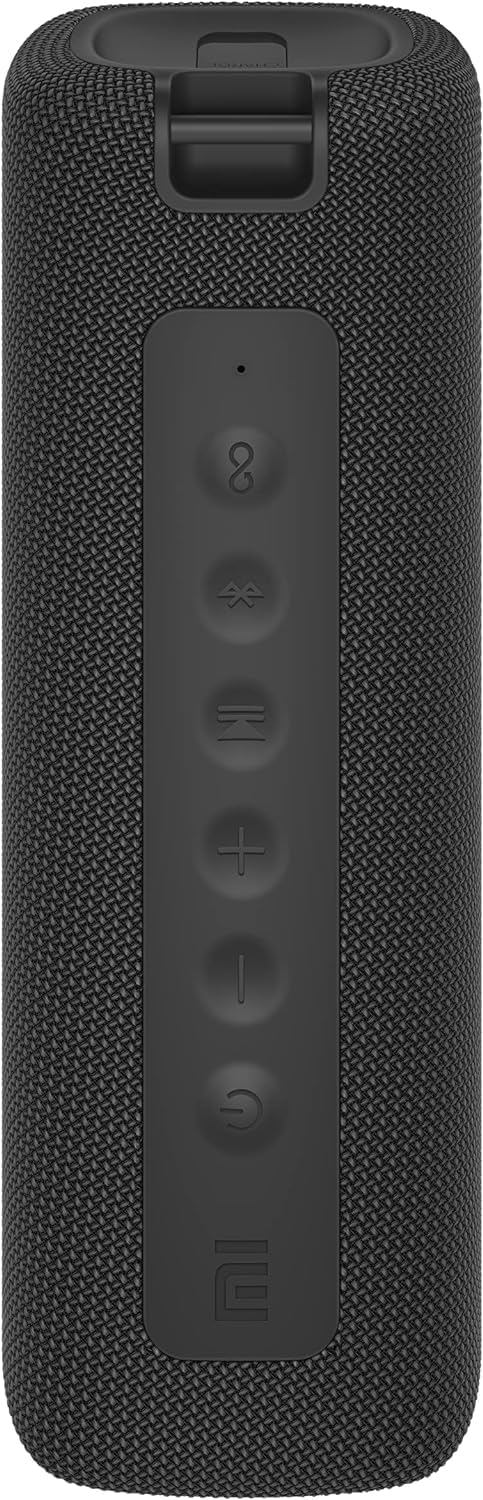
الصورة: الجبهة view of the speaker with clearly visible control buttons.
| زر / مؤشر | وظيفة |
|---|---|
| زر الطاقة (⏻) | Press and hold for 2 seconds to power on/off. Short press to play/pause music or answer/end calls. |
| خفض الصوت (-) | اضغط ضغطة قصيرة لخفض الصوت. اضغط مع الاستمرار للانتقال إلى المقطع السابق. |
| رفع الصوت (+) | اضغط لفترة قصيرة لرفع مستوى الصوت. اضغط باستمرار للانتقال إلى المقطع التالي. |
| زر البلوتوث (Ⓑ) | اضغط لفترة قصيرة للدخول إلى وضع الاقتران بالبلوتوث. |
| زر TWS (∞) | Press to initiate True Wireless Stereo pairing with another Mi Portable Bluetooth Speaker. |
| مؤشر LED | يشير إلى حالة الطاقة، وحالة الشحن، وحالة اقتران البلوتوث. |
5. الإعداد
5.1 شحن السماعة
- قم بتوصيل كابل الشحن USB-C المقدم بمنفذ شحن مكبر الصوت.
- Connect the other end of the cable to a 5V 1A USB power adapter (not included) or a computer's USB port.
- سيوضح مؤشر LED حالة الشحن (على سبيل المثال، اللون الأحمر أثناء الشحن، وإيقاف التشغيل عند الشحن الكامل).
- تستغرق الشحنة الكاملة حوالي 4 ساعات.
5.2 تشغيل/إيقاف التشغيل
- لتشغيل: Press and hold the Power button for 2 seconds. You will hear an audible prompt, and the LED indicator will light up.
- لإيقاف التشغيل: Press and hold the Power button for 2 seconds. You will hear an audible prompt, and the LED indicator will turn off.
5.3 اقتران بلوتوث
- Ensure the speaker is powered on. The LED indicator will flash blue, indicating it's in pairing mode.
- على جهازك (الهاتف الذكي، الجهاز اللوحي، الكمبيوتر)، قم بتمكين البلوتوث وابحث عن الأجهزة المتاحة.
- Select "Mi Portable Bluetooth Speaker" from the list of devices.
- بمجرد الاقتران، سيتحول مؤشر LED إلى اللون الأزرق الثابت، وسوف تسمع صوت تأكيد.
- The speaker will automatically connect to the last paired device when powered on, if within range.
5.4 إقران ستيريو لاسلكي حقيقي (TWS)
To pair two Xiaomi Mi Portable Bluetooth Speakers for stereo sound:
- تأكد من تشغيل كلا السماعتين وعدم توصيلهما بأي جهاز بلوتوث آخر.
- On one speaker (this will be the primary speaker), short press the TWS button (∞). The LED indicator will flash.
- On the second speaker, short press the TWS button (∞).
- The two speakers will automatically connect to each other. You will hear a confirmation sound, and the LED indicators on both speakers will turn solid blue.
- Now, connect your device to the primary speaker via Bluetooth as described in section 5.3. The sound will play in stereo through both speakers.
5.5 اتصال AUX
لتشغيل الصوت السلكي:
- Connect a 3.5mm audio cable (not included) from your audio source to the AUX IN port on the speaker.
- سيتم تحويل مكبر الصوت تلقائيًا إلى وضع AUX.
- Control playback and volume from your audio source device.
6. تعليمات التشغيل
6.1 تشغيل الموسيقى
- تشغيل/إيقاف مؤقت: اضغط لفترة قصيرة على زر الطاقة.
- رفع الصوت: Short press the Volume Up (+) زر.
- اخفض الصوت: Short press the Volume Down (-) زر.
- المسار التالي: Press and hold the Volume Up (+) زر.
- المسار السابق: Press and hold the Volume Down (-) زر.
6.2 إدارة المكالمات
- الرد/إنهاء المكالمة: Short press the Power button when a call comes in or during a call.
- رفض المكالمة: اضغط مع الاستمرار على زر التشغيل لمدة ثانيتين عند ورود مكالمة.
7. الصيانة
- تنظيف: امسح السماعة بقطعة ناعمة ، دamp القماش. لا تستخدم المنظفات أو المذيبات الكاشطة.
- تخزين: قم بتخزين مكبر الصوت في مكان بارد وجاف بعيدًا عن أشعة الشمس المباشرة ودرجات الحرارة القصوى.
- مقاومة الماء: The speaker is IPX7 waterproof. Ensure the charging port cover is securely closed before exposure to water. Do not submerge the speaker for extended periods or beyond specified depths.
- العناية بالبطارية: To prolong battery life, avoid fully discharging the speaker frequently. Charge it regularly, even if not in use for long periods.
8. استكشاف الأخطاء وإصلاحها
| مشكلة | الحل المحتمل |
|---|---|
| لا يتم تشغيل مكبر الصوت. | تأكد من شحن البطارية. وصّل الجهاز بمصدر طاقة وحاول مرة أخرى. |
| لا يمكن الاقتران عبر البلوتوث. |
|
| لا يوجد صوت أو مستوى الصوت منخفض. |
|
| فشل اقتران TWS. |
|
| جودة الصوت رديئة. |
|
9. المواصفات

الصورة: أسفل view of the speaker, displaying model number and certifications.
| المعلمة | قيمة |
|---|---|
| نموذج | ام دي زد-36-دي بي |
| أبعاد المنتج | W 213 x D 74 x H 74 mm (approx. 8 x 3 x 3 inches) |
| الاتصال | Bluetooth 5.0, 3.5mm AUX IN |
| الناتج المقدر | 2 × 8 واط (إجمالي 16 واط) |
| إشارة إلى نسبة الضوضاء | ≥ 70 ديسيبل |
| TWS Connection Range | ≤ 5 متر |
| تصنيف مقاومة الماء | IPX7 |
| نوع البطارية | ليثيوم أيون، 3.7 فولت |
| سعة البطارية | 2600 مللي أمبير |
| وقت شحن البطارية | حوالي 4 ساعات |
| وقت التشغيل | تقريبا. 13 ساعات (بحجم 50٪) |
| نطاق التردد | 80 هرتز إلى 20 كيلو هرتز |
| المقاومة المقدرة | 4 أوم |
| مسافة الإرسال | 15م |
| المدخلات المقدرة | 5 فولت 1 أمبير |
| وزن العنصر | 500 جرام (1.1 رطل) |
10. الضمان والدعم
For detailed warranty information, please refer to the warranty card included with your product or visit the official Xiaomi webموقع.
If you encounter any issues not covered in this manual, please contact Xiaomi customer support or visit their official support channels for assistance.


