مقدمة
The Epson EpiqVision Mini EF11 Laser Projector delivers a versatile and immersive viewing experience. Designed for portability and ease of use, this projector features advanced 3LCD technology for vibrant Full HD 1080p images up to 150 inches. With 1000 lumens of color and white brightness, a built-in dual-speaker audio system, and flexible connectivity options, it's ideal for various entertainment and presentation needs.
تتضمن الميزات الرئيسية ما يلي:
- جودة صورة مذهلة: Enjoy immersive Full HD 1080p images up to 150 inches.
- عالية السطوع: Delivers 1000 lumens of color and white brightness for clear visuals.
- Integrated Dual-Speaker Audio System: Features a high-quality internal speaker system for rich audio.
- تصميم أنيق وصغير الحجم: Portable and modern design allows for easy placement and transport.
- Epson MicroLaser Array Technology: Provides exceptional brightness and enhanced black density.
- Advanced Scene Adaptive Color Correction: Automatically adjusts color for a natural picture.
- تصميم جهاز عرض ثلاثي الرقاقات حقيقي: Ensures outstanding color accuracy and brightness without "rainbowing."
- تصحيح انحراف الصورة التلقائي: Automatically corrects vertical image geometry for optimal viewعمل.
- Single HDMI Input: Standard HDMI port for video and audio connections.
ماذا يوجد في الصندوق
Upon unboxing your Epson EpiqVision Mini EF11 Laser Projector, ensure all the following items are present:
- جهاز عرض ليزر إبسون EF-11
- سلك الطاقة
- جهاز تحكم عن بعد يعمل ببطاريات AAA
- إعداد دليل سريع

Image: Contents of the Epson EpiqVision Mini EF11 box, including the projector, remote, power cord, and quick setup guide.
يثبت
- الموقع: Position the projector on a stable, flat surface. Ensure there is adequate space around the projector for ventilation. The projector can be placed in front of the screen or wall, or mounted on a ceiling.
- توصيل الطاقة: Connect the provided power cord to the projector's power input and then to an electrical outlet.
- توصيل الأجهزة:
- HDMI: Connect your streaming device (e.g., Apple TV, Roku, Amazon Fire TV, Android TV, game console) to the projector's HDMI port using an HDMI cable.
- USB: The projector features a USB Type-A port (5V/2A power supply) for connecting compatible devices.
- تشغيل الطاقة: Press the power button on the projector or the remote control to turn on the device. The projector will automatically perform initial setup and image adjustments.
- تعديل الصورة: The projector features Auto Picture Skew Correction to automatically adjust the vertical geometry of the picture. Manual adjustments for focus and keystone can be made via the projector's settings menu if needed.

Image: The Epson EpiqVision Mini EF11 Projector showcasing its compact design and projected image quality.
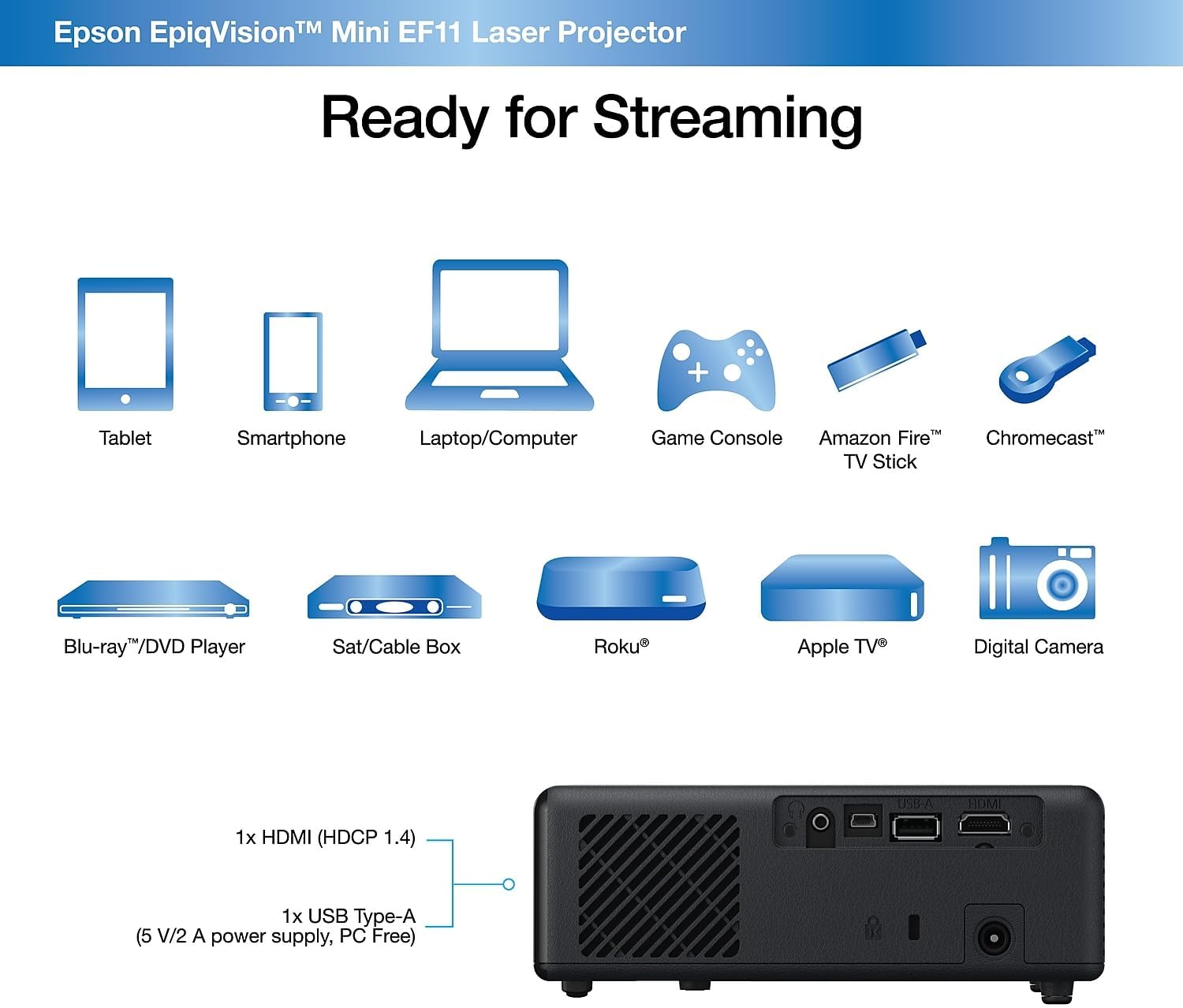
الصورة: الخلفية view of the Epson EpiqVision Mini EF11 Projector, highlighting the HDMI and USB ports for connecting various devices.
التشغيل
- تشغيل/إيقاف التشغيل: Press the power button on the projector's top panel or the remote control to turn on the device.
- اختيار المصدر: Use the "Source" button on the remote or projector to cycle through available input sources (e.g., HDMI).
- التحكم في مستوى الصوت: Adjust the volume using the '+' and '-' buttons on the remote control or the projector's top panel.
- الوصول إلى المحتوى:
- If using an external streaming device, navigate its interface using its remote.
- The projector is compatible with various streaming solutions like Apple TV, Roku, Amazon Fire TV, or Android TV.
- إعدادات الصورة: Access the projector's menu to adjust picture settings such as color mode, light output, scene adaptive gamma, color temperature, dynamic contrast, and noise reduction.
- إعدادات الصوت: Customize your audio experience through sound settings, including sound mode (e.g., Theatre, TV, Studio), virtual surround, clear voice, auto loudness, and bass extension.

Image: The Epson EpiqVision Mini EF11 Laser Projector displaying a high-quality, vibrant image on a wall.

Image: A visual representation of the Epson EpiqVision Mini EF11 Projector's capability to project images at different sizes, from 70 inches to 150 inches.
تكامل الوسائط
Official Product Video: EF12 Plug and Play
Video: This official video from Epson America Inc. demonstrates the "Plug and Play" functionality of the EpiqVision Mini EF12 (similar to EF11), highlighting its ease of setup and immediate use for various media content.
تحديد
| ميزة | التفاصيل |
|---|---|
| أبعاد المنتج | 6.89 × 6.89 × 2.28 بوصة |
| وزن العنصر | 2.7 رطل |
| رقم موديل العنصر | اي اف 11 |
| ماركة | إبسون |
| الاستخدامات الموصى بها | الألعاب |
| المميزات الخاصة | مكبر صوت مدمج، خفيف الوزن |
| تكنولوجيا الاتصال | منفذ HDMI |
| دقة العرض | 1920 × 1080 (دقة عالية كاملة) |
| سطوع | 1000 لومن (سطوع اللون والأبيض) |
| تكنولوجيا العرض | 3LCD, Laser |
صيانة
تضمن الصيانة المناسبة طول عمر جهاز العرض الخاص بك وأداءه الأمثل:
- تنظيف العدسة: Use a soft, dry, lint-free cloth to gently wipe the projector lens. Avoid using abrasive cleaners or solvents.
- تنظيف فتحات التهوية: Regularly check and clean the air vents to prevent dust buildup, which can lead to overheating. Use a soft brush or a vacuum cleaner with a brush attachment.
- تخزين: عند عدم استخدام جهاز العرض لفترات طويلة، قم بتخزينه في مكان بارد وجاف، بعيدًا عن أشعة الشمس المباشرة ودرجات الحرارة القصوى.
استكشاف الأخطاء وإصلاحها
إذا واجهت مشاكل مع جهاز العرض الخاص بك، فجرب خطوات استكشاف الأخطاء وإصلاحها الشائعة التالية:
- لا يوجد طاقة:
- Ensure the power cord is securely connected to both the projector and the electrical outlet.
- تأكد من أن المخرج الكهربائي يعمل عن طريق توصيل جهاز آخر.
- لا توجد صورة:
- تأكد من تحديد مصدر الإدخال الصحيح على جهاز العرض.
- Ensure the HDMI cable (or other video cable) is securely connected to both the projector and the source device.
- تأكد من أن الجهاز المصدر قيد التشغيل ويخرج إشارة.
- صورة ضبابية:
- Adjust the focus using the projector's settings menu.
- Ensure the projector is placed at an appropriate distance from the screen or wall.
- تحقق من وجود أي عوائق أمام العدسة.
- لا يوجد صوت:
- قم بزيادة مستوى الصوت على كل من جهاز العرض والجهاز المصدر.
- تحقق من إعدادات إخراج الصوت على جهازك المصدر للتأكد من أنه يرسل الصوت عبر HDMI.
- إذا كنت تستخدم مكبرات صوت خارجية، فتأكد من توصيلها وتشغيلها بشكل صحيح.
الضمان والدعم
The Epson EpiqVision Mini EF11 Laser Projector comes with a standard 2-year limited warranty, including full-unit replacement. Free technical phone support is available for the life of the product.
For further assistance or to explore other Epson products, please visit the متجر إبسون.


