مقدمة
This manual provides detailed instructions for the setup, operation, maintenance, and troubleshooting of your Sennheiser XSW 1-825 Dual-A Channel Wireless Microphone System. This system is designed for clear audio transmission in various applications, including live vocals, presentations, and events.
The bundle includes an EM-XSW 1 dual stationary receiver, two SKM XSW transmitters with e825 capsules, two MZQ 1 microphone clips, an NT 12-5 CW power supply, four AA batteries, two tripod microphone stands with fixed booms, and two XLR-XLR cables.

Image: The Sennheiser XSW 1-825 Dual-A Wireless Microphone System, showing the receiver unit and two handheld microphones.
المميزات الرئيسية:
- Easy-to-use handheld wireless system for reliable audio.
- One-button scanning and synchronization for simplified setup.
- Intuitive icon-based indicators for clear operation status.
- Internal diversity receiver antennas for a compact design.
- Supports simultaneous use of up to 10 systems.
تعليمات الإعداد
- فك مكونات الحزمة: Carefully remove all items from the packaging. Verify that all components listed in the introduction are present.
- وضع المتلقي: Place the EM-XSW 1 dual stationary receiver on a stable surface, away from potential sources of interference (e.g., Wi-Fi routers, other wireless devices).
- قم بتوصيل الطاقة بجهاز الاستقبال: Connect the NT 12-5 CW power supply to the receiver's power input and then to an electrical outlet.
- Connect Receiver to Audio Mixer: Use the provided XLR-XLR cables to connect the balanced XLR outputs (Bal) on the rear of the receiver to the input channels of your audio mixer. Alternatively, use the unbalanced 1/4" jack outputs (Unbal).
- تركيب البطاريات في أجهزة الإرسال: Unscrew the bottom part of each SKM XSW handheld transmitter. Insert two AA batteries into each transmitter, observing the correct polarity (+/-). Screw the bottom part back on securely.
- Assemble Microphone Stands: Assemble the two tripod microphone stands. Attach the MZQ 1 microphone clips to the stands. Secure the handheld microphones into the clips.
- Power On and Scan: Power on the receiver and then each handheld transmitter. Press the مسح ضوئي button on the receiver. The system will automatically search for available frequencies.
- تزامن: Once a clear frequency is found, press the المزامنة button on the receiver. Then, hold the handheld transmitter close to the receiver's SYNC port and press the المزامنة button on the transmitter (if available, or follow on-screen prompts). The receiver and transmitter will synchronize to the same frequency. Repeat for the second microphone.
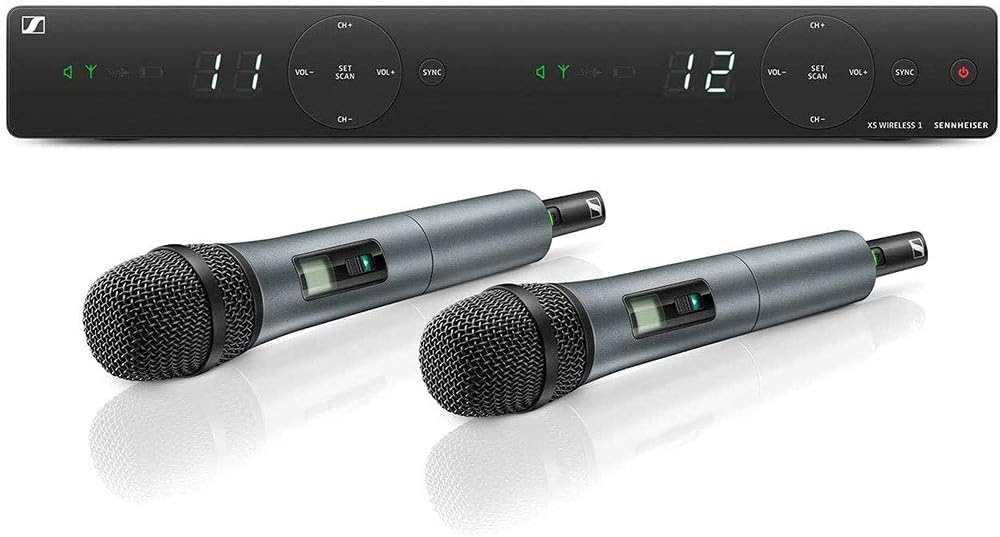
Image: Front panel of the EM-XSW 1 receiver, showing display and control buttons.

Image: Rear panel of the EM-XSW 1 receiver, displaying balanced XLR outputs, unbalanced 1/4" jack outputs, and power input.

Image: An XLR-XLR audio cable, used for connecting the receiver to an audio mixer.

Image: Two SKM XSW handheld microphones, ready for use.

Image: A black tripod microphone stand with an adjustable boom arm.
تعليمات التشغيل
تشغيل/إيقاف التشغيل:
- المتلقي: Press the power button on the front panel of the receiver.
- المرسل: Press and hold the power button on the handheld transmitter until the display illuminates.
وظيفة كتم الصوت:
Each SKM XSW transmitter features a mute switch. Slide the switch to mute or unmute the microphone. The display on the transmitter will indicate the mute status.
ضبط مستوى الصوت:
Adjust the output volume of each channel using the المجلد- و المجلد+ buttons on the receiver's front panel. Fine-tune the overall audio level using your connected audio mixer.
Channel Selection and Synchronization:
If interference occurs or you need to change channels, use the ضبط المسح button on the receiver to find a new clear frequency. After scanning, press المزامنة on the receiver and then on the transmitter to re-synchronize the devices.
صيانة
- استبدال البطارية: Replace AA batteries in the handheld transmitters when the low battery indicator appears on the transmitter display. Always use fresh, high-quality batteries.
- تنظيف:
- الميكروفونات: Gently wipe the microphone body with a soft, dry cloth. For the microphone grille, use a soft brush to remove dust or debris. Do not use liquid cleaners directly on the grille or capsule.
- المتلقي: Wipe the receiver's surface with a soft, slightly damp cloth. Ensure no moisture enters the unit.
- تخزين: When not in use for extended periods, remove batteries from the transmitters to prevent leakage. Store the system in a dry, cool place, away from direct sunlight and extreme temperatures.
- العناية بالكابلات: Avoid sharp bends or kinks in the XLR cables. Store them coiled loosely to prevent damage.
استكشاف الأخطاء وإصلاحها
| مشكلة | السبب المحتمل | حل |
|---|---|---|
| لا يوجد صوت من الميكروفون. |
|
|
| تداخل أو جودة صوت رديئة. |
|
|
| One microphone not working when both are connected to a mixer. |
|
|
تحديد
| اسم الموديل | XSW 1-825 DUAL-A |
| ماركة | سينهايزر |
| عامل شكل الميكروفون | نظام ميكروفون (محمول باليد) |
| مصدر الطاقة | Battery Powered (Transmitters), AC Adapter (Receiver) |
| عدد البطاريات | 4 AA batteries required (2 per transmitter) |
| مادة | Alloy Steel (Microphone body, stand) |
| عدد القنوات | 2 (Dual-channel receiver) |
| استجابة التردد | 548 to 572 MHz (A-band) |
| وزن العنصر | يبلغ وزن العبوة حوالي 16.81 رطلاً. |
| تكنولوجيا الاتصال | XLR (Receiver output) |
| النمط القطبي | Unidirectional (Microphone capsule) |
| الاستخدامات الموصى بها | Live Vocals (Duets / Two Singers) |
معلومات الضمان
The Sennheiser XSW 1-825 Dual-A Channel Wireless Microphone System comes with a ضمان محدود لمدة عامين from the date of purchase. This warranty covers defects in materials and workmanship under normal use. Please retain your proof of purchase for warranty claims. For full warranty terms and conditions, please refer to the warranty card included in your product packaging or visit the official Sennheiser webموقع.
يدعم
For technical assistance, product inquiries, or service requests, please contact Sennheiser customer support. You can find contact information, FAQs, and additional resources on the official Sennheiser webموقع:
When contacting support, please have your product model number (XSW 1-825 Dual-A) and serial number (if applicable) ready.


