مقدمة
This manual provides comprehensive instructions for the installation, operation, maintenance, and troubleshooting of your Netgear C6900-100NAR Nighthawk AC1900 Cable Modem Router. This device combines a high-speed cable modem with a powerful AC1900 Wi-Fi router, designed to deliver fast internet and reliable wireless connectivity. Please read these instructions carefully before using the device.
يثبت
1. محتويات العبوة
قبل البدء، تأكد من أن الحزمة الخاصة بك تحتوي على العناصر التالية:
- Netgear C6900-100NAR Nighthawk AC1900 Cable Modem Router
- كابل إيثرنت
- محول الطاقة
- Quick Start Guide (this document serves as a detailed guide)

Image: Retail packaging for the Netgear C6900-100NAR Nighthawk AC1900 Cable Modem Router, showing the device and branding.
2. الاتصال الجسدي
- توصيل الكابل المحوري: Connect a coaxial cable from your cable wall outlet to the Cable In port on the back of the modem router. Ensure the connection is finger-tight.
- توصيل محول الطاقة: Connect the power adapter to the modem router's power port and then plug it into an electrical outlet. The Power LED on the front of the modem router should light up.
- انتظر ظهور شاشة LED عبر الإنترنت: Wait for the Online LED (usually a globe or internet icon) on the front of the modem router to light solid white or green. This indicates that the modem is connected to the internet. This process can take several minutes.
- توصيل جهاز كمبيوتر (اختياري): For initial setup or wired connection, connect one end of the Ethernet cable to an Ethernet port on the modem router and the other end to your computer's Ethernet port.

الصورة: الخلفية view of the Netgear C6900-100NAR, highlighting the coaxial cable input, Ethernet ports, and power input.
3. ISP Activation
After connecting the hardware, you need to activate your modem router with your Internet Service Provider (ISP). You will typically need your account information and the modem's MAC address (found on a label on the device).
- Call your ISP: Contact your ISP's customer support and inform them you are installing a new cable modem. Provide them with the MAC address when requested.
- التفعيل عبر الإنترنت: تقدم بعض شركات تزويد خدمة الإنترنت بوابة تفعيل عبر الإنترنت. افتح واحدة web browser on a connected computer, and you may be redirected to the ISP's activation page. Follow the on-screen instructions.
4. الإعداد الأولي لشبكة الواي فاي
Once activated, your modem router will broadcast Wi-Fi networks. The default Wi-Fi network name (SSID) and password (network key) are usually printed on a label on the device.
- On your Wi-Fi enabled device (laptop, smartphone, tablet), search for available Wi-Fi networks.
- Select the Netgear C6900-100NAR's default SSID.
- Enter the default Wi-Fi password when prompted.
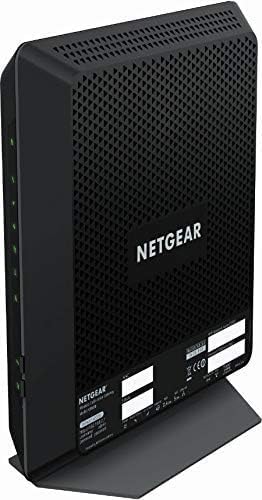
الصورة: الأمامية والجانبية view of the Netgear C6900-100NAR Nighthawk AC1900 Cable Modem Router, showing its vertical design and ventilation.
التشغيل
1. فهم مؤشرات LED
The LEDs on the front panel provide information about the modem router's status:
- مؤشر الطاقة LED: Solid green indicates power is on. Blinking indicates a startup sequence.
- مصابيح LED في اتجاه المصب/المصب: Solid green indicates a successful connection to the cable network. Blinking indicates scanning for a connection.
- الصمام على الانترنت: Solid green indicates successful internet connection. Blinking indicates connection in progress.
- مؤشر LED بتقنية واي فاي بتردد 2.4 جيجاهرتز: Solid green indicates the 2.4 GHz Wi-Fi radio is on. Blinking indicates activity.
- مؤشر LED بتقنية واي فاي بتردد 5 جيجاهرتز: Solid green indicates the 5 GHz Wi-Fi radio is on. Blinking indicates activity.
- مؤشرات LED الخاصة بشبكة الإيثرنت (1-4): Solid green indicates a device is connected to that port. Blinking indicates data activity.
2. الوصول إلى إعدادات جهاز التوجيه
To customize your network settings, access the modem router's web الواجهة:
- افتح web browser (e.g., Chrome, Firefox, Edge) on a computer or device connected to the modem router (either wired or wirelessly).
- يكتب
routerlogin.netor192.168.0.1في شريط العناوين واضغط على Enter. - عند المطالبة، أدخل اسم المستخدم الافتراضي (عادةً
admin) وكلمة المرور (عادةًpassword). These are also typically found on the device label. - You will now be in the Netgear Genie interface, where you can manage your network settings.
3. تكوين Wi-Fi
Within the router settings, you can modify your Wi-Fi network:
- تغيير اسم الشبكة اللاسلكية (SSID): Navigate to the Wireless section to change your Wi-Fi network names (SSIDs) for both 2.4 GHz and 5 GHz bands.
- تغيير كلمة المرور: Update your Wi-Fi security key (password) for stronger security. WPA2-PSK [AES] is recommended.
- شبكة ضيف: قم بتمكين شبكة ضيوف منفصلة للزوار، مع الحفاظ على أمان شبكتك الرئيسية.
The C6900-100NAR features a 1.6GHz combined processor speed, enhancing performance for demanding tasks like streaming and gaming across its dual-band AC1900 Wi-Fi.
صيانة
1. تحديثات البرامج الثابتة
Regularly updating the firmware ensures optimal performance, security, and access to new features. You can usually check for and install updates through the router's web interface under the 'Advanced' or 'Administration' section.
2. إعادة تشغيل الجهاز
If you experience connectivity issues or slow performance, a simple restart can often resolve the problem:
- Unplug the power adapter from the modem router.
- انتظر لمدة 10-15 ثانية على الأقل.
- قم بتوصيل محول الطاقة مرة أخرى.
- Wait for the modem router to fully boot up and reconnect to the internet (Online LED solid).
3. التنظيف
Keep the modem router in a well-ventilated area. Periodically clean the exterior with a soft, dry cloth. Avoid using liquid cleaners or aerosols directly on the device.
استكشاف الأخطاء وإصلاحها
1. المشكلات الشائعة
- لا يوجد اتصال بالإنترنت:
- تحقق من جميع توصيلات الكابلات (المحورية، الإيثرنت، الطاقة).
- Verify LED indicators: Power, Downstream, Upstream, and Online LEDs should be solid. If the Online LED is blinking or off, contact your ISP.
- Restart the modem router (see Maintenance section).
- Confirm ISP activation is complete.
- سرعة Wi-Fi بطيئة أو انقطاعات متكررة:
- Ensure the modem router is centrally located and not obstructed by large objects or other electronics.
- Try connecting to the 5 GHz Wi-Fi band for faster speeds, if your device supports it and is close to the router.
- تحقق من وجود تحديثات البرامج الثابتة.
- Reduce interference by changing Wi-Fi channels in the router settings.
- لا يمكن الوصول إلى إعدادات جهاز التوجيه:
- Ensure your device is connected to the modem router's network.
- تأكد من استخدامك لعنوان IP الصحيح (
routerlogin.netor192.168.0.1) and credentials. - قم بمسح ذاكرة التخزين المؤقت للمتصفح الخاص بك أو جرب متصفحًا آخر.
2. إعادة ضبط المصنع
If issues persist, a factory reset can restore the modem router to its original settings. Warning: This will erase all custom configurations, including Wi-Fi names and passwords.
- With the modem router powered on, locate the Reset button (often a small pinhole) on the back panel.
- Use a paperclip or similar pointed object to press and hold the Reset button for about 7-10 seconds.
- Release the button when the LEDs start to flash.
- Allow the modem router to restart. You will need to reconfigure your settings or use the default Wi-Fi credentials.
تحديد
| ميزة | مواصفة |
|---|---|
| ماركة | نت جير |
| اسم الموديل | C6900-100NAR |
| نوع لاسلكي | 802.11 ايه سي |
| فئة نطاق التردد | النطاق المزدوج (2.4 جيجاهرتز و 5 جيجاهرتز) |
| تكنولوجيا الاتصال | واي فاي، إيثرنت، كابل محوري |
| الأجهزة المتوافقة | Personal Computer, Gaming Consoles, Mobile Devices |
| الاستخدامات الموصى بها | Gaming, Streaming, General Internet Use |
| وزن العنصر | 4.07 رطل |
| أبعاد الحزمة | 16.06 × 12.52 × 4.76 بوصة |
| المجلدtage | 100-240 فولت (تيار متردد) |
| نوع الهوائي | داخلي |
| ميزة خاصة | DOCSIS 3.0 Cable Modem, WiFi Cable Modem Router |
الضمان والدعم
For warranty information, please refer to the documentation provided with your product at the time of purchase or visit the official NETGEAR support website. NETGEAR provides technical support and resources for their products.
If you encounter issues that cannot be resolved using this manual, please visit the دعم نتغير webموقع or contact their customer service for assistance. Ensure you have your model number (C6900-100NAR) and serial number ready when contacting support.


