مقدمة
This manual provides detailed instructions for the installation, setup, and operation of your JVC KD-X260BT Digital Media Receiver. This unit is designed to provide high-quality audio playback and hands-free communication in your vehicle, featuring Bluetooth connectivity, USB input, and a 13-band equalizer. Please note, this unit does not play CDs. Read this manual thoroughly before use to ensure proper operation and to prevent damage.

الصورة: الجبهة view of the JVC KD-X260BT Digital Media Receiver, showing the display and control buttons.
معلومات السلامة
- Do not operate the unit in a way that distracts you from driving. Always keep your attention on the road.
- Ensure proper wiring connections to prevent short circuits or damage to the vehicle's electrical system.
- تجنب تعريض الوحدة للرطوبة أو درجات الحرارة العالية.
- لا تحاول تفكيك الوحدة أو تعديلها. أحل جميع أعمال الصيانة إلى فنيين مؤهلين.
- Use only accessories specified by JVC.
محتويات الحزمة
تأكد من وجود جميع العناصر في العبوة:
- مستقبل وسائط رقمية JVC KD-X260BT
- ضفيرة توصيل
- External Wired Microphone
- معدات التركيب
- دليل التعليمات (هذا المستند)
تثبيت
Professional installation is recommended for this product. Incorrect installation can lead to damage to the unit or vehicle. The KD-X260BT features a short body design, which facilitates easier installation in various vehicle dashboards.
التوصيلات السلكية:
- Connect the wiring harness according to your vehicle's wiring diagram.
- تأكد من أن جميع التوصيلات آمنة ومعزولة لمنع حدوث دوائر قصيرة.
- Connect the external microphone to the designated input for hands-free calling. Position the microphone in a location that provides clear voice pickup.
- قم بتوصيل كابل الهوائي.
- في حالة استخدام خارجي amplifiers, connect the 2.5V preamp outputs (rear/subwoofer selectable).
التركيب:
- قم بتركيب غلاف التثبيت في فتحة لوحة القيادة.
- أدخل جهاز الاستقبال في غلاف التثبيت حتى يستقر في مكانه.
- نعلق حلقة القطع.
يثبت
التشغيل الأولي:
After installation, turn on your vehicle's ignition. The unit should power on. Follow any on-screen prompts for initial setup, such as language selection.
الاقتران بلوتوث:
The KD-X260BT supports Bluetooth 3.0+EDR and allows for two phones to be connected full-time. This enables receiving calls from either phone with a push of a key.
- On the receiver, navigate to the Bluetooth menu.
- Select "Pairing" or "Device Search".
- على هاتفك الذكي، قم بتمكين البلوتوث وابحث عن الأجهزة المتاحة.
- Select "KD-X260BT" from the list on your phone.
- قم بتأكيد رمز الاقتران على كلا الجهازين إذا طُلب منك ذلك.
- بمجرد الاقتران، ستعرض الوحدة رسالة تأكيد.
The unit supports Bluetooth profiles HFP (Hands-Free Profile 1.6 for wideband speech), HSP (Headset Profile), PBAP (برنامج الوصول إلى دفتر الهاتف الاحترافي)file) ، A2DP (Advanced Audio Distribution Profile)، وAVRCP (جهاز التحكم عن بعد للصوت/الفيديو الاحترافيfile 1.5).
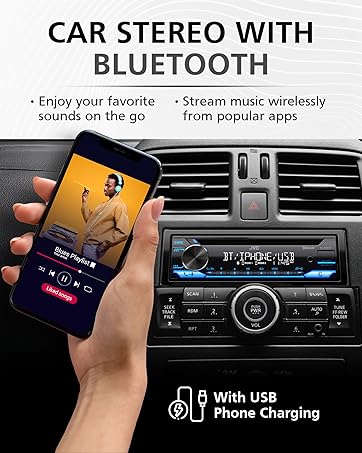
Image: JVC KD-X260BT display indicating Bluetooth connection, with a smartphone showing music playback, illustrating wireless audio streaming.
تطبيق JVC للتحكم عن بعد:
Download the "JVC Remote" app (available for iOS and Android) to control the receiver's source directly from your smartphone using simple finger gestures.
تعليمات التشغيل
الضوابط الأساسية:
- زر الطاقة: اضغط لتشغيل/إيقاف الوحدة.
- مقبض الصوت: قم بتدوير الجهاز لضبط مستوى الصوت. اضغط للوصول إلى خيارات القائمة.
- زر المصدر: اضغط للتنقل بين مصادر الصوت المتاحة (الموالف، USB، صوت البلوتوث، AUX).
- زر العرض: Changes display information (e.g., clock, track title).
موالف الراديو:
- Press the Source button to select "Tuner" (AM/FM).
- استخدم أزرار البحث للعثور على محطات الراديو.
- Press and hold a preset button (1-6) to store a station.
تشغيل USB:
Connect a USB device to the front USB port. The unit supports MP3/WMA/WAV/FLAC playback. The USB port also provides high current 1.5A charging for smartphones.
- Insert the USB device. The unit will automatically switch to USB source and begin playback.
- Use the track buttons to skip tracks.
- Use the folder buttons to navigate through folders.
- معرف MP3 Tag Display (title/artist/album) is supported.
- Android music playback (AOA 2.0) is supported for Android phones (version 4.1 or later).
بث الصوت عبر البلوتوث:
Once a Bluetooth device is paired, select "Bluetooth Audio" as the source to stream music wirelessly. Use the receiver's controls or the paired device to manage playback (play, pause, skip, search via AVRCP 1.5).
الاتصال بدون استخدام اليدين:
When a call comes in on a paired phone, the unit will display the caller ID. Press the call button to answer, and the end call button to hang up. The external microphone ensures clear communication.
Audio Settings (Equalizer):
The unit features a 13-Band Graphic Equalizer with 10 preset EQ settings and 1 user-customizable setting. Access the audio menu to adjust:
- التعادل: Select from preset curves or customize your own.
- تعزيز الجهير: يعزز الترددات المنخفضة.
- بريق: Compensates for perceived loss of bass and treble at low volumes.
- توازن / خافت: Adjusts sound distribution between left/right and front/rear speakers.
- التحكم في مضخم الصوت: Adjust subwoofer output level and frequency if connected.
Internet Radio/Digital Radio Control:
Control Pandora, iHeartRadio, and Spotify directly from the receiver when connected to a compatible Android device via Bluetooth.
Steering Wheel Remote Control:
Factory steering wheel control functions can be retained with a third-party adapter (sold separately).
صيانة
- تنظيف الوحدة: استخدم قطعة قماش ناعمة وجافة لمسح اللوحة الأمامية. لا تستخدم المنظفات الكاشطة أو المذيبات.
- منفذ USB: حافظ على منفذ USB خالياً من الغبار والحطام.
- تحديثات البرامج الثابتة: Check the JVC website periodically for any available firmware updates for improved performance and features.
استكشاف الأخطاء وإصلاحها
| مشكلة | حل |
|---|---|
| لا يوجد طاقة | Check vehicle's fuse. Ensure wiring harness is correctly connected. |
| لا يوجد صوت | Check speaker connections. Verify volume level. Ensure correct source is selected. |
| البلوتوث غير متصل | Ensure Bluetooth is enabled on both devices. Delete previous pairing and re-pair. Move devices closer. |
| لم يتم التعرف على جهاز USB | Ensure USB device is formatted correctly (FAT16/32). Check for compatible file جرب أنواعًا مختلفة. جرب جهاز USB آخر. |
| استقبال الراديو ضعيف | Check antenna connection. Ensure antenna is fully extended (if applicable). |
تحديد
| ميزة | التفاصيل |
|---|---|
| رقم الموديل | KD-X260BT |
| القدرة الناتجة (الذروة) | 50 واط × 4 قنوات |
| خرج الطاقة (RMS) | 22 واط × 4 قنوات |
| عرض | VA LCD Display, Spanish Text Display |
| مدخل أوسب | Front USB, 1.5A Charging, MP3/WMA/WAV/FLAC Playback, Android AOA 2.0 |
| مدخل مساعد | 3.5mm Front Audio Auxiliary Input |
| نسخة البلوتوث | 3.0+EDR Certified |
| بلوتوث بروfiles | HFP 1.6, HSP, PBAP, A2DP, AVRCP 1.5 |
| مُعادل الصوت | 13-Band Graphic Equalizer (10 Preset x 1 User) |
| قبلamp المخرجات | 1 Set of 2.5V (Rear/Subwoofer Selectable) |
| التحكم اللاسلكي عبر الإنترنت | Pandora, Spotify, iHeartRadio (for Android) |
| الأبعاد (المنتج) | 4 × 9 × 8 بوصة |
| وزن العنصر | 1.79 رطل |
الضمان والدعم
This JVC KD-X260BT Digital Media Receiver comes with a 1-Year Manufacturer's Warranty. For warranty claims, technical support, or service inquiries, please contact JVC customer support or visit the official JVC webالموقع. احتفظ بإثبات الشراء للتحقق من الضمان.
دعم عملاء JVC: Refer to the contact information provided with your product packaging or on the official JVC webموقع.


